Ensuring the successful operation of a cloud solution · Topic 3 of 8
Managing Cloud Run, AI Agents and Developer Environments
Cloud Run revisions, traffic splitting and autoscaling, deploying agents to Agent Runtime, Workbench and BigQuery notebooks, and Cloud Workstations.
- 5 min
- Includes a diagram
- Every Cloud Run deploy creates a revision; use
--no-trafficand--tagfor safe releases. update-trafficwith--to-revisionsor--to-latestsplits or moves traffic, including rollbacks.- Autoscaling: min instances, max instances, concurrency.
What it is
This page covers operating serverless and AI workloads: deploying new Cloud Run revisions, splitting traffic between them, configuring Cloud Run autoscaling, deploying an agent to Agent Runtime on Gemini Enterprise Agent Platform, managing notebooks in Agent Platform Workbench and BigQuery, and managing developer environments with Cloud Workstations.
How it works
New revisions and traffic splitting on Cloud Run
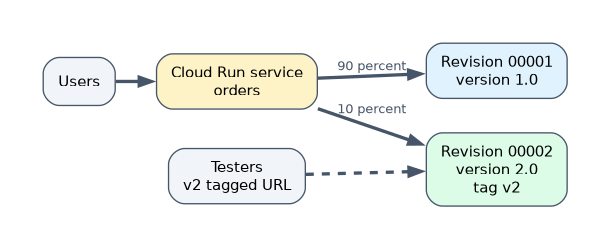 Each deploy creates a new revision. By default it receives all traffic, but you can deploy it with none and shift gradually.
# deploy a new revision without sending it traffic, tagged for testing
gcloud run deploy orders --image=us-docker.pkg.dev/PROJECT/repo/orders:2.0 \
  --region=us-central1 --no-traffic --tag=v2

# send 10 percent of traffic to the new revision
gcloud run services update-traffic orders --region=us-central1 \
  --to-revisions=orders-00002-abc=10

# send all traffic to the latest revision
gcloud run services update-traffic orders --region=us-central1 --to-latest

# roll back by sending traffic to the previous revision
gcloud run services update-traffic orders --region=us-central1 \
  --to-revisions=orders-00001-xyz=100
A tag gives the revision its own URL for testing before it gets production traffic. Cloud Run functions also run as Cloud Run services, so their revisions can be split the same way.
"Test a new version with a small share of users and roll back instantly" is a Cloud Run traffic split between revisions.
Cloud Run autoscaling
| Setting | Effect |
|---|---|
--min-instances | Keeps instances warm, avoiding cold starts (you pay for idle instances) |
--max-instances | Caps scale, protecting downstream systems and cost |
--concurrency | Requests per instance before Cloud Run adds instances |
| CPU allocation | CPU only during requests (default) or always allocated for background work |
gcloud run services update orders --region=us-central1 --min-instances=1 --max-instances=50 --concurrency=80Deploying an agent to Agent Runtime
Agent Runtime on Gemini Enterprise Agent Platform (formerly Vertex AI Agent Engine) is a managed service to deploy, scale and manage AI agents in production. Developers build the agent with a supported framework (such as Google's Agent Development Kit), then deploy it with the Agent Platform SDK; Agent Runtime handles infrastructure, scaling, sessions and integration with monitoring and IAM.
Notebooks
| Option | What it is | Use |
|---|---|---|
| Agent Platform Workbench (formerly Vertex AI Workbench) | Managed JupyterLab instances on Google Cloud | Data science and ML development with control over machine type and GPUs |
| Colab Enterprise | Managed, collaborative notebooks with IAM | Notebooks without managing instances |
| BigQuery notebooks | Notebooks in BigQuery Studio, backed by Colab Enterprise | Analyze BigQuery data with SQL and Python in one place |
Managing Workbench instances includes starting and stopping them (to save cost), choosing machine types and GPUs, enabling idle shutdown, and controlling access with IAM.
Cloud Workstations
Cloud Workstations provides managed, secure development environments in Google Cloud. Administrators define workstation configurations (machine type, container image with the IDE and tools, network, idle timeouts); developers start workstations from them in the browser or a local IDE. Source code stays in the cloud, environments are consistent, and access is controlled by IAM.
A worked scenario
A team releases version 2 of its Cloud Run API with --no-traffic --tag=v2, tests the tagged URL, moves 10 percent of traffic, watches error rates, and then sends 100 percent to the latest revision. They set min instances to 1 to remove cold starts. Their data scientists use Workbench instances with idle shutdown, analysts use BigQuery notebooks, and contractors get Cloud Workstations so code never leaves the cloud. A support agent is deployed to Agent Runtime.
How the exam asks about this
- "Deploy a new version without serving traffic to it."
gcloud run deploy --no-traffic. - "Send 20 percent of traffic to the new revision."
gcloud run services update-traffic --to-revisions=REV=20. - "Avoid cold starts." Set minimum instances.
- "Managed, secure developer environments with source code kept in the cloud." Cloud Workstations.
- "Deploy and scale an AI agent with a managed service." Agent Runtime.
What to remember for the exam
- Every Cloud Run deploy creates a revision; use
--no-trafficand--tagfor safe releases. update-trafficwith--to-revisionsor--to-latestsplits or moves traffic, including rollbacks.- Autoscaling: min instances, max instances, concurrency.
- Agent Runtime deploys and manages AI agents.
- Workbench (managed JupyterLab), Colab Enterprise and BigQuery notebooks for notebooks.
- Cloud Workstations for managed developer environments.
Minimum instances cost money even when idle. Use them only where cold starts matter.
Common mistakes
Redeploying the old image to roll back. Shift traffic back to the previous revision instantly.
Leaving Workbench instances running. Enable idle shutdown or stop them.
Setting no max instances on a service that calls a fragile database. Cap scale to protect it.
Check yourself
How do you deploy a new Cloud Run revision without giving it traffic?
Use
gcloud run deploywith--no-traffic, optionally with--tagfor a test URL.Which setting reduces Cloud Run cold starts?
Minimum instances (
--min-instances).What does Cloud Workstations provide?
Managed, secure development environments defined by administrator configurations and controlled with IAM.
Topic 3 of 8 in Ensuring the successful operation of a cloud solution
Test yourself on Ensuring the successful operation of a cloud solution
The full Google Cloud Associate Cloud Engineer question bank has 661 questions, with timed practice exams and an explanation for every answer.
This study guide is independent and is not affiliated with, endorsed by, or sponsored by Google Cloud. Vendor names, certification names and exam codes are trademarks of their respective owners and are used for identification only.