Ensuring the successful operation of a cloud solution · Topic 8 of 8
Logging, Audit Logs and Diagnostics
Cloud Audit Logs, VPC Flow Logs and firewall logs, log sinks, buckets and Log Analytics, viewing and filtering logs, and Cloud Trace, Profiler and Query Insights.
- 5 min
- Includes a diagram
- Admin Activity and System Event logs are always on; Data Access logs must be enabled.
- VPC Flow Logs per subnet; firewall logging per rule.
- Log Router sinks send logs to log buckets, BigQuery, Cloud Storage, Pub/Sub or other projects; grant the writer identity access.
What it is
Cloud Logging collects logs from Google Cloud services, VMs and applications. The exam covers configuring audit, VPC Flow and firewall logs, routing and exporting logs, log buckets and Log Analytics, viewing and filtering logs, and diagnostic tools (Cloud Trace, Cloud Profiler, Query Insights and index advisor) to investigate application problems.
How it works
Cloud Audit Logs
| Audit log | Records | Enabled by default? |
|---|---|---|
| Admin Activity | Changes to configuration or metadata (create a VM, change IAM) | Yes, always on, cannot be disabled |
| System Event | Google-initiated changes (live migration) | Yes, always on |
| Data Access | Reads of configuration or metadata and user-provided data (reading objects, querying tables) | Off by default (except BigQuery); enable per service; can be high volume |
| Policy Denied | Access denied by a security policy, such as VPC Service Controls | Yes, generated when access is denied |
Data Access logs are enabled in the IAM Audit Logs settings at project, folder or organization level.
"Who read the objects in this bucket?" needs Data Access audit logs, which must be enabled before the access happens.
VPC Flow Logs and firewall logs
| Log | What it shows | How to enable |
|---|---|---|
| VPC Flow Logs | A sample of network flows to and from VM interfaces: IPs, ports, bytes | Per subnet (--enable-flow-logs), with sampling and aggregation settings |
| Firewall rules logging | Which firewall rule allowed or denied a connection | Per rule (--enable-logging) |
gcloud compute networks subnets update web-subnet --region=us-central1 --enable-flow-logs
gcloud compute firewall-rules update allow-web --enable-logging
Log Router, sinks and buckets
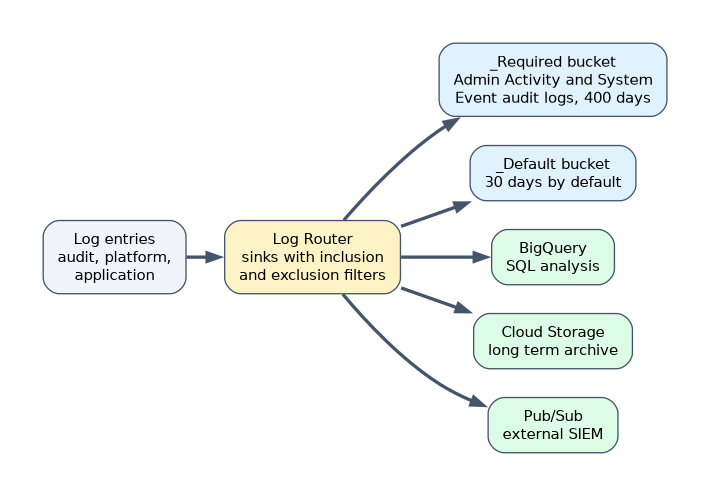 All logs pass through the Log Router. Sinks decide where entries go, using inclusion and exclusion filters.
| Destination | Use |
|---|---|
| Log buckets in Cloud Logging | Store and search logs; _Required (Admin Activity and System Event audit logs, 400 days, not changeable) and _Default (30 days, configurable) exist in each project |
| BigQuery | Analyze logs with SQL |
| Cloud Storage | Cheap long-term archive |
| Pub/Sub | Stream to external systems such as an on-premises SIEM |
| Another project or bucket | Centralize logs, for example with an aggregated sink at the organization level |
gcloud logging sinks create audit-to-bq \
  bigquery.googleapis.com/projects/PROJECT/datasets/audit_logs \
  --log-filter='logName:"cloudaudit.googleapis.com"'
After creating a sink, grant its writer identity (a service account shown in the output) permission on the destination. Log Analytics lets you query logs in a log bucket with SQL, after upgrading the bucket to use it.
Viewing and filtering logs
The Logs Explorer filters by resource, log name, severity, time and text using the logging query language:
resource.type="gce_instance"
severity>=ERROR
timestamp>="2026-10-01T00:00:00Z"
Expanding an entry shows its full payload (textPayload or jsonPayload), labels, trace ID and source location. From the command line: gcloud logging read 'severity>=ERROR' --limit=20.
Diagnostic tools
| Tool | Investigates |
|---|---|
| Cloud Trace | Latency of requests across services, showing which call is slow |
| Cloud Profiler | Which functions in the code use the most CPU and memory, continuously in production |
| Query Insights (Cloud SQL, AlloyDB) | Which database queries are slow or heavy, with query plans and the application tags that issued them |
| Index advisor | Recommends database indexes that would speed up queries |
| Error Reporting | Groups application exceptions |
A worked scenario
Security wants every admin change and every read of a finance bucket retained for a year and sent to its SIEM. The engineer enables Data Access logs for Cloud Storage, creates an aggregated sink at the organization to a BigQuery dataset, and a second sink to Pub/Sub for the SIEM. To debug a slow checkout, she uses Cloud Trace to find a slow database call, Query Insights to find the heavy query, and index advisor to add an index. VPC Flow Logs confirm traffic patterns between services.
How the exam asks about this
- "Record who read data in a bucket." Enable Data Access audit logs.
- "Send logs to an on-premises SIEM." A sink to Pub/Sub.
- "Analyze logs with SQL." A sink to BigQuery, or Log Analytics.
- "Which firewall rule blocked the connection?" Firewall rules logging.
- "Find the slow database query." Query Insights.
What to remember for the exam
- Admin Activity and System Event logs are always on; Data Access logs must be enabled.
- VPC Flow Logs per subnet; firewall logging per rule.
- Log Router sinks send logs to log buckets, BigQuery, Cloud Storage, Pub/Sub or other projects; grant the writer identity access.
_Requiredkeeps Admin Activity and System Event audit logs 400 days;_Defaultkeeps 30 days by default.- Logs Explorer filters; Log Analytics queries with SQL.
- Trace for latency, Profiler for code resources, Query Insights and index advisor for databases.
Logs that were never routed or retained cannot be recovered later. Configure sinks and retention before you need them.
Common mistakes
Expecting Data Access logs to exist by default. They must be enabled (BigQuery is the exception).
Forgetting the sink writer identity permission. Exports fail and nothing reaches the destination.
Using Cloud Profiler to find slow requests across services. That is Cloud Trace.
Check yourself
Which audit logs are always enabled and cannot be turned off?
Admin Activity and System Event audit logs.
How do you export logs to an external system in real time?
Create a Log Router sink to a Pub/Sub topic that the external system subscribes to.
Which tool shows which database queries are slow in Cloud SQL?
Query Insights.
Topic 8 of 8 in Ensuring the successful operation of a cloud solution
Test yourself on Ensuring the successful operation of a cloud solution
The full Google Cloud Associate Cloud Engineer question bank has 661 questions, with timed practice exams and an explanation for every answer.
This study guide is independent and is not affiliated with, endorsed by, or sponsored by Google Cloud. Vendor names, certification names and exam codes are trademarks of their respective owners and are used for identification only.