Network Perimeter Protection · Topic 6 of 6
IDS and IPS Concepts, Deployment and Solutions
Learn IDS and IPS roles, classes and components, where to place sensors, how to handle false alerts, how to choose a product, and NIDS and HIDS tools.
- 6 min
- Includes a diagram
- IDS detects and alerts, IPS sits inline and can block.
- NIDS watches network traffic, HIDS watches one host.
- Signature detection finds known attacks, anomaly detection finds new ones but gives more false positives.
What it is
An intrusion detection system (IDS) watches traffic or host activity and raises alerts when it sees signs of attack or policy violation. An intrusion prevention system (IPS) does the same and can also block the traffic. An IDS reports, and an IPS acts.
The exam asks you to tell the classes apart, to place sensors, to handle false alerts and to name products.
How it works
Role, capabilities and limitations
An IDS adds visibility that a firewall lacks. It can detect scans, known exploits, malware communication, policy breaks and unusual behavior, and it keeps evidence.
Limitations to remember:
- It does not stop attacks by itself (an IDS only alerts).
- Signature detection misses new attacks until the signature exists.
- Encrypted traffic hides content unless decrypted before the sensor.
- Heavy traffic can overload a sensor and cause dropped packets.
- Poor tuning produces false alerts that analysts learn to ignore.
Classification
| Class | What it watches | Notes |
|---|---|---|
| Network based IDS (NIDS) | Traffic on a segment | Sees many hosts, cannot read encrypted content |
| Host based IDS (HIDS) | Logs, files, processes and system calls on one host | Sees local activity and file changes |
| Wireless IDS (WIDS) | Wi-Fi frames and rogue access points | Radio layer |
| IPS (network or host) | Same as above, inline | Can drop packets and reset connections |
By detection method:
| Method | How it works | Weakness |
|---|---|---|
| Signature (misuse) based | Matches known attack patterns | Misses unknown attacks |
| Anomaly based | Alerts on departure from a learned baseline | More false positives |
| Protocol anomaly | Flags traffic that breaks protocol rules | Needs protocol knowledge |
| Hybrid | Combines methods | Complex to tune |
A passive IDS sits off to the side and gets a copy of traffic. An inline IPS sits in the path, so it can block, but a failure or false positive can disrupt the network.
Components
| Component | Function |
|---|---|
| Sensor or agent | Collects traffic or host data |
| Analyzer (detection engine) | Compares data with signatures and rules |
| Signature or rule database | The patterns, updated regularly |
| Management console | Configuration and alert viewing |
| Alert and log store | Keeps events for investigation |
| Response module | Notifies staff or, for an IPS, blocks |
A Snort style rule has a header and options. For example: alert tcp any any -> $HOME_NET 22 (msg:"SSH connection"; sid:1000001; rev:1;). The header names the action, protocol, source, direction and destination, and the options in brackets describe the match and message.
Effective deployment
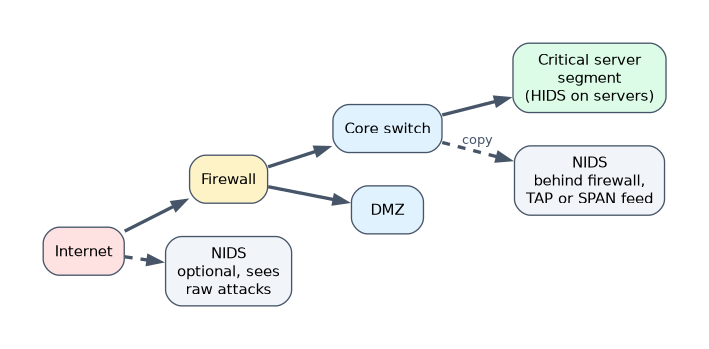
- NIDS placement: behind the firewall to see what got through, in the DMZ, on internal segments with critical servers, and optionally outside the firewall to see raw attacks.
- Traffic feed: a SPAN or mirror port on a switch, or a network TAP that copies traffic. A TAP is less likely than a SPAN port to drop traffic under load.
- HIDS placement: on critical servers, domain controllers and sensitive workstations.
- Encrypted traffic: put the sensor where traffic has been decrypted, or use a HIDS on the endpoint.
- Baseline first: run in detect mode before blocking.
Dealing with false positives and false negatives
| Result | Meaning | Risk |
|---|---|---|
| True positive | Real attack, alert raised | Good |
| False positive | Normal activity raises an alert | Wasted time, alert fatigue |
| True negative | Normal activity, no alert | Good |
| False negative | Real attack, no alert | Dangerous, attacker goes unseen |
To reduce false positives: tune or disable noisy rules, whitelist known good sources, set thresholds, build accurate baselines and add context from asset information. To reduce false negatives: update signatures, add anomaly detection, increase visibility with more sensors, test with simulated attacks and correlate with other logs. Lowering one kind of error usually raises the other, so tune with care and treat false negatives as the greater danger.
Selecting a solution
Check the detection methods supported, tuning ability, throughput against your link speed, rule updates, integration with a SIEM, cost, support and whether it can run inline as an IPS.
NIDS and HIDS solutions
| Product | Type | What it does |
|---|---|---|
| Snort | NIDS and IPS | Open source, rule based packet analysis, with sniffer, logger and IDS modes |
| Suricata | NIDS and IPS | Open source, multi threaded, uses Snort style rules, protocol aware |
| Zeek | Network analysis | Records detailed network activity logs and supports scripted detection |
| OSSEC and Wazuh | HIDS | Log analysis, file integrity checking, rootkit detection and active response |
| Tripwire | HIDS | File integrity monitoring |
| AIDE | HIDS | Open source file integrity checker for Linux |
A worked example
A hospital places a Suricata sensor on a mirror port in front of its patient records servers and installs a HIDS agent on the servers. The sensor alerts on repeated failed logins from one address, and the HIDS reports a changed system file.
Many alerts come from a scanner used by the IT team, so the analyst whitelists its address, which removes a false positive. The changed file turns out to be real, so it is investigated as a true positive.
How the exam asks about this
- "Which system alerts only, and which can also block traffic?" → The IDS alerts, and the IPS can block.
- "An IDS misses a real attack and raises no alert. What is this called?" → A false negative.
- "Which tool monitors file integrity on a host?" → Tripwire (or AIDE), a host based IDS function.
What to remember for the exam
- IDS detects and alerts, IPS sits inline and can block.
- NIDS watches network traffic, HIDS watches one host.
- Signature detection finds known attacks, anomaly detection finds new ones but gives more false positives.
- False negatives are the dangerous error, false positives waste effort.
- Snort and Suricata are NIDS and IPS, while OSSEC, Wazuh and Tripwire are HIDS.
Do not put a new IPS inline with blocking switched on first. Run it in detect mode, tune it, and then enable blocking, or a false positive will cut off real users.
Common mistakes
Assuming an IDS stops attacks. It alerts. Prevention needs an IPS or another control that acts on the alert.
Ignoring encrypted traffic. A NIDS cannot see inside TLS, so it needs decryption upstream or host based visibility.
Tuning only to silence alerts. Turning off rules to cut noise raises false negatives.
Check yourself
Where does a NIDS sensor usually receive its copy of traffic?
From a SPAN or mirror port or a network TAP.
Which is more dangerous, a false positive or a false negative?
A false negative, because a real attack goes undetected.
What does anomaly based detection compare activity with?
A learned baseline of normal behavior.
Topic 6 of 6 in Network Perimeter Protection
Test yourself on Network Perimeter Protection
The full EC-Council 312-38 question bank has 800 questions, with timed practice exams and an explanation for every answer.
This study guide is independent and is not affiliated with, endorsed by, or sponsored by EC-Council. Vendor names, certification names and exam codes are trademarks of their respective owners and are used for identification only.