Incident Detection · Topic 4 of 4
Firewall, Router, Web Server and Centralized Log Monitoring
Learn to read firewall, router and web server logs for attack signs, and how a SIEM collects, correlates and alerts across sources for CND 312-38.
- 5 min
- Includes a diagram
- Firewall logs show allow and deny decisions, router logs show device and routing events, web logs show requests and status codes.
- Many 404 responses mean scanning, repeated 401 or 403 means guessing or forced browsing.
- A SIEM collects, normalizes, correlates, alerts and retains.
What it is
Network devices and servers each produce logs that show a different part of an attack. Firewalls show what was allowed or blocked, routers show topology and configuration changes, and web servers show what clients requested.
Centralized log monitoring gathers all of these into one place, normalizes them and correlates events, so a pattern spread across many devices becomes visible.
How it works
Firewall logs
A firewall log entry normally holds the time, source and destination address, ports, protocol, the action (allow or deny), the rule that matched and the interface.
| Pattern in the log | Meaning |
|---|---|
| One source denied on many ports | Port scan |
| One source denied against many hosts on one port | Sweep for a specific service |
| Many repeated denies from one address | Probing or brute force attempt |
| Allowed outbound traffic to a rare external address on an odd port | Possible command and control or exfiltration |
| Inbound traffic allowed to an internal host that should not be reachable | Rule error |
| A sudden change in rule hits or a rule edit | Configuration change that needs review |
Log denied traffic and also log allowed traffic that matters, such as outbound connections from servers.
Router logs
Routers log device and routing events and, if configured, access list matches.
- Interface up and down events, which may show failures or attacks
- Routing protocol neighbor changes, which can mean a failure or a bogus router injecting routes
- Configuration changes and who made them
- Failed administrative logins and access from unexpected addresses
- Access control list (ACL) hits, which work like a simple firewall log
- SNMP traps and syslog messages sent to a central server
Send router logs to a syslog server, secure the management channel, and use authenticated, role based administrative access (such as TACACS+ or RADIUS) so changes can be traced to a person.
Web server logs
| Server | Common logs |
|---|---|
| Apache HTTP Server | Access log and error log (often under /var/log/apache2/ or /var/log/httpd/) |
| Nginx | access.log and error.log (often under /var/log/nginx/) |
| Microsoft IIS | W3C format logs, by default under C:\inetpub\logs\LogFiles |
An access log line records the client address, time, request method and path, response status code, response size and often the user agent.
| Status code | Meaning | What a pattern may mean |
|---|---|---|
| 200 | OK | Normal |
| 301 or 302 | Redirect | Normal, or open redirect abuse |
| 401 or 403 | Unauthorized or forbidden | Repeated from one address means password guessing or forced browsing |
| 404 | Not found | A burst from one address means scanning for hidden files |
| 500 | Server error | Can follow an injection attempt |
Other red flags: requests containing SQL keywords or ../ path sequences in the URL, unusual user agents of scanning tools, requests for admin pages, very large uploads, and a sudden jump in requests from one address (DoS). A web application firewall adds its own logs of blocked requests.
Centralized log monitoring and analysis
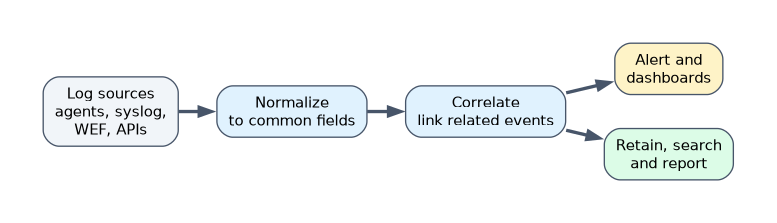 A SIEM (security information and event management) system collects logs, normalizes them to a common format, correlates events and raises alerts. Related tools are log management platforms and SOAR for automated response.
| Function | Purpose |
|---|---|
| Collection | Agents, syslog, Windows Event Forwarding and APIs bring in logs |
| Normalization | Different formats are mapped to common fields |
| Correlation | Rules link events, for example many failed logons followed by a success |
| Alerting and dashboards | Show prioritized detections |
| Retention and search | Keep logs for investigation and compliance |
| Reporting | Evidence for audits |
Good practice:
- Decide the use cases first (brute force, malware, data theft), then collect the logs they need.
- Use secure transport (TLS) and keep time synchronized.
- Protect the log store so it cannot be altered.
- Tune rules to cut false positives and review them often.
- Keep retention long enough for slow attacks and for legal requirements.
Examples of log platforms are Splunk, the Elastic stack and Graylog, but the exam focuses on the function.
A worked example
A web server access log shows one address making 3,000 requests in ten minutes, almost all returning 404 for paths such as admin and backup pages. Firewall logs show the same address was denied on many ports an hour earlier.
Correlated in a SIEM, the two sources show reconnaissance against the server. The defender blocks the address, checks that no admin page is exposed, and watches for the same source in other logs.
How the exam asks about this
- "A firewall log shows one source denied on hundreds of ports. What is this?" → A port scan.
- "Which system collects, normalizes and correlates logs from many sources?" → A SIEM.
- "What does a burst of 404 responses from one client suggest?" → Scanning or forced browsing for hidden content.
What to remember for the exam
- Firewall logs show allow and deny decisions, router logs show device and routing events, web logs show requests and status codes.
- Many 404 responses mean scanning, repeated 401 or 403 means guessing or forced browsing.
- A SIEM collects, normalizes, correlates, alerts and retains.
- Correlation across sources finds attacks a single log cannot show.
- Protect log transport and storage, and keep clocks synchronized.
A SIEM only helps if the right logs reach it. Missing sources create blind spots that attackers use.
Common mistakes
Reading each log alone. The same attacker appears across firewall, web and authentication logs.
Collecting everything with no use case. The result is noise and cost without detection.
Leaving default SIEM rules untuned. Too many false alarms lead analysts to ignore real ones.
Check yourself
What does a SIEM do beyond storing logs?
It normalizes them and correlates events across sources to raise alerts.
What may many HTTP 401 or 403 responses from one address indicate?
Password guessing or forced browsing against protected content.
Why should routers send logs to a syslog server?
So records survive if the device is compromised and can be correlated with other sources.
Topic 4 of 4 in Incident Detection
Test yourself on Incident Detection
The full EC-Council 312-38 question bank has 800 questions, with timed practice exams and an explanation for every answer.
This study guide is independent and is not affiliated with, endorsed by, or sponsored by EC-Council. Vendor names, certification names and exam codes are trademarks of their respective owners and are used for identification only.