Procedures and Methodology · Topic 6 of 11
Volatile and Nonvolatile Acquisition, Write Protection and Live Mac Collection
Acquire volatile and nonvolatile data in order, enable write protection, plan contingencies, validate with hashes, and collect live Mac images and RAM.
- 6 min
- Includes a diagram
- Order of volatility: memory and connections first, disk later, archives last.
- Hardware write blockers are preferred, and they are tested before use.
- Validate with SHA-256 (MD5 and SHA-1 only as supplements) hashes of source and image.
What it is
This page covers steps three to seven of the acquisition methodology and the practical rules around them. The core idea is order of volatility: collect the data that disappears fastest first, protect the media from change, copy it, and prove the copy is exact.
The exam asks what to capture first, how write protection is applied, how a copy is validated, and what is different on a live Mac.
How it works
Acquire volatile data
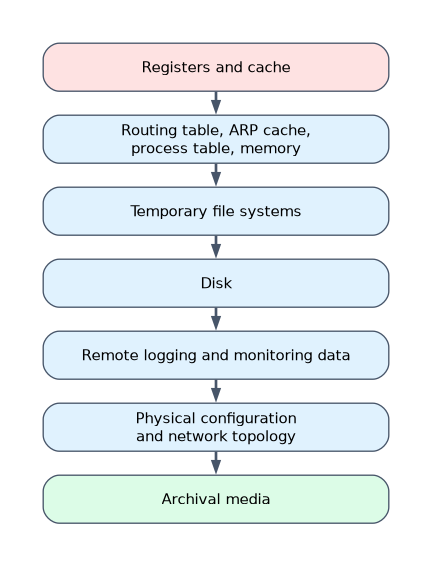 Volatile data is lost at power off. RFC 3227 lists the order from most to least volatile: registers and cache, then routing tables, ARP cache, process table and memory, then temporary file systems, then disk, then remote logs, then physical configuration and archive media.
Typical volatile items on a live system:
| Item | Windows example | Linux example |
|---|---|---|
| Date and time | date /t and time /t | date |
| Running processes | tasklist | ps aux |
| Network connections | netstat -ano | ss -tupan |
| ARP cache | arp -a | arp -a |
| Logged on users | query user (net session for remote sessions) | who |
| DNS cache | ipconfig /displaydns | depends on the resolver in use |
| Open files | Sysinternals tools | lsof |
| Physical memory | Memory capture tool | Memory capture tool |
Run trusted tools from external media rather than those on the suspect system, record the output, and note the time of each step. The memory image is captured first, because every command you run changes memory.
Enable write protection
Write protection prevents any change to the evidence disk during acquisition.
- Hardware write blocker: sits between the evidence drive and the examiner computer. This is the preferred method.
- Software write blocking: an operating system setting. On Windows it is the registry value
WriteProtectunderHKLM\SYSTEM\CurrentControlSet\Control\StorageDevicePolicies. On Linux, mount read only. - Test the blocker before use, with a known drive.
Acquire nonvolatile data
Nonvolatile data survives power off: disks, SSDs, USB drives and memory cards. Make a bit stream image through the write blocker. A typical Linux imaging command with hashing and a log is:
dc3dd if=/dev/sdb hash=sha256 log=case01.log of=/evidence/case01.ddNever write the image to the evidence drive. Use a destination with enough space. Where possible, use a format that stores hashes and metadata, such as E01 from FTK Imager or EnCase.
Plan for contingency
Acquisition can fail: bad sectors, a dying drive or a broken tool. Plan ahead.
- Make two copies of the image, and keep one untouched as master.
- Have a second tool to use if the first fails.
- For damaged drives, continue past read errors and log them (for example dd with
conv=noerror,sync). - If the source cannot be imaged whole, do a logical or sparse acquisition and record why.
- Keep backup power and spare cables.
Validate data acquisition
Validation proves the copy equals the source. Compute a hash of the source before and after, then compute the image hash.
sha256sum case01.ddIf the values match, the copy is exact. Use SHA-256 as the main hash. MD5 and SHA-1 both have known collision attacks, so record them only as supplements where a tool or policy still requires them. Compare again each time the image is moved.
Guidelines and best practices
- Work only on copies. Keep the original sealed.
- Document every step, tool, version and time.
- Verify hashes at start, after acquisition and before analysis.
- Use clean, wiped destination media.
- Use write protection every time, even for "read only" tasks.
- Record the system clock offset against a trusted time source.
- Follow the order of volatility.
Collecting volatile and nonvolatile information together
On a live host the sequence is: record the time, capture memory, collect connection and process data, then image the disk. For a powered off host, only nonvolatile data remains. For encrypted drives, a live system may be the only chance to capture the open volume, so the decision is made before shutdown.
Live Mac data collection
Imaging a Mac has extra constraints because of its file system, security features and hardware.
- Macs use APFS on current systems, and FileVault may encrypt the volume. A live, unlocked Mac can be imaged logically while decrypted, whereas a locked one gives only ciphertext.
- Memory acquisition on current macOS is restricted by System Integrity Protection and Apple silicon, so tool support varies by version.
- Volatile data can be collected with built in commands:
date,ps aux,lsof,netstat -an,arp -a,who, anddiskutil listfor attached storage. - Intel Macs can be imaged through Target Disk Mode. Apple silicon Macs use different recovery based methods.
- Save output to external media, and hash everything.
A worked example
A server suspected of compromise is still running. The investigator records the time, captures memory with a trusted tool from a USB stick, and saves connection and process lists to external storage.
The server is then shut down properly, its disk is connected via a write blocker, and an E01 image is made twice. The SHA-256 of the image matches the source, and the master copy is sealed.
How the exam asks about this
- "Which data should be collected first?" → The most volatile, such as memory and network connections.
- "What proves a forensic image is identical to the source?" → Matching hash values.
- "What is the best way to stop writes to a seized disk?" → A hardware write blocker.
What to remember for the exam
- Order of volatility: memory and connections first, disk later, archives last.
- Hardware write blockers are preferred, and they are tested before use.
- Validate with SHA-256 (MD5 and SHA-1 only as supplements) hashes of source and image.
- Make two images and plan for failure with a second tool.
- On a live Mac, FileVault, SIP and Apple silicon limit what can be acquired.
Running tools stored on the suspect machine can use compromised files and change evidence. Use trusted tools from external media.
Common mistakes
Imaging before capturing memory. Memory is lost at shutdown, so it comes first.
Relying only on MD5. Collisions are known for MD5 and SHA-1, so use SHA-256 as the main hash.
Skipping the second image. A single copy has no backup if it is damaged.
Check yourself
In which order are data collected?
From most volatile to least volatile, so memory first and archives last.
How do you confirm an image matches the source?
Compare hash values, such as SHA-256, of the source and image.
Why might a live Mac be imaged instead of shut down?
FileVault may encrypt the disk, so an unlocked running system can be the only way to read it.
Topic 6 of 11 in Procedures and Methodology
Test yourself on Procedures and Methodology
The full EC-Council 312-49 question bank has 900 questions, with timed practice exams and an explanation for every answer.
This study guide is independent and is not affiliated with, endorsed by, or sponsored by EC-Council. Vendor names, certification names and exam codes are trademarks of their respective owners and are used for identification only.