Digital Forensics · Topic 10 of 11
Malware Forensics, Persistence and Behavior Analysis
Static and dynamic malware analysis, malicious Office and PDF files, registry persistence, system behavior analysis and Gootloader detection, for CHFI v11.
- 6 min
- Includes a diagram
- Static analysis does not run the sample. Dynamic analysis does, in isolation.
- Macros live in .doc, .xls, .docm and .xlsm, not plain .docx or .xlsx.
- Persistence: Run keys, services, scheduled tasks, Winlogon, IFEO, WMI, Startup folder.
What it is
Malware forensics answers three questions: what is this file, what did it do to the system and how does it survive a reboot. The investigator works in an isolated lab, never on a production machine.
This page covers static and dynamic analysis, malicious documents, persistence in the registry and elsewhere, system behavior monitoring, artifact analysis and a fileless loader called Gootloader.
How it works
Static and dynamic malware analysis
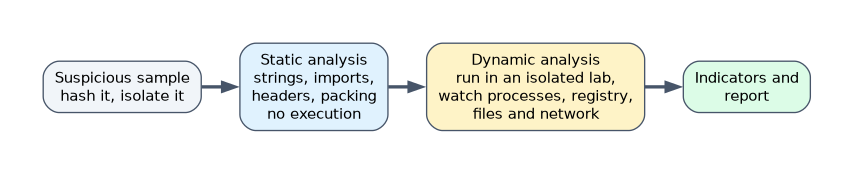
| Static analysis | Dynamic analysis | |
|---|---|---|
| Runs the sample? | No | Yes, in a controlled sandbox |
| Looks at | Hashes, strings, PE headers, imports, entropy, disassembly | Process, file, registry and network behavior |
| Risk | Low | Higher, needs isolation |
| Weakness | Packed or obfuscated code hides content | Malware may detect the sandbox or wait before acting |
| Tools | Hash tools, VirusTotal lookups, strings, PE viewers, IDA, Ghidra | Process Monitor, Process Explorer, Regshot, Wireshark, Cuckoo, FakeNet-NG |
Static checks include the hash (look it up, do not upload sensitive files), readable strings, the PE section table, the import table and high entropy that suggests packing. Dynamic analysis uses a virtual machine with a snapshot that is reverted after each run, with the network simulated or tightly controlled.
Analyzing suspicious Word, Excel and PDF documents
Office files carry malware mainly through macros (VBA) that run on events such as AutoOpen or Document_Open. The older binary formats (.doc, .xls) and macro enabled formats (.docm, .xlsm) can hold macros, while plain .docx and .xlsx cannot. Other tricks are Excel 4.0 macros, DDE fields and remote templates.
PDF files can contain JavaScript and automatic actions. Suspicious keywords in the file are /JavaScript, /JS, /OpenAction, /AA, /Launch and /EmbeddedFile.
| Format | Common tools |
|---|---|
| Office | oledump.py, olevba (oletools) |
| pdfid.py, pdf-parser.py, peepdf |
Analyze without opening the document in its normal application, and never enable macros on the evidence copy.
Registry based malware persistence
| Mechanism | Location |
|---|---|
| Run keys | HKCU and HKLM\Software\Microsoft\Windows\CurrentVersion\Run and RunOnce |
| Winlogon | HKLM\Software\Microsoft\Windows NT\CurrentVersion\Winlogon (Shell, Userinit) |
| Services | HKLM\SYSTEM\CurrentControlSet\Services |
| Image File Execution Options | A Debugger value redirects a program to malware |
| AppInit_DLLs | DLLs loaded into processes that use user32.dll |
| COM hijacking | Changed CLSID entries under HKCU\Software\Classes |
Persistence also exists outside the registry: scheduled tasks, Startup folders and WMI event subscriptions.
Identifying malware persistence
Compare the current autostart entries with a known good baseline.
- Sysinternals Autoruns lists every autostart location in one view.
reg query HKCU\Software\Microsoft\Windows\CurrentVersion\Runshows one key.schtasks /querylists scheduled tasks.- Look for event 7045 (service installed) and 4698 (task created).
- Offline, parse hives with RegRipper or Registry Explorer.
Entries that point to temp folders, user profile paths or oddly named files deserve a closer look.
System behavior analysis: registry, processes, services, startup, logs, API calls, drivers
Take a before and after view of the system. Regshot compares registry and file snapshots. Process Explorer and Process Hacker show process trees, loaded DLLs and unsigned code. Commands such as tasklist /svc, sc query and driverquery list processes, services and drivers. Windows event logs show new services, logons and PowerShell use. API Monitor or a debugger shows API calls such as file, registry, process and network functions, which reveal intent. Unsigned or unexpected drivers may indicate a rootkit.
System behavior analysis: installation and system call monitoring
Installation monitoring records everything changed when a program is installed or run: new files, folders and registry keys. System call monitoring watches the calls a process makes to the OS. On Windows, Process Monitor shows file system, registry, process and thread activity. On Linux, strace traces system calls.
System behavior analysis: files, folders, network, ports and DNS
| Area | What to check | Tool or command |
|---|---|---|
| Files and folders | New or changed files in Temp, AppData, Startup | Process Monitor, folder change monitors |
| Network connections | Remote addresses and ports | netstat -ano, TCPView |
| Listening ports | Unexpected listeners and their processes | netstat -ano |
| DNS | Queried names | ipconfig /displaydns, DNS logs, Wireshark |
| Hosts file | Redirected names | C:\Windows\System32\drivers\etc\hosts |
Lab tools such as FakeNet-NG or INetSim simulate network services so the malware shows its requests without reaching the real internet.
Artifact analysis for suspicious or malicious content
Combine what you found into indicators of compromise: file hashes, file names and paths, registry keys, mutex names, IP addresses and domains. Detection rules such as YARA describe patterns in files, for example:
rule Suspicious_Cmd {
  strings:
    $a = "cmd.exe /c" ascii
  condition:
    $a
}
Check hashes with a reputation service, record the first seen times from file system and Prefetch data, and hash every artifact you extract.
Gootloader fileless malware analysis
Gootloader is a JavaScript based loader. Victims reach it through search engine poisoning, where a compromised site shows a fake forum answer or document template. The download is an archive holding an obfuscated .js file, which Windows Script Host (wscript.exe) runs.
The script then starts PowerShell and loads further payloads into memory, with persistence reported through scheduled tasks or shortcuts. Some reported variants keep encoded data in the registry. "Fileless" means the final payload is not a normal file on disk.
| Evidence | Where |
|---|---|
wscript.exe starting powershell.exe | Process creation events (4688) |
| Script content | PowerShell script block logging (event 4104) |
| Injected code in memory | Memory analysis, for example the malfind plugin (windows.malfind.Malfind in Volatility 3) |
| Encoded data in registry values | Registry hive analysis |
| Download of the archive | Browser history and the Downloads folder |
A worked example
A user opens an Excel file from an email. Process Monitor shows excel.exe spawning powershell.exe, which writes update.exe to %APPDATA% and adds a Run key value. Regshot confirms the new key and Wireshark shows a connection to an unknown domain every 60 seconds.
The analyst records the hash of update.exe and the domain and key as indicators. The static review of the macro with olevba confirms the download command.
How the exam asks about this
- "Which analysis type executes the sample in a sandbox?" -> Dynamic analysis.
- "Which registry key runs a program at every user logon?" -> The
Runkey (HKCU or HKLM). - "Which Sysinternals tool lists every autostart location?" -> Autoruns.
What to remember for the exam
- Static analysis does not run the sample. Dynamic analysis does, in isolation.
- Macros live in .doc, .xls, .docm and .xlsm, not plain .docx or .xlsx.
- Persistence: Run keys, services, scheduled tasks, Winlogon, IFEO, WMI, Startup folder.
- Process Monitor shows file, registry and process activity. Regshot compares snapshots.
- Gootloader is a JavaScript loader. Fileless payloads leave traces in memory, PowerShell logs and the registry.
Never run suspicious code on a networked or production system. Use an isolated VM and revert it after each run.
Common mistakes
Trusting a clean antivirus result. Packed or new malware passes signature checks, so use behavior and artifact evidence.
Missing non-registry persistence. Scheduled tasks, services and WMI also keep malware alive.
Looking only for files. Fileless malware lives in memory and registry values.
Check yourself
What does a high entropy value in a PE section suggest?
The content is probably packed or encrypted.
Which event ID logs PowerShell script block content?
4104.
Why compare autostart entries against a baseline?
New or changed entries stand out, which exposes persistence.
Topic 10 of 11 in Digital Forensics
Test yourself on Digital Forensics
The full EC-Council 312-49 question bank has 900 questions, with timed practice exams and an explanation for every answer.
This study guide is independent and is not affiliated with, endorsed by, or sponsored by EC-Council. Vendor names, certification names and exam codes are trademarks of their respective owners and are used for identification only.