Databricks Machine Learning · Topic 4 of 6
Training and Scoring with Feature Tables
Databricks ML Associate: build a training set with FeatureLookup, log the model with fe.log_model, score with score_batch, and online vs offline tables.
- 5 min
- Includes a diagram
- FeatureLookup(table_name, lookup_key, feature_names) describes what to join; create_training_set combines lookups with the label DataFrame.
- load_df() returns the training DataFrame; exclude_columns removes keys or other non-input columns.
- fe.log_model with training_set stores feature metadata and lineage with the model.
What it is
Once features live in a Unity Catalog feature table, you do not join them by hand. You describe which features to look up for each row, the Feature Engineering client builds the training DataFrame, and the logged model remembers those lookups.
At scoring time you pass only the keys. The model fetches the same features from the feature table, so training and scoring use identical feature logic. Real-time serving reads the same features from an online store instead.
How it works
Building a training set
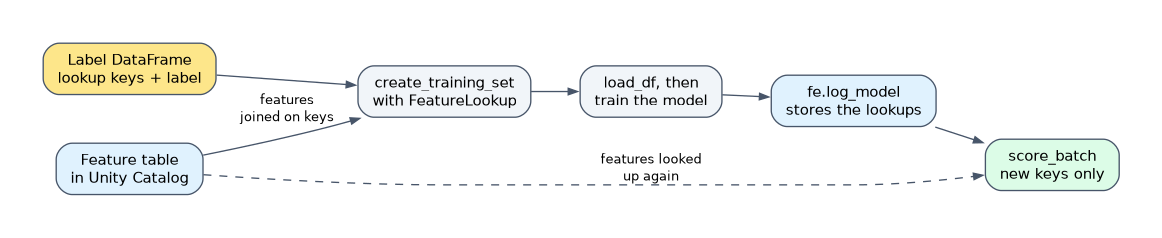 Start from a DataFrame with the lookup key and the label. Each FeatureLookup names a feature table, the key that joins it, and the features to take.
from databricks.feature_engineering import FeatureEngineeringClient, FeatureLookup
fe = FeatureEngineeringClient()
lookups = [FeatureLookup(table_name="ml.retail.customer_features",
    feature_names=["orders_30d", "avg_basket"], lookup_key="customer_id")]
training_set = fe.create_training_set(df=labels_df,
    feature_lookups=lookups, label="churned", exclude_columns=["customer_id"])
train_df = training_set.load_df()
load_df returns the label DataFrame joined with the looked up features. exclude_columns drops columns you do not want as model inputs, such as the key itself.
Other useful FeatureLookup options are feature_names=None (take all features except the keys), output_name to rename a feature, default_values for keys with no match, and timestamp_lookup_key for point in time lookups on time series feature tables.
Training and logging the model
Train on train_df as usual, then log with the Feature Engineering client rather than plain MLflow.
import mlflow
fe.log_model(model=model, artifact_path="model",
    flavor=mlflow.sklearn, training_set=training_set,
    registered_model_name="ml.retail.churn_model")
Passing training_set packages the feature metadata with the model and records lineage from the feature tables to the model in Unity Catalog. That metadata is what makes automatic lookup possible later.
Scoring with feature lookups
score_batch takes a model URI and a DataFrame that only needs the lookup keys.
preds = fe.score_batch(
    model_uri="models:/ml.retail.churn_model@champion",
    df=customer_ids_df)
The client looks up the features from the feature table, runs the model, and returns the input DataFrame plus the feature columns and a prediction column.
Online versus offline feature tables
| Offline feature table | Online feature table | |
|---|---|---|
| Storage | Delta table in Unity Catalog | Online store powered by Databricks Lakebase (Databricks Online Feature Stores) |
| Access pattern | Large scans and joins | Single row lookups by primary key |
| Latency | Seconds to minutes | Milliseconds |
| Used for | Training, batch scoring, streaming feature computation | Real-time Model Serving and Feature Serving endpoints |
| History | Can keep full history for point in time lookups | Holds the latest values for fast reads |
| Source | Your feature pipelines write it | Published from an offline table |
You publish an offline table to an online store with fe.publish_table, which keeps it synced in a triggered, continuous or snapshot mode. A served model logged with fe.log_model then finds its features in the online store automatically when a request arrives with just the keys.
Worked example
A model uses 12 features from two feature tables. A nightly job scores 5 million customers: it calls score_batch against the offline tables. A mobile app needs a prediction for one customer in under 100 ms: the request hits a serving endpoint, which reads the 12 features for that one key from the online store.
How the exam asks about this
- "Batch scoring must use exactly the features used in training, with only customer_id supplied." Log with fe.log_model and the training set, then call fe.score_batch.
- "A real-time endpoint needs feature values in milliseconds." Publish the feature table to an online store; the offline Delta table is too slow for per request lookups.
- "Which call returns a Spark DataFrame of labels joined with features?" training_set.load_df() after fe.create_training_set.
What to remember for the exam
- FeatureLookup(table_name, lookup_key, feature_names) describes what to join; create_training_set combines lookups with the label DataFrame.
- load_df() returns the training DataFrame; exclude_columns removes keys or other non-input columns.
- fe.log_model with training_set stores feature metadata and lineage with the model.
- fe.score_batch(model_uri, df) needs only the keys and looks the features up automatically.
- Offline tables (Delta) serve training and batch scoring; online stores serve low-latency real-time lookups.
- Online tables are published from offline feature tables, not written separately.
If you log the model with plain mlflow.sklearn.log_model, the feature metadata is lost and score_batch cannot look features up. Use fe.log_model with the training set.
Common mistakes
Joining features by hand for scoring. A manual join risks different logic at scoring than at training. score_batch reuses the lookups saved with the model, which prevents training and serving skew.
Using the offline table for real-time serving. Delta tables are built for scans, not millisecond point reads. Real-time endpoints need the features published to an online store.
Leaving the key as a model input. The lookup key is needed for the join, but customer IDs are rarely useful features. Drop it with exclude_columns so the model does not train on it.
Check yourself
Why log the model with fe.log_model and the training set?
It saves the feature lookup metadata and lineage with the model, so score_batch and serving endpoints can fetch the same features automatically from just the keys.
What does score_batch return?
The input DataFrame with the looked up feature columns added and a prediction column.
When do you need an online feature table rather than an offline one?
When a real-time serving endpoint must read features for single keys in milliseconds; training and batch scoring use the offline Delta table.
Topic 4 of 6 in Databricks Machine Learning
Test yourself on Databricks Machine Learning
The full Databricks Machine Learning Associate question bank has 600 questions, with timed practice exams and an explanation for every answer.
This study guide is independent and is not affiliated with, endorsed by, or sponsored by Databricks. Vendor names, certification names and exam codes are trademarks of their respective owners and are used for identification only.