Evaluation and Monitoring · Topic 2 of 2
Monitoring Live Endpoints and Controlling Costs
Databricks GenAI Engineer: key LLM metrics, inference tables, Agent Monitoring, AI Gateway usage tables, rate limits and features that cut LLM costs.
- 5 min
- Includes a diagram
- Inference tables hold payloads; usage tables hold counts; rate limits cap traffic.
- Agent Monitoring scores sampled production traces with judges that need no ground truth.
- Production rows from the inference table become new evaluation data.
What it is
After deployment, an LLM application is watched on two fronts: quality (are answers still good) and operations (latency, errors, tokens and cost). Databricks records traffic in inference tables, scores live traces with Agent Monitoring, and meters and limits usage through AI Gateway.
Each tool answers a different question, and the exam tests which one fits the stated need.
How it works
Metrics by scenario
| Scenario | Metrics to watch |
|---|---|
| Customer facing chatbot | Latency, error rate, safety and relevance scores, user feedback |
| RAG over internal documents | Groundedness, retrieval relevance, questions with no useful chunks |
| High volume API for many teams | Requests and tokens per caller, throttled requests, cost |
| Batch summarization job | Rows processed, failed rows, total tokens |
Pick metrics tied to the requirement in the scenario. A cost concern points to tokens per user; a trust concern points to groundedness and safety; a speed concern points to latency.
Inference tables
An AI Gateway inference table is a Unity Catalog Delta table that logs each request and response to an endpoint, with metadata such as status code, latency and the requester. Endpoints deployed with agents.deploy get one automatically. Logging is not instant, so rows can take a while to appear.
For a deployed RAG application, query the table to find failed requests, slow requests and questions answered with "I don't know". Pull those rows, add expectations, and they become new evaluation data, closing the loop between production and testing.
Agent Monitoring
Agent Monitoring (MLflow 3 production monitoring) runs scorers on a sample of the production traces logged to the agent's MLflow experiment. Results attach to each trace as feedback and feed monitoring dashboards.
from mlflow.genai.scorers import Safety, ScorerSamplingConfig
safety = Safety().register(name="safety")
safety = safety.start(sampling_config=ScorerSamplingConfig(sample_rate=0.5))
Only judges that need no ground truth suit live traffic, such as Safety, RelevanceToQuery, RetrievalGroundedness and Guidelines, because production requests have no expected answer. Sampling keeps the judging cost under control.
AI Gateway
| Feature | What it does | Use it to |
|---|---|---|
| Inference tables | Log request and response payloads | Debug and assess quality |
| Usage tracking | Writes requests and token counts per caller to system tables | Attribute usage and cost |
| Rate limits | Cap queries or tokens per minute | Protect capacity and budget |
| Guardrails | Filter unsafe content or detect PII in traffic | Block harmful requests and responses |
| Fallbacks | Route to another model on failure (external model endpoints) | Keep the app available |
Newer docs mark the serving endpoint AI Gateway as legacy and offer these features in Unity AI Gateway. Usage data lands in the system table system.serving.endpoint_usage. System tables are governed by Unity Catalog: reading it needs USE CATALOG and USE SCHEMA on the system schema and SELECT on the table.
Rate limit rules
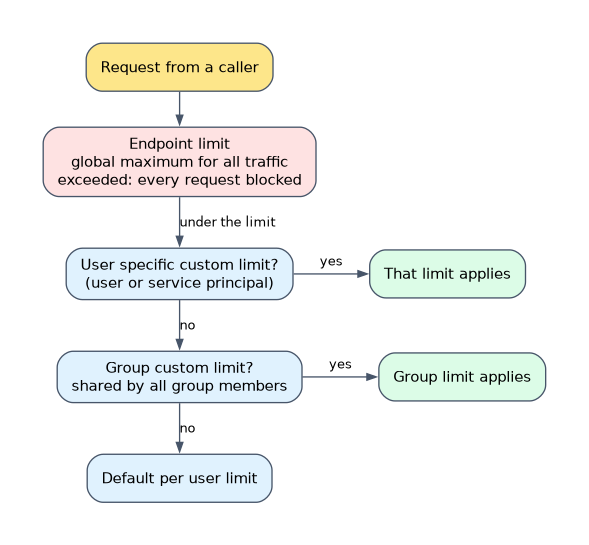
- An endpoint limit is a global maximum for all traffic.
- A default per user limit applies to every user without a custom limit.
- Custom limits target specific users, service principals or groups and override the default per user limit.
- A group limit is shared by all members of the group.
- A user specific custom limit takes priority over a group limit.
- When query based and token based limits both exist, the more restrictive applies.
Controlling LLM costs
- Choose the smallest model that passes evaluation.
- Use pay per token for low or spiky traffic and provisioned throughput only when steady volume justifies dedicated capacity.
- Run table scale work as batch inference with
ai_query()instead of looping over a real time endpoint. - Set rate limits per user or group, and read usage tables to see who spends tokens.
- Enable scale to zero where a cold start is acceptable, and tag endpoints so costs can be attributed.
- Sample live traffic for Agent Monitoring instead of judging every trace.
How the exam asks about this
- "Finance wants token usage per team for a shared LLM endpoint." Enable usage tracking and query the usage system table grouped by requester.
- "One service principal floods the endpoint and slows everyone else." Add a custom rate limit for that service principal.
- "The team must know weekly whether production answers stay grounded." Use Agent Monitoring with RetrievalGroundedness on sampled traces.
What to remember for the exam
- Inference tables hold payloads; usage tables hold counts; rate limits cap traffic.
- Agent Monitoring scores sampled production traces with judges that need no ground truth.
- Production rows from the inference table become new evaluation data.
- Custom limits override the default per user limit; a user limit beats a group limit.
- The more restrictive of query and token limits wins.
- Cost levers: smaller model, right serving mode, batch with ai_query, rate limits, scale to zero.
An inference table shows what was asked and answered, not whether the answer was right. Quality needs scorers, either in Agent Monitoring or in an evaluation run.
Common mistakes
Using inference tables to enforce spending. They log traffic after it happens. To stop overuse, set rate limits.
Running Correctness on live traffic. Production requests have no expected answer. Use groundedness, relevance, safety and guidelines judges.
Granting SELECT only. Reading the usage system table also needs USE CATALOG and USE SCHEMA on its containers. Without them the SELECT grant has no effect.
Check yourself
Which AI Gateway feature shows token use per user or service principal?
Usage tracking, which writes request and token counts per caller to a Unity Catalog system table you can query.
A group has a limit of 100 queries per minute and one member has a custom limit of 300. Which applies to that member?
The user specific limit of 300, because a user specific custom limit takes priority over a group limit.
Why can Agent Monitoring not use the Correctness judge on production traffic?
Correctness needs ground truth, and live requests have no expected facts or expected response to compare against.
Topic 2 of 2 in Evaluation and Monitoring
Test yourself on Evaluation and Monitoring
The full Databricks Generative AI Engineer Associate question bank has 600 questions, with timed practice exams and an explanation for every answer.
This study guide is independent and is not affiliated with, endorsed by, or sponsored by Databricks. Vendor names, certification names and exam codes are trademarks of their respective owners and are used for identification only.