Working with Dashboards and Visualizations · Topic 2 of 2
Sharing, Scheduling and Alerts
Databricks Data Analyst: dashboard permission levels, shared vs individual data permissions, embedding, scheduled refresh, subscriptions and SQL alerts.
- 6 min
- Includes a diagram
- CAN VIEW and CAN RUN view; CAN EDIT edits and publishes; CAN MANAGE also shares and deletes.
- Shared data permissions use the publisher's credentials; individual data permissions use each reader's.
- External users without Databricks accounts need embedding for external users with a service principal.
What it is
A finished AI/BI Dashboard is published, which freezes a snapshot that readers see while you keep editing the draft. Publishing decides whose data access the readers use, and the Sharing dialog decides who can open it.
A schedule refreshes the dashboard automatically and can email snapshots to subscribers. A SQL alert is separate: it runs one query on a schedule and notifies a destination when a value crosses a threshold.
How it works
Permission levels
| Level | Allows |
|---|---|
| CAN VIEW or CAN RUN | Open the dashboard, use filters, refresh, clone |
| CAN EDIT | Also edit the draft and publish |
| CAN MANAGE | Also change permissions and delete |
Grant levels to users, groups or service principals in the Sharing dialog. To reach everyone in the workspace, share with the All workspace users group.
Publishing: whose data access applies
| Publish option | Queries run with | Readers need |
|---|---|---|
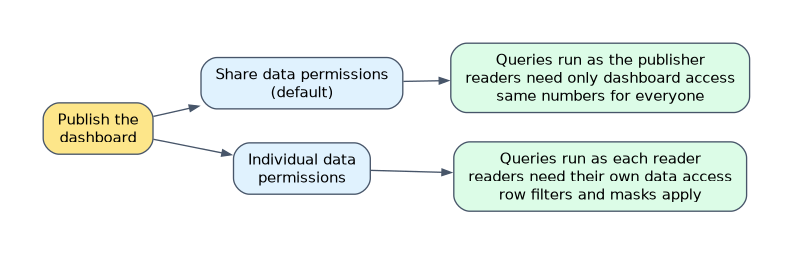
| Share data permissions (default) | The publisher's credentials (or a chosen service principal) | Only access to the dashboard |
| Individual data permissions | Each reader's own credentials | Their own access to the underlying data |
Shared data permissions suit a broad audience that should see the same numbers without table grants. Individual data permissions suit dashboards where row filters or column masks must apply per reader. A draft always uses the viewer's own data permissions.
Sharing beyond the workspace
After publishing, click Copy link to get the dashboard URL. Users in the Databricks account who are not in the workspace can open a shared dashboard with view only access, using the publisher's credentials for compute; they never see the draft.
To share with the whole account, choose Anyone in my account can view. An admin must first add outside people to the account, because a link alone does not grant access.
Embedding in external apps
Only a published dashboard can be embedded.
| Method | Viewers | How |
|---|---|---|
| Basic embedding | Users in your workspace or account | Iframe code from the Share dialog; viewers sign in |
| Embedding for external users | People with no Databricks account | Your app authenticates with a service principal and an OAuth secret |
Workspace admins must allow the places where dashboards can be embedded. With individual data permissions the service principal needs grants on the data, and dataset queries can filter per viewer with __aibi_external_value; OAuth tokens last one hour.
Scheduled refresh
Click Schedule on the dashboard and set the frequency, start time and time zone, or Show cron syntax for Quartz cron. Advanced settings let you pick another SQL warehouse, add subscribers and choose attachments.
Each run executes the dataset queries and fills the result cache, so readers get a fast first load. Subscribers receive a PDF snapshot by email, optionally with CSV, TSV or Excel data, and Slack or Teams channels receive an image and a link.
Subscribers can be workspace users or notification destinations, such as an email distribution list for external partners or a Slack channel set up by an admin. A list holds up to 100 subscribers, and a destination counts as one. Subscribing yourself needs CAN VIEW; adding other people needs CAN EDIT.
SQL alerts
An alert owns its own query and runs it on a schedule on a chosen SQL warehouse. Alert queries cannot use parameters.
| Setting | Choice |
|---|---|
| Value to check | First value of a column, or an aggregation such as Sum or Average over all rows |
| Operator | Such as greater than or less than |
| Threshold | A static value by default |
| Notifications | Users or notification destinations such as email, Slack, Teams or a webhook |
| Advanced | Notify on OK, empty result state, custom template |
SELECT COUNT(*) AS failed_orders
FROM main.sales.orders
WHERE status = 'FAILED' AND order_date = current_date();
With value failed_orders, operator > and threshold 10, the alert is TRIGGERED when more than 10 orders fail today. Each evaluation ends as OK, TRIGGERED or ERROR. Test condition checks the setup before saving, and Notify on OK also sends a message when the value returns to normal.
How the exam asks about this
- "Executives without table access must see the same sales figures." Publish with shared data permissions and grant CAN VIEW.
- "Each regional manager must see only their region through row filters." Publish with individual data permissions.
- "Post a message to the ops Slack channel when failed orders exceed 10." A SQL alert with threshold 10 and the Slack notification destination.
What to remember for the exam
- CAN VIEW and CAN RUN view; CAN EDIT edits and publishes; CAN MANAGE also shares and deletes.
- Shared data permissions use the publisher's credentials; individual data permissions use each reader's.
- External users without Databricks accounts need embedding for external users with a service principal.
- A schedule refreshes the cache and sends PDF snapshots; up to 100 subscribers.
- Alert condition: value or aggregation, operator, threshold; statuses OK, TRIGGERED, ERROR.
- Slack, Teams, webhook and shared email destinations are notification destinations an admin sets up.
With shared data permissions, every reader sees what the publisher can see. If row filters or column masks must apply per person, publish with individual data permissions instead.
Common mistakes
Using an alert to email a whole dashboard. Alerts watch one query value. A regular emailed snapshot is a dashboard schedule with subscribers.
Granting CAN EDIT so someone can view. CAN VIEW is enough to open and filter a published dashboard. Least privilege keeps drafts safe.
Assuming a copied link works for anyone. The link still checks access. The person must be granted access or be in an account that has it.
Check yourself
What is the difference between shared and individual data permissions when publishing?
Shared data permissions run queries with the publisher's credentials, so readers need no data access; individual data permissions run them with each reader's own credentials.
What does a scheduled dashboard refresh do?
It runs the dataset queries on a SQL warehouse, fills the result cache for fast loading and sends a snapshot to any subscribers.
Which three settings define an alert condition?
The value to check (a column's first value or an aggregation), a comparison operator and a threshold value.
Topic 2 of 2 in Working with Dashboards and Visualizations
Test yourself on Working with Dashboards and Visualizations
The full Databricks Data Analyst Associate question bank has 600 questions, with timed practice exams and an explanation for every answer.
This study guide is independent and is not affiliated with, endorsed by, or sponsored by Databricks. Vendor names, certification names and exam codes are trademarks of their respective owners and are used for identification only.