Securing Data · Topic 1 of 1
Unity Catalog Security and PII Protection
Databricks Data Analyst Associate: three level namespace, GRANT and REVOKE, inheritance, sharing settings, ownership, row filters and column masks.
- 5 min
- Includes a diagram
- Names are catalog.schema.object; volumes sit at the third level beside tables.
- Reading a table needs USE CATALOG, USE SCHEMA and SELECT.
- Grants inherit to current and future child objects; there is no DENY.
What it is
Unity Catalog governs data access in Databricks. Every table, view, volume and function is secured in one hierarchy, and every query from any tool is checked against it.
Workspace objects such as dashboards and Genie Agents have their own sharing settings. These control who can open the object; Unity Catalog still decides which data they see.
How it works
The three level namespace
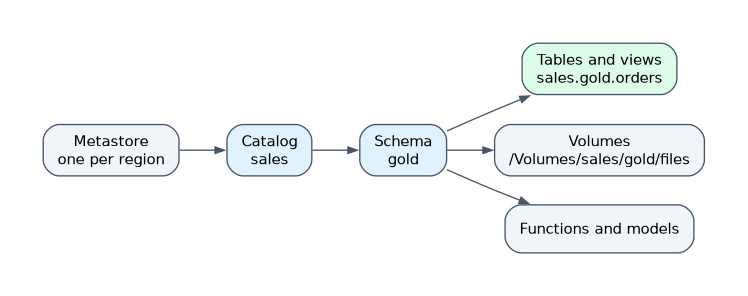 Objects are named
 catalog.schema.object. A catalog is the top container, often one per business unit or environment, and a schema groups related objects inside it. The third level holds tables, views, volumes, functions and models.
SELECT order_id, amount
FROM sales.gold.orders     -- catalog.schema.table
WHERE amount > 100;
Volumes hold files rather than tables and use paths such as /Volumes/sales/raw/landing/. All catalogs sit in a metastore, which is attached to the workspaces of a region.
Privileges and inheritance
| Privilege | Lets the user |
|---|---|
| USE CATALOG / USE SCHEMA | Reach objects inside the container; gives no data by itself |
| BROWSE | See objects and metadata in a catalog without reading data |
| SELECT | Query a table, view or materialized view |
| MODIFY | Insert, update and delete table data |
| CREATE TABLE | Create tables or views in a schema |
| READ VOLUME / WRITE VOLUME | Read files, or add and delete files, in a volume |
| EXECUTE | Call a function |
| ALL PRIVILEGES | All applicable privileges; MANAGE is not included |
| MANAGE | Grant and revoke, rename, drop and transfer ownership without being owner |
Privileges inherit downward: SELECT granted on a schema applies to every current and future table in it.
GRANT USE CATALOG ON CATALOG sales TO `analysts`;
GRANT USE SCHEMA ON SCHEMA sales.gold TO `analysts`;
GRANT SELECT ON SCHEMA sales.gold TO `analysts`;
REVOKE SELECT ON SCHEMA sales.gold FROM `contractors`;
SHOW GRANTS ON SCHEMA sales.gold;
Unity Catalog has no DENY statement. REVOKE removes only that principal's own grant, so access through another group remains.
Roles and ownership
Every object has one owner. The owner has all privileges on it and can grant them to others. Account admins and metastore admins manage the metastore, and workspace admins manage the workspace and its objects.
Best practice is to make a group the owner of catalogs, schemas and production tables, so access does not depend on one person.
ALTER TABLE sales.gold.orders OWNER TO `data_engineering`;Sharing settings for workspace objects
Dashboards, queries, notebooks and Genie Agents use levels such as CAN VIEW, CAN RUN, CAN EDIT and CAN MANAGE. Grant them to groups, and keep CAN MANAGE for the object's owners.
A published AI/BI dashboard can use shared data permissions, so viewers see its data through the publisher's credentials without their own table grants. With individual data permissions, each viewer needs their own Unity Catalog access.
Storage best practices
Prefer managed tables: Unity Catalog controls their files and lifecycle, and predictive optimization can maintain them. External tables and volumes read paths through secured external locations, so users never need direct cloud storage keys.
Use MANAGED LOCATION on CREATE CATALOG or CREATE SCHEMA when managed data must be stored in a specific place; a schema location overrides the catalog location.
Protecting PII
| Need | Feature |
|---|---|
| Hide some rows from some users | Row filter on the table |
| Hide or partly hide a column's values | Column mask on the column |
| Expose a safe subset of columns | A view, with SELECT on the view only |
Row filters and column masks are SQL functions attached to the table, so they apply in every tool; is_account_group_member() decides what each user sees.
CREATE FUNCTION sales.gold.mask_email(email STRING)
RETURN CASE WHEN is_account_group_member('hr') THEN email ELSE '***' END;
ALTER TABLE sales.gold.customers ALTER COLUMN email SET MASK sales.gold.mask_email;
CREATE FUNCTION sales.gold.emea_only(region STRING)
RETURN is_account_group_member('admins') OR region = 'EMEA';
ALTER TABLE sales.gold.orders SET ROW FILTER sales.gold.emea_only ON (region);How the exam asks about this
- "Analysts can see the schema but get a permission error on the table." Grant SELECT on the table or the schema.
- "Support staff must see customers but not full email addresses." Add a column mask on the email column.
- "The table owner is leaving the company." Transfer ownership to a group with ALTER TABLE ... OWNER TO.
What to remember for the exam
- Names are catalog.schema.object; volumes sit at the third level beside tables.
- Reading a table needs USE CATALOG, USE SCHEMA and SELECT.
- Grants inherit to current and future child objects; there is no DENY.
- Owners have all privileges on an object; set owners to groups, not people.
- Row filters hide rows, column masks hide values; both apply in every tool.
- Prefer managed tables and external locations over direct storage credentials.
USE CATALOG and USE SCHEMA give no data. A grant of SELECT on a table is useless until the user also has the usage privileges on its catalog and schema.
Common mistakes
Looking for DENY. Unity Catalog has no DENY statement. Remove access with REVOKE, or grant narrowly in the first place.
Copying PII tables to hide columns. A stripped copy drifts out of date and doubles the risk; a column mask or a view is the governed answer.
Granting to individual users. Grants and ownership held by one person break when that person leaves; groups are easy to audit and change.
Check yourself
What does a user need to query sales.gold.orders?
USE CATALOG on sales, USE SCHEMA on sales.gold and SELECT on the table or on a parent that it inherits from.
How do you stop one group from seeing a column's real values while others still can?
Attach a column mask function to the column that returns the real value only for allowed groups.
Why should a group own a production table?
Ownership carries all privileges and the right to grant, so a group owner keeps control working when individual people leave.
Topic 1 of 1 in Securing Data
Test yourself on Securing Data
The full Databricks Data Analyst Associate question bank has 600 questions, with timed practice exams and an explanation for every answer.
This study guide is independent and is not affiliated with, endorsed by, or sponsored by Databricks. Vendor names, certification names and exam codes are trademarks of their respective owners and are used for identification only.