Executing Queries with Databricks SQL · Topic 2 of 3
Aggregations, Joins, Set Operations and Filtering
Databricks Data Analyst SQL: count vs approx_count_distinct, avg and summary stats, inner and outer joins, UNION vs UNION ALL, WHERE, HAVING, ORDER BY.
- 5 min
- Includes a diagram
count(*)counts every row;count(col)skips NULLs; aggregates other thancount(*)ignore NULLs.approx_count_distincttrades a small error for speed;count(DISTINCT)is exact.- Inner drops unmatched rows; left keeps all left rows; right keeps all right rows; full keeps both.
What it is
These are the core query patterns an analyst writes in Databricks SQL: aggregates that summarize rows, joins that combine tables side by side, set operations that stack results, and sorting and filtering that shape what comes back.
The exam usually shows a short query and asks what it returns. Most questions turn on row counts and NULLs.
How it works
Aggregate functions
| Function | Returns |
|---|---|
count(*) | All rows, including rows with NULLs |
count(col) | Rows where col is not NULL |
count(DISTINCT col) | Exact number of distinct non NULL values |
approx_count_distinct(col) | Estimated distinct count, much cheaper on large data |
avg(col) or mean(col) | Average of non NULL values |
sum, min, max | Totals and extremes, ignoring NULLs |
stddev, median, percentile_approx(col, 0.9) | Spread and percentiles |
SELECT region,
       count(*) AS orders,
       approx_count_distinct(customer_id) AS customers,
       avg(amount) AS avg_amount
FROM main.sales.orders
GROUP BY region;
Use approx_count_distinct when a dashboard over billions of rows needs a fast distinct count and a small error is acceptable. For a quick set of summary statistics in a notebook, the results table also offers a Data Profile view.
Join types
| Join | Keeps |
|---|---|
INNER JOIN | Only rows with a match on both sides |
LEFT [OUTER] JOIN | Every left row; right columns NULL where no match |
RIGHT [OUTER] JOIN | Every right row; left columns NULL where no match |
FULL [OUTER] JOIN | Every row from both sides |
LEFT SEMI JOIN | Left rows that have a match, left columns only |
LEFT ANTI JOIN | Left rows that have no match |
CROSS JOIN | Every combination of rows |
Multiple keys are combined with AND in the ON clause, or listed in USING:
SELECT c.customer_id, c.region, o.amount
FROM main.sales.customers AS c
LEFT JOIN main.sales.orders AS o
  ON c.customer_id = o.customer_id AND c.region = o.region;
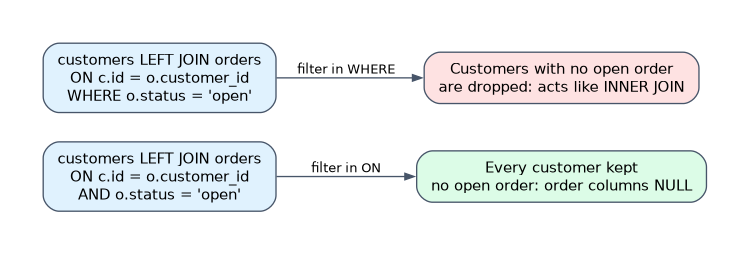
A filter on the right table in WHERE runs after the join and removes the NULL rows a left join kept, turning it into an inner join in effect. Put that condition in ON to keep unmatched rows. If the key is not unique on one side, the join multiplies rows, which inflates sums.
Set operations
| Operator | Result |
|---|---|
UNION | Rows from both queries, duplicates removed |
UNION ALL | Rows from both queries, duplicates kept |
INTERSECT | Rows present in both |
EXCEPT | Rows in the first query but not the second |
SELECT customer_id FROM main.sales.store_orders
UNION ALL
SELECT customer_id FROM main.sales.web_orders;
Both queries need the same number of columns with compatible types, matched by position, not by name. UNION ALL is faster because it skips the duplicate check, so use it when duplicates are impossible or wanted.
Sorting and filtering
SELECT region, sum(amount) AS revenue
FROM main.sales.orders
WHERE order_date >= '2026-01-01' AND status IN ('paid', 'shipped')
GROUP BY region
HAVING sum(amount) > 10000
ORDER BY revenue DESC NULLS LAST
LIMIT 10;| Clause | Use |
|---|---|
WHERE | Filter rows before grouping; cannot use aggregates |
HAVING | Filter groups after aggregation |
ORDER BY ... ASC or DESC | Sort; ascending is the default |
NULLS FIRST or NULLS LAST | Place NULLs; default is first for ascending, last for descending |
LIMIT n | Return the first n rows; pair with ORDER BY for a top n |
BETWEEN a AND b, IN, LIKE 'A%' | Range (inclusive), list and pattern filters |
How the exam asks about this
- "Count unique visitors over five billion events, a small error is fine, and the dashboard must be fast." Use approx_count_distinct.
- "Show every customer, including those with no orders." Use customers LEFT JOIN orders, with any order filter in the
ONclause. - "Combine two monthly extracts and keep every row, including repeats." Use UNION ALL.
What to remember for the exam
count(*)counts every row;count(col)skips NULLs; aggregates other thancount(*)ignore NULLs.approx_count_distincttrades a small error for speed;count(DISTINCT)is exact.- Inner drops unmatched rows; left keeps all left rows; right keeps all right rows; full keeps both.
- Multiple join keys go in
ON ... AND ...orUSING (k1, k2). UNIONremoves duplicates;UNION ALLkeeps them and is faster; columns match by position.WHEREfilters rows,HAVINGfilters groups,ORDER BYwithLIMITgives a top n.
A WHERE condition on the right table of a LEFT JOIN removes the unmatched rows the join kept. If the question says all left rows must appear, the condition belongs in ON.
Common mistakes
Using = NULL to filter. Comparisons with NULL return NULL, never true. Use IS NULL or IS NOT NULL.
Expecting UNION to align by column name. Set operations match columns by position. Swapped column order silently mixes values of compatible types.
Using WHERE with an aggregate. WHERE sum(amount) > 100 is an error. Filters on aggregated values go in HAVING.
Check yourself
A left join returns 100 rows, then
WHERE o.status = 'paid'returns 60. Why?The
WHEREfilter removes rows where the order columns are NULL, along with unpaid orders; moving the condition intoONkeeps every left row.When do UNION and UNION ALL return different row counts?
When the two queries produce duplicate rows. UNION removes duplicates, while UNION ALL keeps every row.
Why would
count(email)be lower thancount(*)on the same table?count(email)counts only rows where email is not NULL, whilecount(*)counts every row.
Topic 2 of 3 in Executing Queries with Databricks SQL
Test yourself on Executing Queries with Databricks SQL
The full Databricks Data Analyst Associate question bank has 600 questions, with timed practice exams and an explanation for every answer.
This study guide is independent and is not affiliated with, endorsed by, or sponsored by Databricks. Vendor names, certification names and exam codes are trademarks of their respective owners and are used for identification only.