Structured Streaming · Topic 2 of 3
Operations on Streams - Selection, Windows, Aggregation and Watermarks
Streaming operations for the Databricks Spark exam: select and filter, event time windows, aggregations, watermarks, late data and unsupported calls.
- 4 min
- Includes a diagram
- Select, filter and withColumn are stateless; aggregations and windows are stateful.
- A tumbling window has one duration; a sliding window adds a slide interval smaller than the duration.
- The watermark equals the maximum event time seen minus the threshold.
What it is
Most batch DataFrame operations work on a streaming DataFrame in the same way. You can select columns, filter rows, add columns and aggregate, and Spark applies them to every micro batch.
The stream-specific idea is event time. A window groups rows by the time the event happened, not by when Spark received it, and a watermark tells Spark how late data may arrive.
How it works
Selection and projection
Selection (filter, where) and projection (select, withColumn, drop) are stateless. Each row is handled on its own, so no history is kept. They work with append and update mode, but not complete mode.
from pyspark.sql import functions as F
clean = (events.filter(F.col("amount") > 0)
    .select("user_id", "amount", "event_time"))
Aggregation
A streaming groupBy aggregation is stateful: Spark keeps the running result for every group between batches. Without a bound on the state, memory grows as new groups appear. Aggregations support complete and update mode, and append only when a watermark is set on an event time window.
Event time windows
F.window(timeColumn, windowDuration, slideDuration) assigns each row to a window.
| Window | Call | Rows belong to |
|---|---|---|
| Tumbling | F.window("event_time", "10 minutes") | Exactly one window |
| Sliding | F.window("event_time", "10 minutes", "5 minutes") | Several overlapping windows |
The result column window is a struct with start and end fields. You group by it together with other columns.
Watermarks and late data
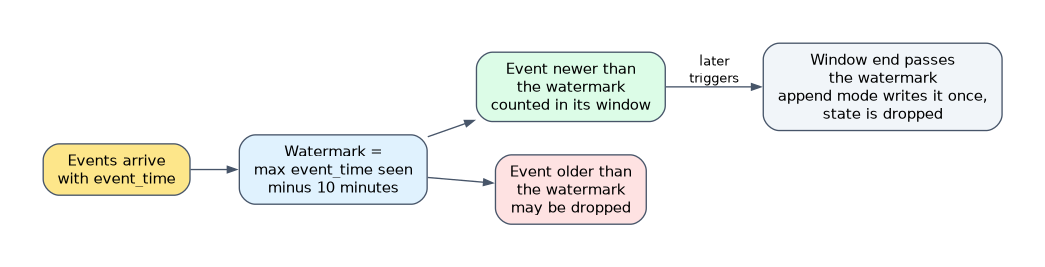
withWatermark("event_time", "10 minutes") tells Spark to tolerate events up to 10 minutes late. The watermark is the largest event time seen so far minus that threshold.
State for windows that end before the watermark can be dropped, and events later than the watermark may be discarded. Data that is late by less than the threshold is always included.
counts = (events
    .withWatermark("event_time", "10 minutes")
    .groupBy(F.window("event_time", "5 minutes"), "page")
    .count())
Call withWatermark before the aggregation, on the same column the window uses. In append mode a window's result is written once, after the watermark passes the end of the window, so output is delayed. In update mode the engine writes the changed counts at each trigger.
Operations a stream does not allow
Some batch operations cannot run on an unbounded input.
| Not supported | Alternative |
|---|---|
limit() and take(n) | Apply limit logic in the sink or a batch step |
distinct() | dropDuplicates on key columns |
count() as an action | groupBy().count() as a query |
show(), collect() | Console sink, or write to a table |
| Sorting | Only after an aggregation, in complete mode |
Using these on a stream fails, usually with an AnalysisException. Check this table before choosing an answer that calls any of them.
How the exam asks about this
- "Count events per 10 minute period of event time." Use
groupBy(F.window("event_time", "10 minutes")).count(). - "Late data arrives up to 15 minutes late and state must stay bounded." Add
withWatermark("event_time", "15 minutes")before the aggregation. - "Why does
streamingDf.distinct()fail?" Distinct on an unbounded stream is not supported; usedropDuplicates.
What to remember for the exam
- Select, filter and withColumn are stateless; aggregations and windows are stateful.
- A tumbling window has one duration; a sliding window adds a slide interval smaller than the duration.
- The watermark equals the maximum event time seen minus the threshold.
- Call
withWatermarkbefore the aggregation, on the event time column used in the window. - With a watermark, append mode emits a window only after the watermark passes its end.
- Streams do not support
limit,distinct,showor a plaincount()action.
A streaming aggregation without a watermark cannot use append mode. The query fails because the results can still change as new data arrives.
Common mistakes
Watermarking a different column. The watermark must be on the same timestamp column used in the window. A watermark on another column does not bound the window state.
Watermarking after the aggregation. Calling withWatermark after groupBy has no effect on that aggregation. It must come before.
Grouping by processing time. Using current_timestamp() instead of the event time column groups by arrival time, so late events land in the wrong window.
Check yourself
How does a sliding window differ from a tumbling window?
A sliding window has a slide interval shorter than its length, so one event can fall into several overlapping windows, while a tumbling window assigns each event to exactly one.
What does a 10 minute watermark mean?
Spark tolerates events up to 10 minutes behind the largest event time seen, and can drop state for windows older than that point.
Why does
limit(10)fail on a streaming DataFrame?A stream is unbounded, so the Spark guide lists limit and take of the first N rows as unsupported on streaming data.
Topic 2 of 3 in Structured Streaming
Test yourself on Structured Streaming
The full Databricks Associate Developer for Apache Spark question bank has 600 questions, with timed practice exams and an explanation for every answer.
This study guide is independent and is not affiliated with, endorsed by, or sponsored by Databricks. Vendor names, certification names and exam codes are trademarks of their respective owners and are used for identification only.