Threats, Vulnerabilities, and Mitigations · Topic 8 of 9
Application Attacks and Indicators
Security+ application attacks such as injection, CSRF, SSRF and traversal, plus indicators of compromise like impossible travel and missing logs.
- 4 min
- Includes a diagram
- Injection mixes input with commands, and the fix is validation and parameterized queries.
- Buffer overflow writes past the end of a memory buffer.
- Replay resends captured valid data. Time stamps and one time tokens defend against it.
What it is
Application attacks abuse how software handles input, sessions and permissions. Indicators of malicious activity are the signs in logs and system behavior that suggest an attack is under way or has happened.
Together they let you move from "what is the attack" to "how would I notice it".
How it works
Application attack types
| Attack | Description |
|---|---|
| Injection | Input is treated as a command, as in Structured Query Language (SQL) or operating system command injection |
| Buffer overflow | Data written past a buffer corrupts memory and may run attacker code |
| Replay | Valid captured data, such as a session token, is sent again |
| Privilege escalation | The attacker gains higher rights, either vertically (higher level) or horizontally (another user at the same level) |
| Forgery | Requests are faked so that they appear to come from a trusted party |
| Directory traversal | Path tricks such as ../ reach files outside the intended folder |
Forgery in detail
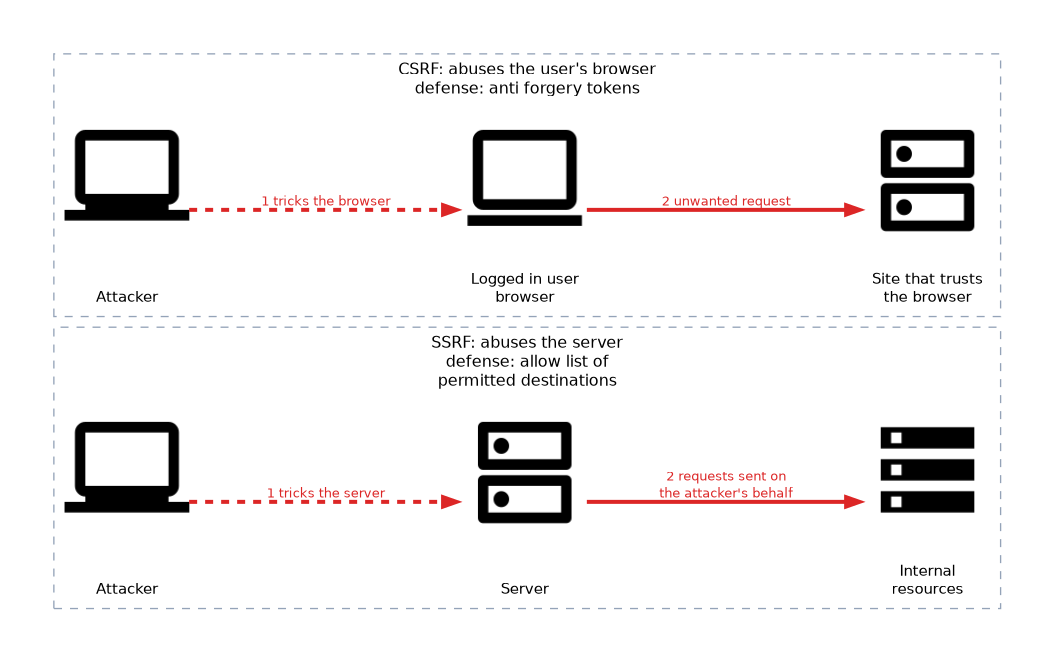 Cross site request forgery (CSRF) tricks a logged in user's browser into sending an unwanted request to a site that trusts it. Server side request forgery (SSRF) tricks a server into making requests to internal resources on the attacker's behalf.
Anti forgery tokens help against CSRF. Allow lists of permitted destinations help against SSRF.
Directory traversal
If an application builds a file path from user input without checking it, an attacker can add ../ segments to climb out of the web folder and read other files. The fix is to validate and normalize paths and to run the application with minimal file permissions.
GET /download?file=../../etc/passwdIndicators of malicious activity
| Indicator | What it suggests |
|---|---|
| Account lockout | Repeated failed logins, possibly guessing or spraying |
| Concurrent session usage | One account in use from two places at once |
| Blocked content | Security tools blocking known bad sites or files |
| Impossible travel | Logins from places too far apart for a person to travel between in the time |
| Resource consumption | Unusual processor, memory, disk or network use |
| Resource inaccessibility | Systems or files that suddenly cannot be reached |
| Out of cycle logging | Log entries at odd times, such as logins at 3 a.m. |
| Published or documented | Data or credentials turning up in public, such as on a leak site |
| Missing logs | Logs deleted or gaps in time, often to hide activity |
Several indicators together are far stronger evidence than one alone. A single failed login is normal, but a burst of failures followed by a success from a new location deserves attention.
Privilege escalation signs
Look for a standard user suddenly in an administrative group, new accounts that nobody requested and unexpected use of administrative tools. Least privilege and regular access reviews limit the scope of escalation.
What to remember for the exam
- Injection mixes input with commands, and the fix is validation and parameterized queries.
- Buffer overflow writes past the end of a memory buffer.
- Replay resends captured valid data. Time stamps and one time tokens defend against it.
- Privilege escalation can be vertical or horizontal.
- CSRF abuses a user's logged in browser. SSRF abuses the server.
- Directory traversal uses ../ style paths to leave the intended folder.
- Impossible travel, concurrent sessions and out of cycle logging point to account compromise.
- Missing logs and sudden resource spikes are signs of malicious activity or cover up.
When a question lists a series of failed logins followed by a successful one, it usually points to a credential attack that finally worked.
Common mistakes
Mixing up CSRF and XSS. CSRF forces an action from a trusted user's browser. Cross site scripting (XSS) runs attacker script in the page.
Reading one indicator as proof. A lockout may simply be a forgotten password. Combine indicators before declaring an incident.
Confusing vertical and horizontal escalation. Vertical gains higher authority. Horizontal reaches another user's data at the same level.
Overlooking missing logs. Silence in a log is itself a warning sign, since attackers often clear traces.
Treating directory traversal as a network attack. It is an input handling flaw in an application.
Do not rely on client side checks to stop these attacks. Validate input and enforce permissions on the server.
Check yourself
What does impossible travel indicate?
Two logins from places too far apart for one person to reach in the time, which suggests stolen credentials.
Which attack tricks a logged in user's browser into sending an unwanted request?
Cross site request forgery (CSRF).
What is the difference between vertical and horizontal privilege escalation?
Vertical escalation gains a higher level of rights, while horizontal escalation gains access to another account at the same level.
Topic 8 of 9 in Threats, Vulnerabilities, and Mitigations
Test yourself on Threats, Vulnerabilities, and Mitigations
The full CompTIA Security+ SY0-701 question bank has 848 questions, with timed practice exams and an explanation for every answer.
This study guide is independent and is not affiliated with, endorsed by, or sponsored by CompTIA. Vendor names, certification names and exam codes are trademarks of their respective owners and are used for identification only.