Security Operations · Topic 8 of 13
Endpoint, Email and Data Security Tools
Security+ endpoint and email tools: Group Policy, SELinux, SPF, DKIM, DMARC, file integrity monitoring, DLP, NAC, EDR, XDR and behavior analytics.
- 4 min
- Includes a diagram
- Group Policy manages Windows settings centrally. SELinux provides mandatory access control on Linux.
- SPF lists allowed senders, DKIM signs messages, and DMARC sets the policy and reports.
- FIM detects unauthorized changes to files.
What it is
This page covers the tools that protect endpoints, email and data inside the enterprise: operating system controls, email authentication, file integrity monitoring, data loss prevention, network access control, endpoint detection and response, and behavior analytics.
Each tool addresses a specific gap. The exam asks you to choose the tool that matches the problem described.
How it works
Operating system security
| Tool | What it does |
|---|---|
| Group Policy | Central control of settings on Windows computers in a directory domain |
| Security Enhanced Linux (SELinux) | Adds mandatory access control to Linux, limiting what processes can do |
Group Policy pushes password rules, firewall settings and other configuration to many machines at once. SELinux restricts a process to the access it needs, so a compromised service has limited reach.
Email security
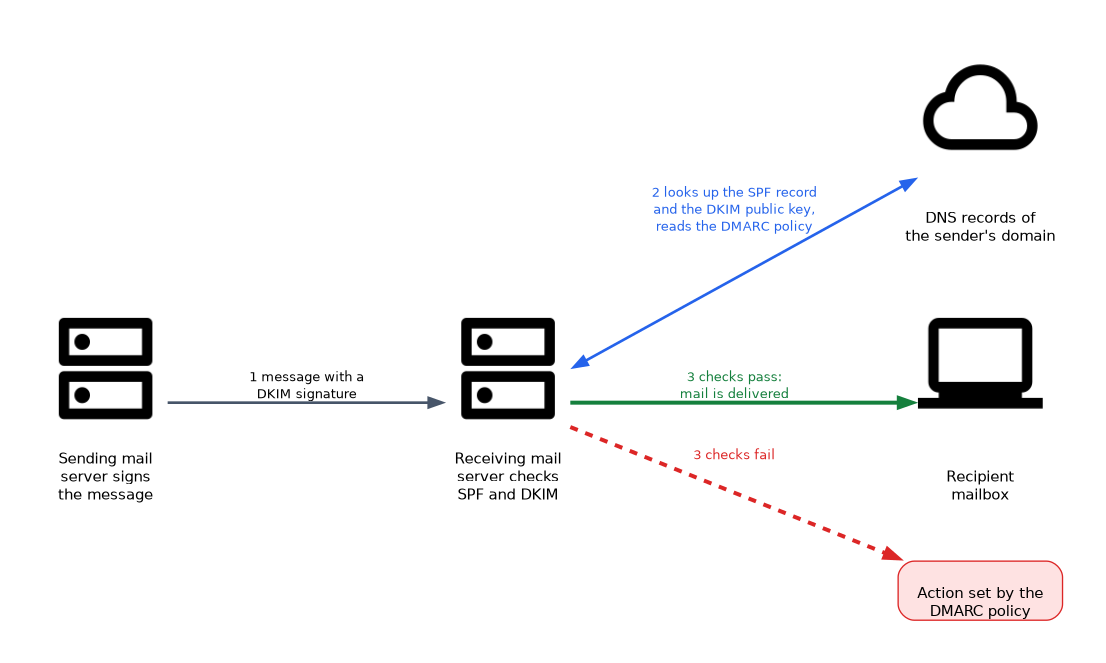 Three Domain Name System (DNS) based standards help prove that mail is genuine.
| Standard | Purpose |
|---|---|
| Sender Policy Framework (SPF) | A DNS record lists the servers allowed to send mail for a domain |
| DomainKeys Identified Mail (DKIM) | The sending server signs messages, and receivers check the signature with a public key in DNS |
| Domain based Message Authentication, Reporting and Conformance (DMARC) | A policy that tells receivers what to do when SPF or DKIM fail, and provides reports |
An email gateway adds filtering for spam, malicious links and attachments. Together, these controls reduce spoofing and phishing.
File integrity monitoring and data loss prevention
File integrity monitoring (FIM) records a trusted state of important files, such as system files and configuration, and alerts when they change. It detects tampering, including by malware.
Data loss prevention (DLP) inspects data in motion, at rest and in use, and blocks or alerts when sensitive data leaves through email, uploads or removable media. It relies on labels or patterns, such as card number formats.
Network access control
Network access control (NAC) checks a device when it connects. It may verify the user, the certificate and the health of the device, such as patch level and antivirus status. A device that fails can be denied or placed in a restricted quarantine network.
EDR, XDR and behavior analytics
| Tool | Focus |
|---|---|
| Endpoint detection and response (EDR) | Collects detailed activity on endpoints, detects suspicious behavior and allows response such as isolating the host |
| Extended detection and response (XDR) | Combines data from endpoints, network, cloud and email for broader correlation |
| User behavior analytics (UBA) | Learns normal activity for users and flags unusual behavior |
Behavior based tools detect problems that have no known signature. For example, a user who suddenly downloads thousands of files at night stands out against their usual pattern.
Choosing the right tool
| Need | Tool |
|---|---|
| Push the same settings to many Windows machines | Group Policy |
| Stop spoofed mail from your domain | SPF, DKIM and DMARC |
| Alert when a system file is altered | File integrity monitoring |
| Stop card numbers leaving by email | Data loss prevention |
| Keep unhealthy devices off the network | Network access control |
| Investigate and contain a suspect laptop | EDR |
| Correlate endpoint, cloud and email signals | XDR |
| Spot an account behaving oddly | User behavior analytics |
What to remember for the exam
- Group Policy manages Windows settings centrally. SELinux provides mandatory access control on Linux.
- SPF lists allowed senders, DKIM signs messages, and DMARC sets the policy and reports.
- FIM detects unauthorized changes to files.
- DLP prevents sensitive data from leaving.
- NAC checks identity and device health before granting access, and can quarantine failing devices.
- EDR focuses on endpoints, and XDR correlates across several sources.
- UBA finds unusual user behavior by comparing it with a normal baseline.
- Behavior based detection can find threats that have no signature.
For "prove that email really came from our domain", think SPF, DKIM and DMARC, with DMARC tying them together with a policy.
Common mistakes
Mixing up SPF and DKIM. SPF checks the sending server. DKIM checks a signature on the message.
Believing DMARC works alone. It builds on SPF and DKIM results.
Treating FIM as antivirus. FIM reports that a file changed. It does not decide whether the change is malicious.
Using EDR and XDR interchangeably. EDR is limited to endpoints, and XDR gathers more kinds of data.
Forgetting quarantine for NAC failures. A device that fails a health check may still need limited access to get updates.
DLP that blocks too aggressively can stop real work, and DLP that is too lax misses leaks. Test rules in monitor mode before enforcing them.
Check yourself
Which email standard tells receivers what to do when SPF or DKIM checks fail?
DMARC.
What does file integrity monitoring detect?
Unauthorized or unexpected changes to important files.
How does EDR differ from XDR?
EDR focuses on endpoint activity, while XDR combines data from endpoints, network, cloud and other sources.
Topic 8 of 13 in Security Operations
Test yourself on Security Operations
The full CompTIA Security+ SY0-701 question bank has 848 questions, with timed practice exams and an explanation for every answer.
This study guide is independent and is not affiliated with, endorsed by, or sponsored by CompTIA. Vendor names, certification names and exam codes are trademarks of their respective owners and are used for identification only.