Vulnerability Assessment and Risk Management · Topic 1 of 4
Vulnerability Management, Reconnaissance and Scanning
Learn the vulnerability management cycle, active and passive reconnaissance, port scanning with nmap and how automated scanning supports mitigation.
- 5 min
- Includes a diagram
- Vulnerability management is a repeating cycle of identify, assess, prioritise, mitigate and verify.
- Mitigation can be a patch, a configuration change or a compensating control.
- Passive reconnaissance does not touch the target, and active reconnaissance does.
What it is
Vulnerability management is the ongoing process of finding, ranking and fixing weaknesses before attackers use them.
New flaws appear every day, and networks change all the time. So this is a repeating cycle, not a one off task.
This page covers the steps of the cycle, the two styles of reconnaissance, port scanning, and why automation matters.
How it works
Each stage feeds the next, and the cycle starts again after every round of fixes.
The vulnerability management cycle
- Identify assets and find vulnerabilities, using scans, vendor notices and reports.
- Assess each finding. How serious is it, and how likely is it to be used against you?
- Prioritise by risk, so that the most dangerous flaws on the most important systems come first.
- Mitigate by patching, changing a setting, or adding a control that reduces exposure.
- Verify with a new scan that the fix worked.
- Report to the owners, and repeat.
Mitigation does not always mean a patch. If a patch is not ready, you can disable a service, block a port, or isolate the system until it is fixed. If you decide to live with a flaw, that is a risk decision that someone with the authority must record.
Active and passive reconnaissance
Reconnaissance means gathering information about a target. Attackers do it before an attack, and defenders do it to see what an attacker would see.
| Type | What it means | Examples |
|---|---|---|
| Passive | Collects information without touching the target's systems | Search engines, public records, social media, DNS records, job adverts |
| Active | Sends traffic to the target to get answers | Port scans, ping sweeps, banner grabbing |
Passive reconnaissance is hard to detect, because the target sees nothing. Active reconnaissance can be noticed in logs and by intrusion detection tools, because it touches the target.
Port scanning
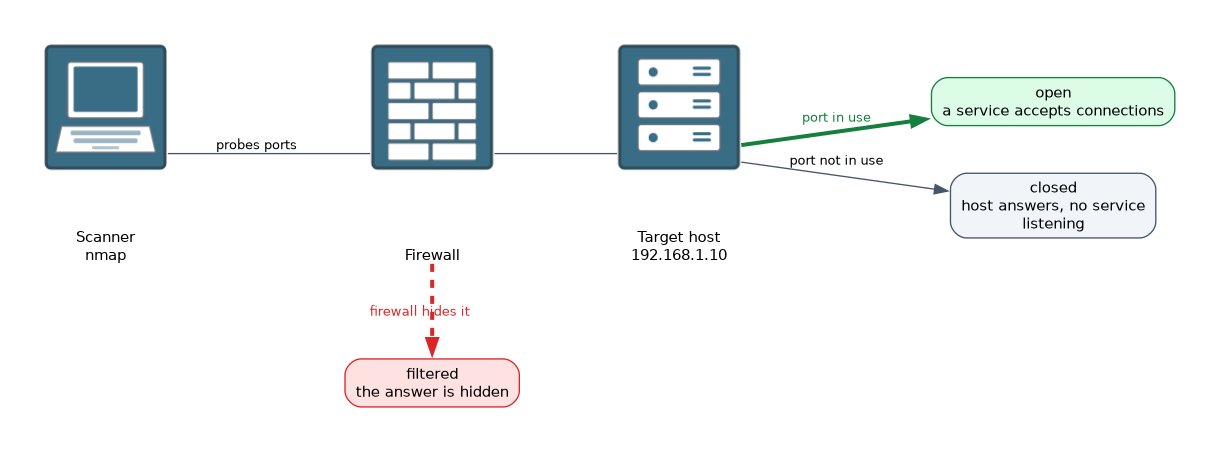 A port scan probes a host to see which TCP or UDP ports respond. Open ports show which services are running, and each service could have a weakness.
Common results for a port are:
- open, where a service accepts connections
- closed, where the host answers but no service is listening
- filtered, where something such as a firewall hides the answer
Nmap is a widely used scanning tool.
$ nmap 192.168.1.10
$ nmap -p 22,80,443 192.168.1.10
$ nmap -sV 192.168.1.10
$ nmap -sn 192.168.1.0/24
The first command scans the most common ports. The second scans only the listed ports. The -sV option tries to find the version of each service, and -sn finds which hosts are up without scanning ports.
Knowing a service version matters because old versions often have known flaws. Defenders compare the list of open ports with what should be running, and close or protect everything else.
Vulnerability scanners and automation
A vulnerability scanner is a tool that checks systems against a database of known flaws and reports what it finds. Examples include Nessus and OpenVAS.
Scans can be:
- unauthenticated, which see the system from outside, as an attacker would
- authenticated, which log in with an account and can see missing patches and settings in more detail
Automation means the scans run on a schedule, for example weekly, and results feed into tickets and reports. This matters because networks change and manual checks are slow. Automated scans also give a record over time, so you can show that the number of serious flaws is falling.
Scanners are not perfect. They can report a false positive, which is a flaw that is not really there, and they can miss a real flaw. A person needs to check important results.
Get written permission before you scan a network. Scanning systems you do not own, or have not been authorised to test, can be illegal. Scans can also slow down fragile systems, so schedule them carefully.
What to remember for the exam
Seven facts cover most questions on this topic.
- Vulnerability management is a repeating cycle of identify, assess, prioritise, mitigate and verify.
- Mitigation can be a patch, a configuration change or a compensating control.
- Passive reconnaissance does not touch the target, and active reconnaissance does.
- A port scan shows which ports are open, closed or filtered.
nmap -sVtries to identify service versions.- Authenticated scans see more detail than unauthenticated scans.
- Get written permission before scanning.
If the question says the information came from public sources and the target was never contacted, the answer is passive reconnaissance.
Common mistakes
These four errors are common.
Running one scan and stopping. New flaws appear all the time, so scanning must repeat.
Treating every finding as equal. Rank by risk so the most important fixes come first.
Trusting a scanner without checking. False positives and missed flaws both happen.
Scanning without permission. This can be illegal and can disrupt systems.
A port scan against a network you do not own, or are not authorised to test, can break the law and your organisation's rules.
Check yourself
Work through these three questions.
What is the difference between active and passive reconnaissance?
Passive reconnaissance gathers information without touching the target, such as from public records. Active reconnaissance sends traffic to the target, such as a port scan.
What do the port states open, closed and filtered mean?
Open means a service accepts connections, closed means the host answers but nothing is listening, and filtered means something such as a firewall hides the answer.
Why are scans automated?
Networks change all the time and manual checks are slow, so scheduled scans find new flaws regularly and give a record over time.
Topic 1 of 4 in Vulnerability Assessment and Risk Management
Test yourself on Vulnerability Assessment and Risk Management
The full Cisco CCST 100-160 Cybersecurity question bank has 864 questions, with timed practice exams and an explanation for every answer.
This study guide is independent and is not affiliated with, endorsed by, or sponsored by Cisco. Vendor names, certification names and exam codes are trademarks of their respective owners and are used for identification only.