Essential Security Principles · Topic 2 of 5
Malware, Denial of Service, Botnets and Network Threats
Learn the main malware types, ransomware, denial of service, botnets, man in the middle attacks and IoT weaknesses, and how each one harms the CIA triad.
- 5 min
- Includes a diagram
- A virus needs a host file and a user action, but a worm spreads by itself.
- A trojan pretends to be useful software.
- Ransomware encrypts data and demands payment, so it harms availability first.
What it is
These are the technical threats that attack systems and networks directly, rather than tricking people.
Malware is software written to cause harm. Other threats in this group flood a service, sit between two devices, or abuse weak smart devices.
You need to recognise each one from a short description, and know which security goal it damages.
How it works
Each threat has a typical way in, a typical effect, and a typical defence.
Types of malware
Malware is a general word for malicious software. The main kinds differ in how they spread and what they do.
| Type | How it behaves |
|---|---|
| Virus | Attaches to a file or program and spreads when the host file is run or shared |
| Worm | Spreads by itself across networks without a user action |
| Trojan | Looks like useful software but hides a harmful function |
| Spyware | Secretly collects information such as what you type or browse |
| Adware | Shows unwanted adverts, and may track browsing |
| Rootkit | Hides the attacker's presence deep in the operating system |
| Keylogger | Records keystrokes to steal passwords |
| Ransomware | Locks or encrypts data and demands payment |
Ransomware encrypts files, or locks the whole system, and demands a ransom for the key. It mainly harms availability. Many attackers also steal the data first, which adds a confidentiality problem.
The best protection against ransomware is tested, offline or separate backups, together with patching and user awareness. Paying the ransom does not guarantee that you get your data back.
Denial of service and botnets
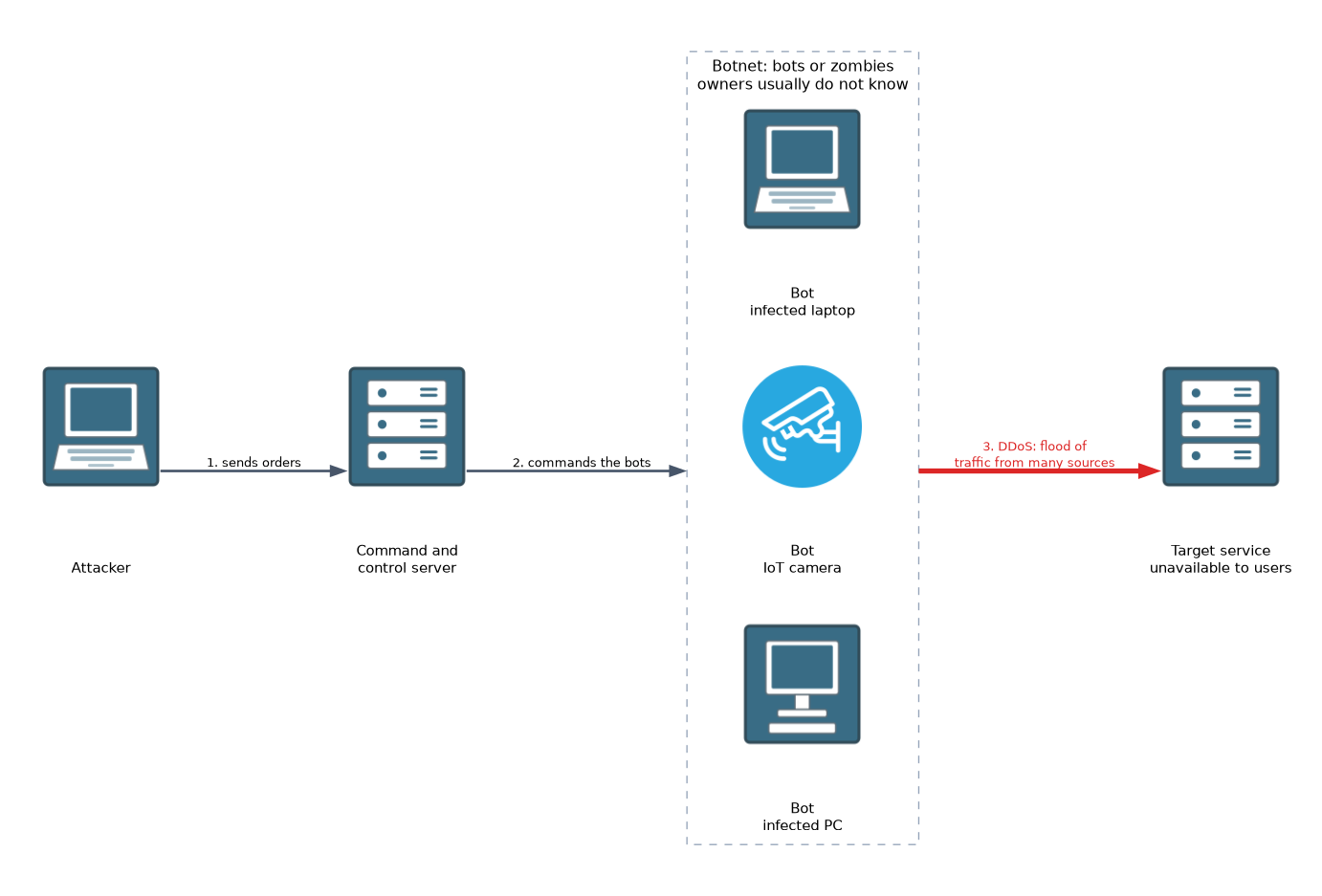 A denial of service (DoS) attack tries to make a system or network unavailable to its users. A common method is to flood the target with more traffic or requests than it can handle.
A distributed denial of service (DDoS) attack uses many sources at once. That makes it harder to block, because the traffic does not come from a single address.
The sources are often a botnet. This is a group of infected devices, called bots or zombies, that an attacker controls remotely through a command and control server. The owners of the devices usually do not know.
DoS attacks harm availability. Defences include rate limiting, traffic filtering, and services that absorb or scrub large floods.
Man in the middle
In a man in the middle (MITM) attack, the attacker secretly sits between two parties and can read or change what passes between them. Neither side notices, because each believes it is talking directly to the other.
Common places for this are open public wireless networks, fake access points, and networks where an attacker can poison address resolution. A MITM attack harms confidentiality because the attacker reads the data, and integrity because the attacker may alter it.
Encryption helps. When traffic is encrypted end to end and certificates are checked, a person in the middle sees only unreadable data.
IoT vulnerabilities
Internet of Things (IoT) devices are smart objects such as cameras, thermostats, door locks and sensors. They are often a weak point because they were built to be cheap and easy to use.
Typical problems are:
- default or hard coded passwords that are never changed
- little or no support for updates
- unnecessary services left switched on
- no encryption of the data they send
- being forgotten, because nobody lists them as assets
Attackers often take over IoT devices to build botnets. Good practice is to change default passwords, update firmware when updates exist, and keep the devices on a separate network segment.
Putting the harm in order
| Threat | Main goal harmed |
|---|---|
| Ransomware | Availability (and often confidentiality) |
| DoS or DDoS | Availability |
| Spyware or keylogger | Confidentiality |
| Man in the middle | Confidentiality and integrity |
| Trojan or rootkit | Depends on the payload |
What to remember for the exam
Seven facts cover most questions on this topic.
- A virus needs a host file and a user action, but a worm spreads by itself.
- A trojan pretends to be useful software.
- Ransomware encrypts data and demands payment, so it harms availability first.
- Backups that are kept separate are the key recovery control for ransomware.
- A DDoS attack uses many sources, often the bots of a botnet.
- A man in the middle attacker reads or changes traffic between two parties.
- IoT devices are risky because of default passwords and missing updates.
When a question says the attacker hides inside the operating system, think rootkit. When it says it spreads on its own, think worm.
Common mistakes
These five errors appear often.
Calling every threat a virus. Virus is only one kind of malware. Choose worm, trojan or ransomware when the description fits better.
Thinking DoS steals data. A DoS attack aims to stop service, so it harms availability rather than confidentiality.
Believing a botnet is one machine. A botnet is many infected devices under one controller.
Trusting the ransom payment. Payment does not guarantee recovery, so backups matter more.
Ignoring small smart devices. A camera with a default password is a real entry point to the network.
A MITM attacker on an open public wireless network can see unencrypted traffic. Avoid sending sensitive data over such a network unless it is encrypted.
Check yourself
Work through these three questions.
How does a worm differ from a virus?
A virus attaches to a host file and needs a user action to spread. A worm spreads by itself across networks.
Which part of CIA does a DDoS attack mainly harm, and what often provides the traffic?
It mainly harms availability. The traffic often comes from the bots of a botnet.
Why are IoT devices a common weak point?
They often keep default passwords, miss updates and run unneeded services, so attackers can take them over.
Topic 2 of 5 in Essential Security Principles
Test yourself on Essential Security Principles
The full Cisco CCST 100-160 Cybersecurity question bank has 864 questions, with timed practice exams and an explanation for every answer.
This study guide is independent and is not affiliated with, endorsed by, or sponsored by Cisco. Vendor names, certification names and exam codes are trademarks of their respective owners and are used for identification only.