Basic Network Security Concepts · Topic 7 of 7
VPNs and Network Access Control
Learn how VPNs protect traffic with encrypted tunnels, how site to site and remote access VPNs differ, and how NAC checks devices before access.
- 5 min
- Includes a diagram
- A VPN uses an encrypted tunnel to protect traffic on an untrusted network.
- A remote access VPN joins one user, and a site to site VPN joins two networks.
- IPsec and SSL or TLS are the two main VPN technologies.
What it is
A VPN protects traffic that crosses an untrusted network, and NAC decides which devices may join a trusted one.
A VPN (virtual private network) builds an encrypted tunnel across a network such as the internet. NAC (network access control) checks who and what is connecting before it allows access.
Together they protect data on the way and control who gets in at the edge.
How it works
A VPN uses tunnelling and encryption, and NAC uses identity and device checks.
What a VPN does
A VPN gives three protections to traffic crossing a public network:
- Confidentiality, because the data is encrypted
- Integrity, because changes to the data can be detected
- Authentication, because each end proves who it is
Tunnelling means the original packet is wrapped inside another packet. The wrapper carries it across the public network, and the far end removes it.
VPN types
| Type | Connects | Typical use |
|---|---|---|
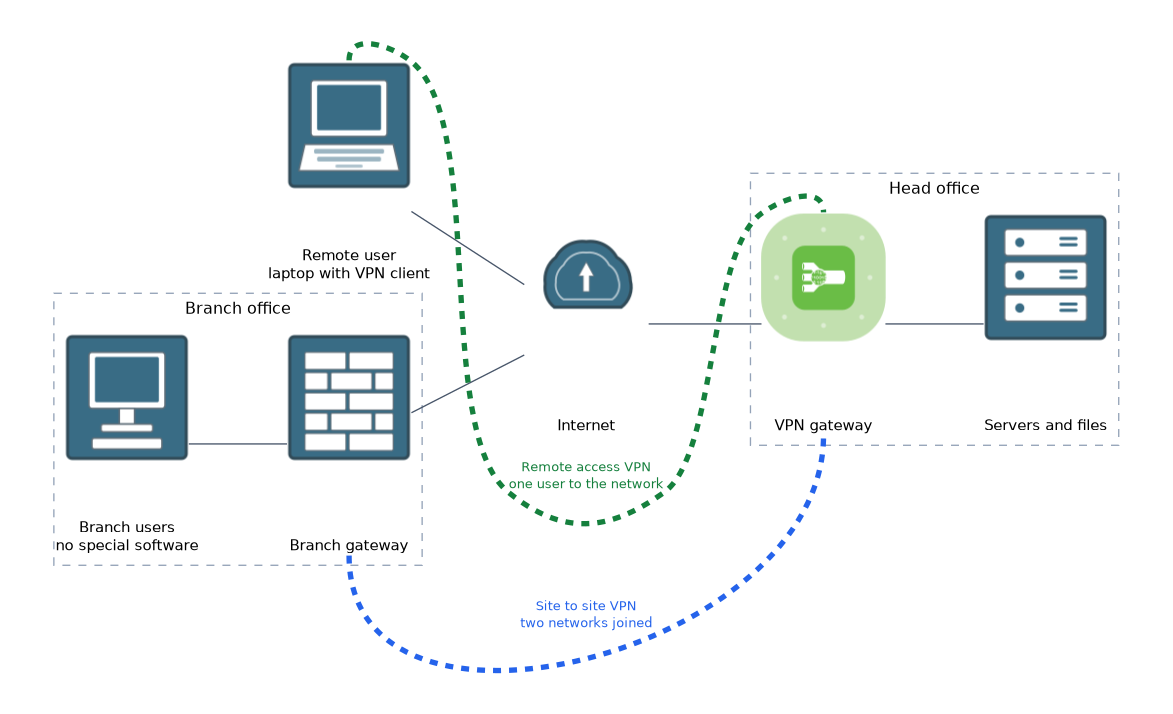
| Remote access | One user device to a company network | Staff working from home or travelling |
| Site to site | Two whole networks | Linking a branch office to head office |
In a remote access VPN, the user runs client software or uses a browser, and logs in to a VPN gateway. In a site to site VPN, two gateways or firewalls build the tunnel, and users at each site need no special software.
VPN technologies
| Technology | Notes |
|---|---|
| IPsec | A set of standards that protects IP packets, widely used for site to site tunnels and also for remote access |
| SSL or TLS VPN | Uses TLS, the same technology as HTTPS, and can work through a web browser or a small client |
Both can use strong encryption. The right choice depends on the use case and the devices involved.
A split tunnel sends only company traffic through the VPN and lets other traffic go straight to the internet. A full tunnel sends everything through the VPN. Full tunnel gives the company more visibility and control, but it uses more bandwidth.
A VPN does not make a device safe. If the laptop is infected, the VPN simply carries the infection into the company network, so endpoint protection still matters.
What NAC does
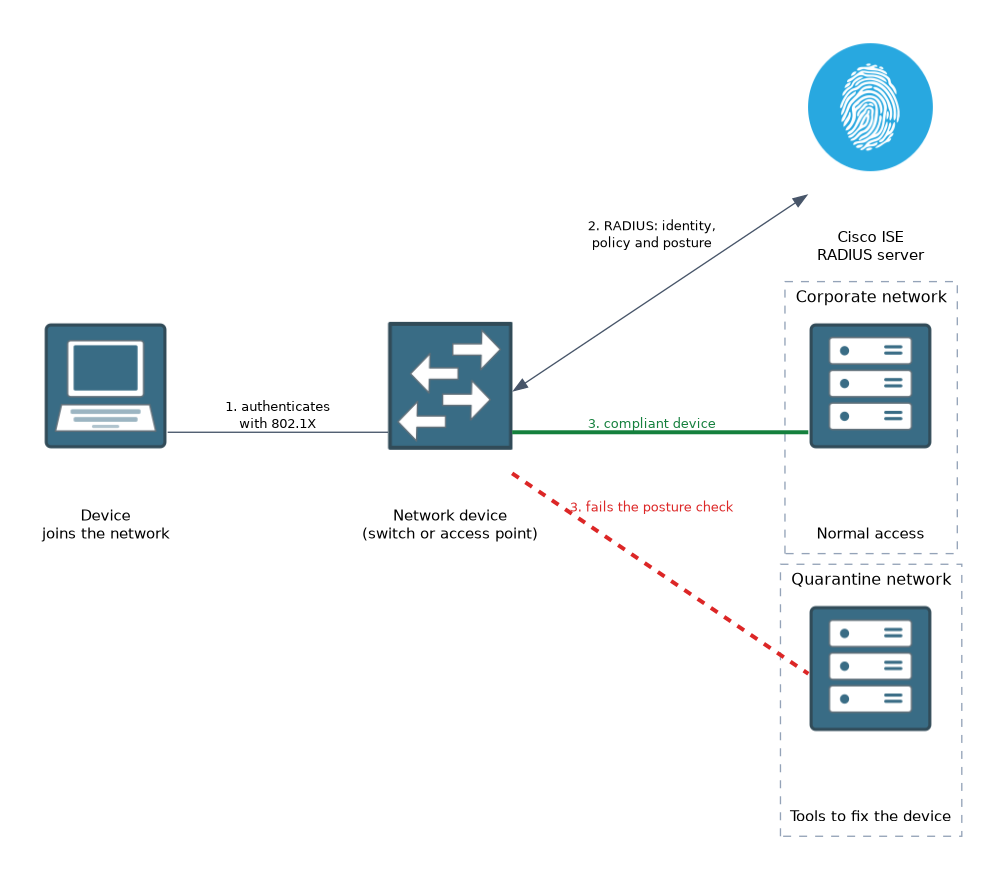 NAC controls access to the network based on who is connecting and the state of the device. It can check a device when it connects, and again while it stays connected.
A typical NAC process is:
- A device plugs in or joins the wireless network.
- The device and user are authenticated, often with 802.1X and a RADIUS server.
- The device may get a posture check, which tests items such as an up to date operating system, active antivirus and a running host firewall.
- A decision is made. A compliant device gets normal access, and a failing device is sent to a restricted or quarantine network where it can only reach tools to fix itself.
NAC also helps with guests, personal devices and IoT devices, because each can be placed on a suitable network. Cisco Identity Services Engine (ISE) is an example of a NAC product.
NAC supports least privilege and segmentation, because access is matched to the device and the user.
What to remember for the exam
Seven facts cover most questions on this topic.
- A VPN uses an encrypted tunnel to protect traffic on an untrusted network.
- A remote access VPN joins one user, and a site to site VPN joins two networks.
- IPsec and SSL or TLS are the two main VPN technologies.
- A split tunnel sends only some traffic through the VPN, and a full tunnel sends all of it.
- NAC checks the user and the device before it allows access.
- A posture check tests items such as updates and antivirus.
- Non compliant devices are placed in a quarantine network.
Branch office to head office points to site to site. A person on a laptop points to remote access.
Common mistakes
These four errors are common.
Thinking a VPN makes a device safe. A VPN protects the traffic in the tunnel, not the health of the device.
Mixing up remote access and site to site. Remote access serves a person, and site to site serves a whole network.
Treating NAC as only a login. NAC also checks the state of the device, not just the password.
Forgetting guest and IoT devices. These need a controlled network, and NAC can place them there.
ISE and RADIUS are used together in many NAC designs, so the ideas from the access management page carry over here.
Check yourself
Work through these three questions.
What three protections does a VPN give to traffic?
It gives confidentiality through encryption, integrity through change detection, and authentication of the two ends.
When would you use a site to site VPN instead of a remote access VPN?
Use site to site to join two whole networks, such as a branch and head office. Remote access is for one user device.
What happens to a device that fails a NAC posture check?
It is placed in a restricted or quarantine network, where it can only reach what it needs to fix the problem.
Topic 7 of 7 in Basic Network Security Concepts
Test yourself on Basic Network Security Concepts
The full Cisco CCST 100-160 Cybersecurity question bank has 864 questions, with timed practice exams and an explanation for every answer.
This study guide is independent and is not affiliated with, endorsed by, or sponsored by Cisco. Vendor names, certification names and exam codes are trademarks of their respective owners and are used for identification only.