Infrastructure · Topic 4 of 13
Spanning Tree Enhancements and Guards
Configure and verify PortFast, BPDU guard, BPDU filter, root guard, loop guard and UDLD, and learn which spanning tree failure each one prevents.
- 6 min
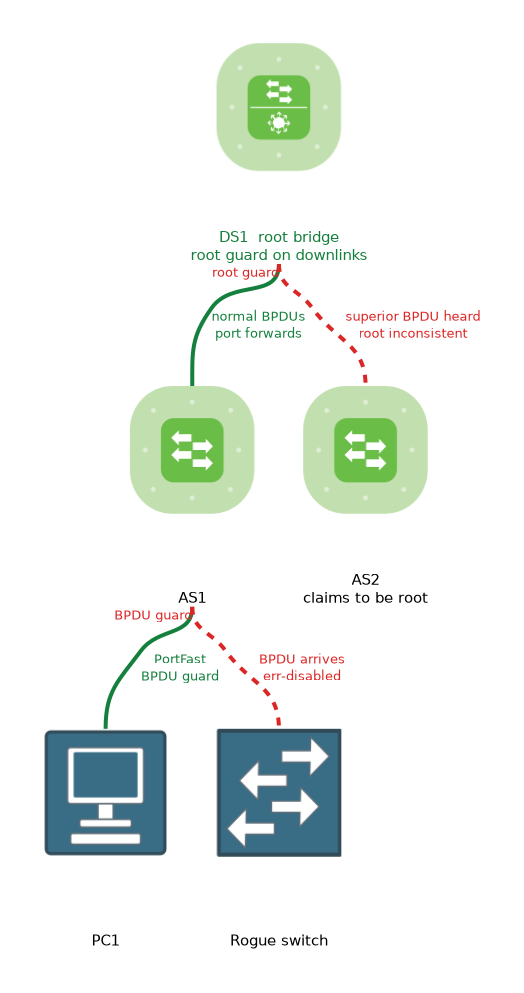
- Includes a diagram
- PortFast sends edge ports straight to forwarding.
- BPDU guard err disables a port that receives a BPDU.
- BPDU filter hides BPDUs, and it can allow loops if misused.
What it is
Spanning Tree enhancements are features that protect the tree from wrong devices, lost messages and one way links.
Spanning Tree trusts the BPDUs that it receives, and that trust can be abused or can fail. A user might plug in a rogue switch. A cable fault might stop BPDUs in one direction.
Each enhancement handles one of these cases.
How it works
Each feature is applied at the port where its risk appears, and the commands are IOS XE.
PortFast
PortFast moves an edge port straight to forwarding. It avoids delay when a PC or server connects. It is meant only for ports with end devices.
Switch(config)# interface GigabitEthernet1/0/5
Switch(config-if)# spanning-tree portfast
Switch(config)# spanning-tree portfast default
The global command spanning-tree portfast default turns PortFast on for all access ports. On a trunk, you need the trunk keyword to enable it on that interface.
BPDU guard
BPDU guard protects an edge port. If a BPDU arrives on a port with BPDU guard, the port goes into the err disabled state at once. The idea is that an end device should never send BPDUs, so a BPDU means a switch has been connected.
Switch(config)# spanning-tree portfast bpduguard default
Switch(config-if)# spanning-tree bpduguard enable
The first command enables BPDU guard on all PortFast ports. The second enables it on one interface, whether or not PortFast is on.
An err disabled port stays down until you act. You can bring it back by hand with shutdown followed by no shutdown. You can also let it recover on a timer:
Switch(config)# errdisable recovery cause bpduguard
Switch(config)# errdisable recovery interval 300
BPDU filter
BPDU filter stops a port from sending and receiving BPDUs. It is enabled with spanning-tree bpdufilter enable on an interface, or by default on PortFast ports with a global command.
It is risky. If a switch is attached to a filtered port, the two switches cannot see each other, and a loop can form. Use it rarely, and know that BPDU guard is the safer choice for edge ports.
Root guard
Root guard keeps the root bridge where you placed it. If a port with root guard hears a superior BPDU, one that would make another switch the root, the port moves to the root inconsistent state. It does not forward while the condition lasts.
When the superior BPDUs stop, the port recovers on its own.
Switch(config-if)# spanning-tree guard rootApply it on ports that face switches that must never become the root, such as downlinks toward the access layer. Root guard works on a designated port.
Loop guard
Loop guard protects against a unidirectional link. If a port stops receiving BPDUs, because of a fault in one direction, the switch might wrongly decide the link is safe and begin forwarding. Loop guard puts the port in a loop inconsistent state instead of letting it become a designated port.
Switch(config-if)# spanning-tree guard loop
Switch(config)# spanning-tree loopguard default
Loop guard is meant for ports that are root or alternate ports on point to point links. It should not be enabled together with root guard on the same port.
UDLD
Unidirectional Link Detection (UDLD) is a separate protocol. It sends frames over a link to check that traffic flows both ways. If it detects a one way link, it can shut the port down, depending on the mode.
Switch(config)# udld enable
Switch(config)# udld aggressive
Switch# show udld GigabitEthernet1/0/1
The global udld enable command turns it on for fibre ports only, so other ports need it set per interface. Aggressive mode tries harder to recover and err disables a port if the neighbour stops responding.
Comparing the features
| Feature | Protects against | Applied on | Result when triggered |
|---|---|---|---|
| PortFast | Delay at edge ports | Edge ports | Fast forwarding |
| BPDU guard | A switch on an edge port | Edge ports | Err disabled |
| Root guard | A new root bridge | Ports facing downstream | Root inconsistent |
| Loop guard | Missing BPDUs, one way link | Root and alternate ports | Loop inconsistent |
| UDLD | One way links | Links | Port err disabled, depending on mode |
Verifying
Switch# show spanning-tree summary
Switch# show spanning-tree inconsistentports
Switch# show errdisable recovery
Switch# show interfaces status err-disabled
show spanning-tree summary lists which features are enabled. show spanning-tree inconsistentports lists ports held by root guard or loop guard. The err disabled commands show ports shut by BPDU guard or UDLD.
What to remember for the exam
Eight facts cover most questions on this topic.
- PortFast sends edge ports straight to forwarding.
- BPDU guard err disables a port that receives a BPDU.
- BPDU filter hides BPDUs, and it can allow loops if misused.
- Root guard blocks a port that hears a superior BPDU, and the port recovers by itself.
- Loop guard stops a port from forwarding when it no longer receives BPDUs.
- UDLD detects one way links and can shut down the port.
- An err disabled port needs a manual reset or
errdisable recovery. show spanning-tree inconsistentportsshows root and loop inconsistent ports.
Pair PortFast with BPDU guard on every edge port. One makes the port fast, and the other keeps it safe.
Common mistakes
These four mistakes appear often.
Applying root guard to the uplink toward the real root. The port would block as soon as it hears the real root's BPDU.
Using BPDU filter instead of BPDU guard. The filter hides loops, while the guard stops them.
Forgetting to recover an err disabled port. The port stays down until reset or until the recovery timer runs.
Enabling both root guard and loop guard on one port. They solve different problems, and they should not be combined.
PortFast on a port that connects to another switch can create a loop, so use it only where end devices connect.
Check yourself
Work through these three questions.
What does BPDU guard do when a BPDU arrives on a protected port?
It places the port in the err disabled state at once.
Which feature stops another switch from becoming the root bridge?
Root guard, enabled with
spanning-tree guard root, blocks a port that hears a superior BPDU.What does UDLD detect?
It detects a link that carries traffic in only one direction, and it can shut the port down.
Topic 4 of 13 in Infrastructure
Test yourself on Infrastructure
The full Cisco CCNP 350-401 ENCOR question bank has 854 questions, with timed practice exams and an explanation for every answer.
This study guide is independent and is not affiliated with, endorsed by, or sponsored by Cisco. Vendor names, certification names and exam codes are trademarks of their respective owners and are used for identification only.