Infrastructure · Topic 11 of 13
Configuring HSRP and VRRP
Configure and verify the first hop redundancy protocols HSRP and VRRP on IOS XE: virtual IP, priority, preempt, timers, tracking, states and show commands.
- 5 min
- Includes a diagram
- HSRP is Cisco. VRRP is an open standard.
- HSRP roles are active and standby. VRRP roles are master and backup.
- The default priority is 100 in both, and the highest priority wins.
What it is
HSRP and VRRP let two routers share one virtual default gateway so that hosts keep working if one router fails.
Hosts are given the virtual IP address as their gateway. One router answers for it, and the other waits. If the first router fails, the second takes over the virtual address and the virtual MAC address, and hosts notice nothing.
How it works
Both protocols elect one forwarding router by priority and watch it with hello messages.
HSRP
Hot Standby Router Protocol is Cisco proprietary. One router is active and forwards traffic.
One is standby and takes over if the active router fails. The others listen.
R1(config)# interface GigabitEthernet0/0
R1(config-if)# ip address 10.1.1.2 255.255.255.0
R1(config-if)# standby version 2
R1(config-if)# standby 1 ip 10.1.1.1
R1(config-if)# standby 1 priority 110
R1(config-if)# standby 1 preempt
The number after standby is the group number, and the routers in one group must use the same number. The default priority is 100, and the highest priority wins. If priorities are equal, the highest IP address on the interface wins.
A router does not take the active role back by default. The command standby 1 preempt allows a router with a higher priority to take over when it comes back.
| Item | HSRP version 1 | HSRP version 2 |
|---|---|---|
| Groups | 0 to 255 | 0 to 4095 |
| Multicast address | 224.0.0.2 | 224.0.0.102 |
| Virtual MAC | 0000.0C07.ACxx | 0000.0C9F.Fxxx |
| IPv6 support | No | Yes |
The default hello timer is 3 seconds, and the default hold timer is 10 seconds. The states a router passes through are Initial, Learn, Listen, Speak, Standby and Active.
Tracking
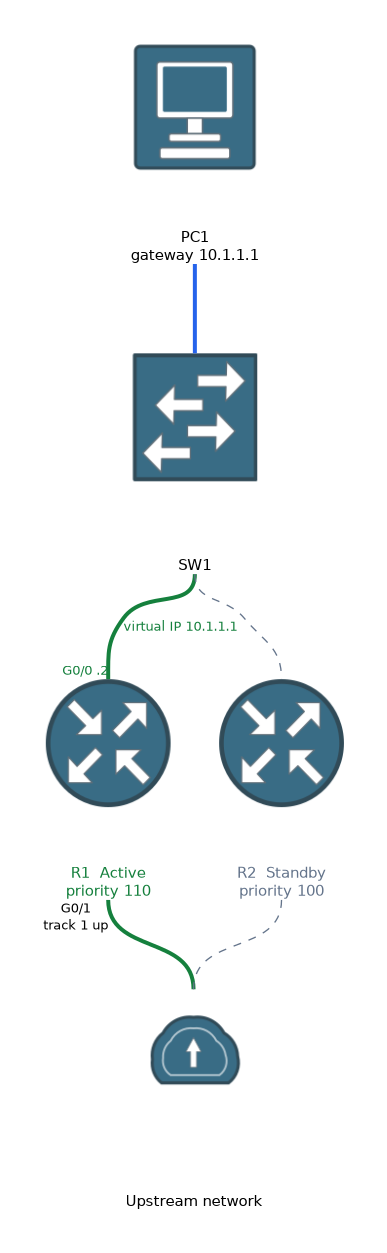
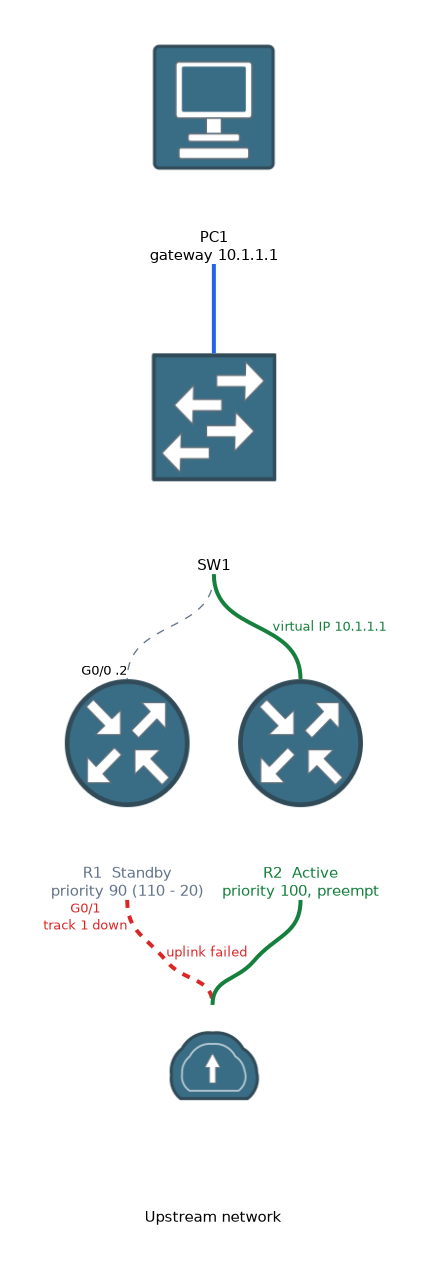 A router could stay active even though its uplink has failed. Tracking lowers its priority when something it depends on goes down.
R1(config)# track 1 interface GigabitEthernet0/1 line-protocol
R1(config)# interface GigabitEthernet0/0
R1(config-if)# standby 1 track 1 decrement 20
If the uplink fails, the priority drops from 110 to 90. The other router, at 100, then wins if preempt is on. Preempt is needed for this to work, so pair tracking with standby 1 preempt.
VRRP
Virtual Router Redundancy Protocol is an open standard from the IETF. One router is the master and the others are backups. The roles are similar to HSRP, but with a few differences.
R1(config)# interface GigabitEthernet0/0
R1(config-if)# ip address 10.1.1.2 255.255.255.0
R1(config-if)# vrrp 1 ip 10.1.1.1
R1(config-if)# vrrp 1 priority 110
Newer IOS XE releases use VRRP version 3, which has its own configuration style.
R1(config)# fhrp version vrrp v3
R1(config)# interface GigabitEthernet0/0
R1(config-if)# vrrp 1 address-family ipv4
R1(config-if-vrrp)# address 10.1.1.1
R1(config-if-vrrp)# priority 110
The command syntax depends on the software release, so read the output carefully when you see a configuration in an exam.
Comparing HSRP and VRRP
| Feature | HSRP | VRRP |
|---|---|---|
| Standard | Cisco | IETF |
| Roles | Active and standby | Master and backup |
| Default priority | 100 | 100 |
| Preempt | Off by default | On by default |
| Multicast address | 224.0.0.2 or 224.0.0.102 | 224.0.0.18 |
| Transport | UDP port 1985 | IP protocol 112 |
| Virtual MAC | 0000.0C07.ACxx (v1) | 0000.5E00.01xx |
If a VRRP router owns the virtual address as its real interface address, its priority is 255 and it is the master. Some facts differ by version, so compare against your platform documentation.
Verifying
R1# show standby brief
R1# show standby
R1# show vrrp brief
R1# show vrrp
show standby brief lists each group with the interface, priority, preempt flag, state, the active and standby routers and the virtual IP. Check that exactly one router is active in each group. If two routers show active, they cannot hear each other's hellos, so check the link and any access list or VLAN between them.
What to remember for the exam
Eight facts cover most questions on this topic.
- HSRP is Cisco. VRRP is an open standard.
- HSRP roles are active and standby. VRRP roles are master and backup.
- The default priority is 100 in both, and the highest priority wins.
- HSRP does not preempt by default. VRRP does.
standby GROUP ip ADDRESSconfigures HSRP.vrrp GROUP ip ADDRESSconfigures VRRP.- HSRP hello is 3 seconds and hold is 10 seconds by default.
- Tracking lowers the priority when a tracked object fails.
show standby briefandshow vrrp briefverify the state.
Tracking only helps if preempt is enabled on the other router, because the lower priority must be allowed to take over.
Common mistakes
These four mistakes appear often.
Using different group numbers. The routers then act as separate groups and both become active.
Forgetting preempt in HSRP. The preferred router does not return to the active role after it recovers.
Setting the host gateway to a real address. Hosts must use the virtual IP address.
Mixing HSRP versions. Routers on different versions will not form one group.
Two active routers in one HSRP group means hello messages are not getting through, which can cause duplicate addresses and unstable traffic.
Check yourself
Work through these three questions.
Which first hop redundancy protocol preempts by default?
VRRP preempts by default, while HSRP needs the
standby preemptcommand.What is the default HSRP priority, and what decides a tie?
The default priority is 100, and a tie goes to the router with the highest interface IP address.
Why use tracking with HSRP?
Tracking lowers the priority when an uplink fails, so the other router can become active.
Topic 11 of 13 in Infrastructure
Test yourself on Infrastructure
The full Cisco CCNP 350-401 ENCOR question bank has 854 questions, with timed practice exams and an explanation for every answer.
This study guide is independent and is not affiliated with, endorsed by, or sponsored by Cisco. Vendor names, certification names and exam codes are trademarks of their respective owners and are used for identification only.