Infrastructure · Topic 7 of 13
eBGP Neighbours and Best Path Selection
Configure and verify eBGP between directly connected neighbours, read the neighbour states, advertise networks and apply the best path order.
- 6 min
- Includes a diagram
- BGP is a path vector protocol that runs on TCP port 179.
- eBGP peers are in different autonomous systems, and the default TTL needs them to be directly connected.
neighbor ADDRESS remote-as ASNcreates the session.
What it is
The Border Gateway Protocol (BGP) exchanges routes between autonomous systems, and eBGP is BGP between different autonomous systems.
An autonomous system (AS) is a group of networks under one administration with its own AS number. BGP is a path vector protocol. It carries a list of AS numbers for each route, which prevents loops and lets you apply policy.
It runs over TCP port 179, and neighbours are configured by hand.
How it works
You configure the neighbour, advertise networks and then let BGP choose paths, using IOS XE syntax.
Configuring eBGP
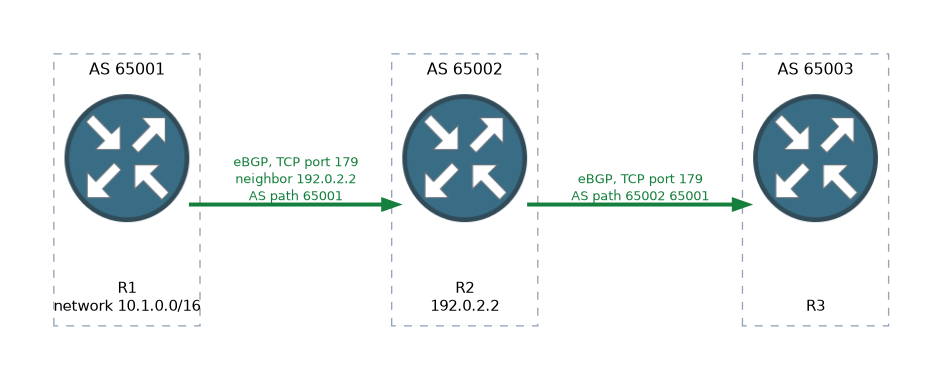
R1(config)# router bgp 65001
R1(config-router)# bgp router-id 1.1.1.1
R1(config-router)# neighbor 192.0.2.2 remote-as 65002
R1(config-router)# network 10.1.0.0 mask 255.255.0.0
The neighbor command names the peer address and its AS. If the remote AS differs from the local one, the session is eBGP. The network command advertises a prefix, but only if an exact match for that prefix is already in the routing table.
By default eBGP packets are sent with a time to live of 1, so neighbours must be directly connected. The usual peering uses the addresses of the connecting link. Peering between loopbacks over one hop needs extra settings.
R1(config-router)# neighbor 2.2.2.2 remote-as 65002
R1(config-router)# neighbor 2.2.2.2 update-source Loopback0
R1(config-router)# neighbor 2.2.2.2 ebgp-multihop 2
Neighbour states
A BGP session moves through states as the TCP connection and the BGP messages are exchanged.
| State | Meaning |
|---|---|
| Idle | Not started, or waiting after a failure |
| Connect | Waiting for the TCP connection |
| Active | Trying to make the TCP connection |
| OpenSent | TCP is up and an Open message has been sent |
| OpenConfirm | An Open has been received, waiting for a keepalive |
| Established | The session is up and routes are exchanged |
A session stuck in Idle or Active points to a configuration error or a connection problem. Common causes are a wrong neighbour address, a wrong remote AS, no route to the peer, or a filter blocking TCP port 179. In the summary, a number in the last column, rather than the word Established, shows that the session is up and gives the count of prefixes received.
Verifying
R1# show ip bgp summary
R1# show ip bgp
R1# show ip bgp neighbors 192.0.2.2
R1# show ip route bgp
show ip bgp summary lists each neighbour, its AS, how long the session has been up, and the prefixes received.
show ip bgp shows the BGP table, with a > mark beside the best path. The routing table gets the best path only. External BGP routes have an administrative distance of 20.
The best path algorithm
BGP may learn several paths to the same prefix, so it picks one by comparing attributes in order. The first attribute that differs decides. The main steps in order are:
- Highest weight. This is a Cisco attribute that stays on the local router.
- Highest local preference. This is shared inside an AS.
- Routes the router itself originated are preferred.
- Shortest AS path.
- Lowest origin code, where IGP is preferred over EGP, and EGP over incomplete.
- Lowest MED, compared between paths from the same neighbouring AS.
- An eBGP path is preferred over an iBGP path.
- Lowest IGP metric to the next hop.
- Further tie breakers, such as the lowest router ID, come last.
A common memory aid is that weight and local preference are checked first, and the AS path is the first step that looks at the path length.
Influencing the choice
You change the outcome with route maps that set attributes. For example, set a higher local preference for routes from one neighbour:
R1(config)# route-map PREFER permit 10
R1(config-route-map)# set local-preference 200
R1(config)# router bgp 65001
R1(config-router)# neighbor 192.0.2.2 route-map PREFER in
You can make a path less attractive to other autonomous systems by adding to the AS path, which is called prepending. The same route map idea applies.
Loop prevention
A router rejects a route if its own AS number is already in the AS path. This is the loop prevention rule for eBGP, and it is the reason the AS path is carried with each route.
What to remember for the exam
Eight facts cover most questions on this topic.
- BGP is a path vector protocol that runs on TCP port 179.
- eBGP peers are in different autonomous systems, and the default TTL needs them to be directly connected.
neighbor ADDRESS remote-as ASNcreates the session.- The
networkcommand advertises a prefix only if it is in the routing table. - The session is up in the Established state, and
show ip bgp summaryshows it. - eBGP has an administrative distance of 20.
- Best path order starts with weight, then local preference, then locally originated, then AS path.
- A router rejects a route that already has its own AS in the AS path.
For the best path steps, remember that weight is local to the router and higher is better, while the shortest AS path wins at step four.
Common mistakes
These four mistakes appear often.
Expecting loopback peering to work by default. The TTL of 1 stops the session unless you add ebgp-multihop and update-source.
Advertising a prefix that is not in the table. The network command needs an exact match in the routing table.
Confusing weight with local preference. Weight stays on one router, while local preference is shared inside the AS.
Reading Active as a good state. Active means the router is still trying to connect.
Do not forget the remote AS check. A wrong remote-as stops the session even if the TCP connection works.
Check yourself
Work through these three questions.
Why does a session between loopbacks of two eBGP neighbours fail by default?
The eBGP TTL is 1, so peering must be direct unless you add
ebgp-multihopandupdate-source.What is the first attribute compared in the best path algorithm?
The highest weight is compared first, and weight is a Cisco attribute local to the router.
What does the
networkcommand need before it will advertise a prefix?An exact match for that prefix must be in the routing table.
Topic 7 of 13 in Infrastructure
Test yourself on Infrastructure
The full Cisco CCNP 350-401 ENCOR question bank has 854 questions, with timed practice exams and an explanation for every answer.
This study guide is independent and is not affiliated with, endorsed by, or sponsored by Cisco. Vendor names, certification names and exam codes are trademarks of their respective owners and are used for identification only.