Web Auth and Guest Services · Topic 1 of 3
Local and Central Web Authentication
Compare local web authentication on the network device with central web authentication on ISE, and learn the redirect, redirect ACL and CoA steps.
- 5 min
- Includes a diagram
- LWA serves the page from the network device. CWA serves it from ISE.
- CWA is the usual choice, because it supports CoA, guest flows and posture.
- CWA starts with MAB, then ISE returns a redirect URL and a redirect ACL.
What it is
Web authentication lets a user sign in through a browser page, instead of through a supplicant on the device.
There are two kinds. In local web authentication the network device hosts the page. In central web authentication, ISE hosts the page, and the network device only redirects the browser to it.
How it works
Central web authentication uses a two step authorization, with a CoA in between.
Local web authentication
With local web authentication, or LWA, the switch or controller serves the login page. The user types a username and password. The device sends them to ISE in a RADIUS request.
LWA is simple, but it has limits. The device holds the page, so you must change each device to change the page.
The device usually cannot support CoA based flows such as posture or a guest flow with sponsor approval. For that reason, central web authentication is the usual choice with ISE.
Central web authentication
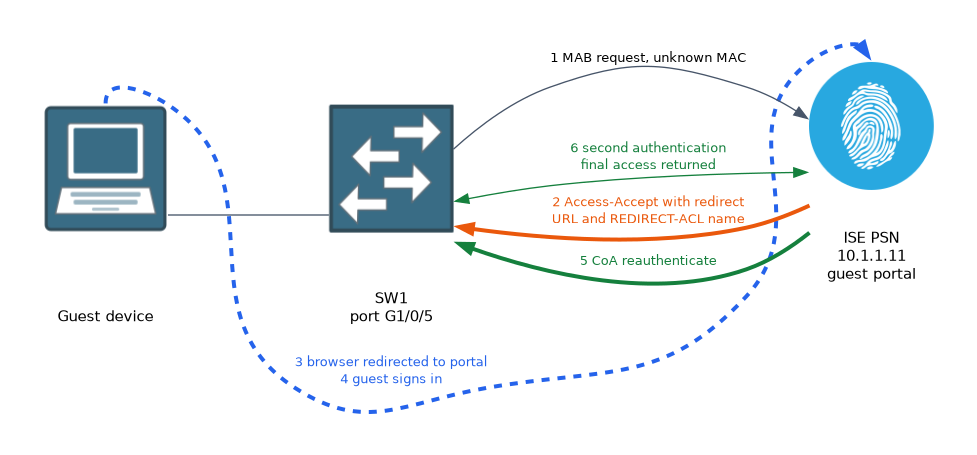 Central web authentication, or CWA, keeps the page and the logic on ISE. The flow runs as follows:
- The endpoint connects, and the port or WLAN uses MAB or MAC filtering.
- ISE sees an unknown MAC address and returns an Access-Accept that carries a redirect URL and a redirect ACL name.
- The user opens a browser. The device intercepts the web traffic that the ACL selects and redirects it to the ISE portal.
- The user signs in on the portal.
- ISE sends a CoA to the device to reauthenticate the session.
- On the second authentication ISE sees that the user is signed in, and returns the final access.
The first result limits access, so the endpoint can reach DNS, DHCP and ISE, and nothing else. The second result gives the real access.
The redirect ACL
The redirect ACL does not block or allow traffic in the normal way. It selects which traffic is redirected.
On a switch, a permit entry in the redirect ACL means redirect that traffic, and a deny entry means do not redirect it. You deny DNS and traffic to ISE, and you permit web traffic to everything else.
Switch(config)# ip access-list extended REDIRECT-ACL
Switch(config-ext-nacl)# deny udp any any eq domain
Switch(config-ext-nacl)# deny ip any host 10.1.1.11
Switch(config-ext-nacl)# permit tcp any any eq www
Switch(config-ext-nacl)# permit tcp any any eq 443
The meaning of permit and deny can differ on other platforms. On a legacy AireOS controller, traffic that the ACL permits is not redirected, so the sense is reversed. Check the guide for your platform and software release.
Switch settings
The switch needs the web server turned on, because it intercepts the HTTP and HTTPS traffic itself.
Switch(config)# ip http server
Switch(config)# ip http secure-server
Switch(config)# aaa server radius dynamic-author
Switch(config-locsvr)# client 10.1.1.11 server-key SECRET
The dynamic author entry lets ISE send the CoA. Without it, the guest signs in on the portal and nothing changes on the port.
ISE authorization profile
On ISE, the first result is an authorization profile with web redirection turned on. You choose the type, which is central web authentication, then the ACL name, and then the portal to use.
The ACL name must match the ACL on the device exactly. A mismatch means the device cannot find the ACL and the redirect does not happen. You then add the second rule that returns the final access once the user has signed in.
Verify
Switch# show authentication sessions interface GigabitEthernet1/0/5 details
Switch# show ip access-lists
In the details, look for the URL redirect and the redirect ACL on the session. On ISE, the live logs should show two authentications for a successful guest, one before the sign in and one after the CoA.
Wireless CWA
On a wireless controller, the WLAN uses MAC filtering, and the policy profile accepts AAA override and NAC. ISE returns the same redirect URL and a redirect ACL. The ACL must exist on the controller by the same name.
If the browser never redirects, test the ACL first. Then check that the HTTP server is enabled and that DNS works for the endpoint.
What to remember for the exam
Seven facts cover this topic.
- LWA serves the page from the network device. CWA serves it from ISE.
- CWA is the usual choice, because it supports CoA, guest flows and posture.
- CWA starts with MAB, then ISE returns a redirect URL and a redirect ACL.
- After sign in, ISE sends a CoA, and the second authentication returns the final access.
- On a switch, permit in the redirect ACL means redirect and deny means do not redirect.
- The switch needs
ip http serverandip http secure-serverto redirect. - The dynamic author entry on the device is needed for the CoA.
Redirect ACL logic differs by platform. Do not copy a switch ACL to a controller without checking how that platform reads permit and deny.
Common mistakes
These four mistakes are common.
Reading the redirect ACL as a filter. It chooses what to redirect, and it does not block traffic.
Redirecting DNS or ISE traffic. The redirect then fails or loops.
Missing the CoA setup. The sign in works but the endpoint never gets the final access.
Misspelling the ACL name in ISE. The device cannot find the ACL and nothing is redirected.
Check yourself
Work through these three questions.
What is the main difference between LWA and CWA?
LWA serves the login page from the network device, and CWA serves it from ISE after a redirect.
What does ISE send to the device after the guest signs in on the portal?
A CoA that makes the device reauthenticate the session so ISE can return the final access.
Which switch commands allow the redirect to work?
ip http serverandip http secure-server, together with a redirect ACL.
Topic 1 of 3 in Web Auth and Guest Services
Test yourself on Web Auth and Guest Services
The full Cisco CCNP 300-715 SISE question bank has 852 questions, with timed practice exams and an explanation for every answer.
This study guide is independent and is not affiliated with, endorsed by, or sponsored by Cisco. Vendor names, certification names and exam codes are trademarks of their respective owners and are used for identification only.