Policy Enforcement · Topic 2 of 7
Wireless Network Access with 802.1X
Set up an 802.1X secured WLAN with ISE, from the controller RADIUS settings and WLAN security to the ISE network device, allowed protocols and policy.
- 5 min
- Includes a diagram
- In wireless 802.1X the client is the supplicant, the WLC is the authenticator and ISE is the authentication server.
- EAP runs between client and ISE, and the WLC carries it inside RADIUS.
- EAP-TLS uses a client certificate. PEAP with MS-CHAPv2 uses a username and password.
What it is
802.1X is a port based access control standard, and on wireless it lets a client prove who it is before it joins the WLAN.
Three roles take part. The supplicant is the client, the authenticator is the wireless LAN controller, and the authentication server is ISE. The client and ISE exchange EAP messages, and the controller carries them in RADIUS.
How it works
The controller blocks everything except EAP until ISE accepts the client, and ISE returns the result with optional attributes.
The authentication exchange
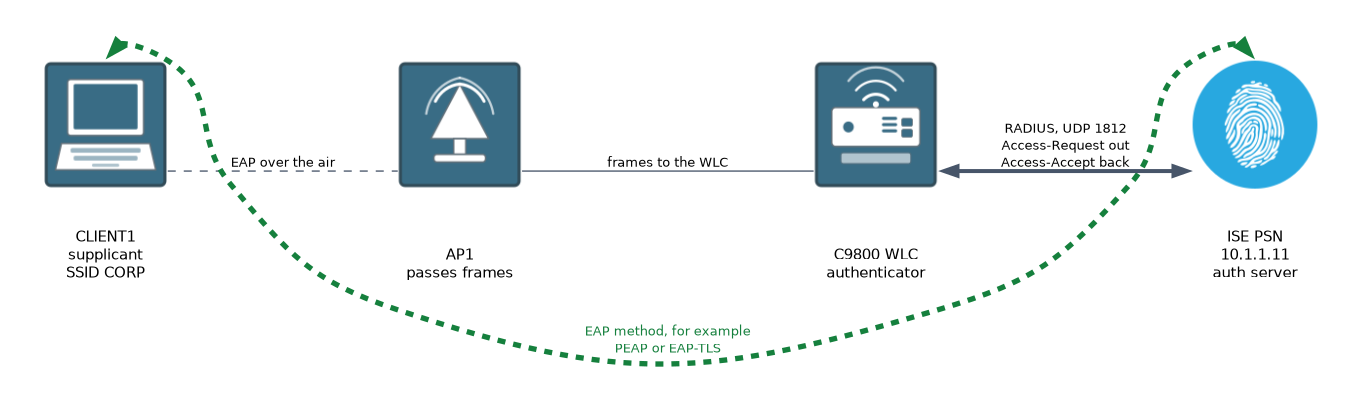 The client associates to the WLAN, and the controller asks it for an identity. The client answers, and the controller sends that identity to ISE in a RADIUS Access-Request.
ISE picks an EAP method, and the two sides build a protected tunnel when the method needs one. If the credentials pass, ISE sends an Access-Accept. The controller then lets the client onto the network.
Common EAP methods
| Method | Credential | Notes |
|---|---|---|
| PEAP with MS-CHAPv2 | Username and password | Server certificate only. Needs AD or internal users. |
| EAP-TLS | Client certificate | Very strong. Needs a certificate on the client. |
| EAP-FAST | Username and password or PAC | Cisco method. Can chain machine and user. |
| TEAP | Certificate, password, or both | Standard method that supports chaining. |
Configure the controller
This example uses an IOS XE wireless controller (Catalyst 9800). First define ISE as a RADIUS server and group.
C9800(config)# aaa new-model
C9800(config)# radius server ISE-PSN1
C9800(config-radius-server)# address ipv4 10.1.1.11 auth-port 1812 acct-port 1813
C9800(config-radius-server)# key SECRET
C9800(config-radius-server)# exit
C9800(config)# aaa group server radius ISE-GRP
C9800(config-sg-radius)# server name ISE-PSN1
C9800(config-sg-radius)# exit
C9800(config)# aaa authentication dot1x ISE-LIST group ISE-GRP
C9800(config)# aaa authorization network ISE-LIST group ISE-GRP
Then create the WLAN with 802.1X key management and the authentication list.
C9800(config)# wlan CORP 1 CORP
C9800(config-wlan)# security wpa akm dot1x
C9800(config-wlan)# security dot1x authentication-list ISE-LIST
The WLAN is attached to a policy profile. The policy profile needs AAA override so that ISE can set the VLAN or ACL, and NAC so that CoA works.
C9800(config)# wireless profile policy CORP-POLICY
C9800(config-wireless-policy)# aaa-override
C9800(config-wireless-policy)# nac
The controller also has to accept CoA from ISE. Add the PSN as a dynamic authorization client.
C9800(config)# aaa server radius dynamic-author
C9800(config-locsvr)# client 10.1.1.11 server-key SECRET
On the older AireOS controllers the same ideas apply, but the settings are on the WLAN pages. You enable Layer 2 security of WPA2 or WPA3 with 802.1X, add the RADIUS server, allow AAA override, and set the NAC state to ISE NAC.
Configure ISE
On ISE the work has four parts:
- Add the controller as a network device, with its IP address and the same shared secret.
- Make sure the allowed protocols list includes the EAP method you plan to use.
- Join or connect the identity store the users live in.
- Add a policy set that matches wireless 802.1X and returns the right authorization result.
The network device list is under Administration, Network Resources, Network Devices. Policy sets are under Policy, Policy Sets. ISE has a built in condition for wireless 802.1X that you can use as the match, so you do not have to build it from RADIUS attributes.
The authorization result can include a VLAN, an ACL name, or a security group tag. These are returned in the Access-Accept. They take effect only if the policy profile allows AAA override.
Verify
C9800# show wireless client summary
C9800# show wireless client mac-address AAAA.BBBB.CCCC detail
C9800# show aaa servers
The client detail output shows the policy state and the authentication method. On ISE, open Operations, RADIUS, Live Logs to see each attempt with its result and the reason for any failure.
If the live logs show nothing, ISE either never received the request or discarded it. Check the controller address and shared secret before you look at policy.
What to remember for the exam
Seven facts cover this topic.
- In wireless 802.1X the client is the supplicant, the WLC is the authenticator and ISE is the authentication server.
- EAP runs between client and ISE, and the WLC carries it inside RADIUS.
- EAP-TLS uses a client certificate. PEAP with MS-CHAPv2 uses a username and password.
- The WLC must be a network device in ISE, with a matching shared secret.
- The WLAN uses 802.1X key management and an authentication list that points at ISE.
- AAA override lets ISE set the VLAN or ACL, and NAC supports CoA.
- Operations, RADIUS, Live Logs is where you troubleshoot.
A shared secret mismatch makes ISE discard the request. The live logs may show nothing, or show a failed request with an unknown device or bad secret.
Common mistakes
These five mistakes are common.
Leaving out AAA override. ISE returns a VLAN or ACL and the controller ignores it.
Forgetting CoA. Without a dynamic authorization client, ISE cannot change a session after it starts.
Allowing the wrong protocols. The EAP method the client uses must be on the allowed list.
Untrusted server certificate. Clients refuse to connect if they do not trust the ISE EAP certificate.
Mixing up the roles. The access point does not talk to ISE. The controller does.
Check yourself
Work through these three questions.
Which device is the authenticator in wireless 802.1X?
The wireless LAN controller, which carries the EAP exchange to ISE in RADIUS.
What does
aaa-overridedo on the policy profile?It lets attributes from ISE, such as a VLAN or ACL, replace the profile values for that client.
Where do you see why a wireless client failed?
In Operations, RADIUS, Live Logs on ISE.
Topic 2 of 7 in Policy Enforcement
Test yourself on Policy Enforcement
The full Cisco CCNP 300-715 SISE question bank has 852 questions, with timed practice exams and an explanation for every answer.
This study guide is independent and is not affiliated with, endorsed by, or sponsored by Cisco. Vendor names, certification names and exam codes are trademarks of their respective owners and are used for identification only.