Network Access Device Administration · Topic 2 of 2
TACACS+ Device Administration
Configure ISE and Cisco devices for TACACS+ device administration, including the Device Admin service, policy sets, command sets, profiles and accounting.
- 6 min
- Includes a diagram
- The Device Admin service must be enabled on the PSN.
- TACACS+ needs the device in the network device list, with TACACS+ enabled and a shared secret.
- Device admin policy sets are separate from network access policy sets.
What it is
TACACS+ device administration lets ISE decide who may log in to a network device, what privilege they get, and which commands they may run.
Without it, each device keeps its own local accounts, which are hard to manage and audit. With it, the accounts live in one identity store, and every login and command is recorded on ISE.
How it works
You turn on the service, add the device, write a device admin policy with results, and configure the device.
Enable the Device Admin service
The service runs on a Policy Service Node. You turn it on in the node settings in the deployment page. A node with the service off does not answer TACACS+ requests.
Device administration is a licensed feature, so make sure your ISE licensing covers it.
Add the network device
The device must be in the network device list. Under the settings for the device you enable TACACS+ and enter the shared secret. The device list is the same one used for RADIUS, so one entry can carry both.
You can use network device groups to sort devices by type or by site, such as routers and switches. The policy can then match the group, which keeps rules short.
The Device Administration work center
The tasks are in the Device Administration work center. It holds the network resources, the policy elements, the device admin policy sets and the reports.
Device admin policy is separate from network access policy. It has its own policy sets, and its own results.
Policy elements
TACACS+ uses two kinds of result.
| Result | What it holds |
|---|---|
| TACACS command set | A list of commands that are permitted or denied |
| TACACS profile | The shell settings, such as the privilege level |
Command sets. A command set is a list of entries. Each entry has a grant of permit or deny, a command name, and arguments. There is also an option to permit any command that is not in the list.
The two basic designs are a list of what is allowed, or a list of what is blocked. A read only command set permits show commands and denies the rest. A full access command set permits everything.
TACACS profiles. A profile holds the shell settings. The main ones are the default privilege level and the maximum privilege level, from 0 to 15. Privilege 15 is full access on an IOS XE device, and privilege 1 is basic user access.
A profile can also hold custom attributes, for platforms that need them. Check the device documentation for the exact names, since they differ by platform.
The device admin policy set
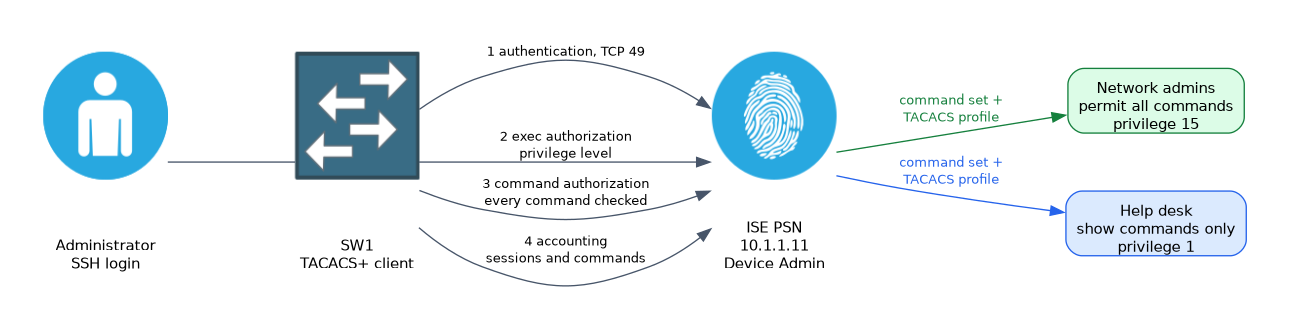 A device admin policy set has the same layers as the network access policy. It has a condition, an authentication policy, and an authorization policy.
The authentication policy picks the identity store, often Active Directory, for the administrators. The authorization policy matches on a group, such as network admins or help desk. The result is a command set and a profile.
| Group | Command set | Profile |
|---|---|---|
| Network admins | Permit all commands | Privilege 15 |
| Help desk | Permit show commands only | Privilege 1 |
Configure the device
This is IOS XE. The device needs AAA, a TACACS+ server, and lists for each function.
Switch(config)# aaa new-model
Switch(config)# tacacs server ISE-TAC1
Switch(config-server-tacacs)# address ipv4 10.1.1.11
Switch(config-server-tacacs)# key SECRET
Switch(config-server-tacacs)# exit
Switch(config)# aaa group server tacacs+ TAC-GRP
Switch(config-sg-tacacs+)# server name ISE-TAC1
Switch(config-sg-tacacs+)# exit
Switch(config)# aaa authentication login default group TAC-GRP local
Switch(config)# aaa authorization exec default group TAC-GRP local
Switch(config)# aaa authorization commands 15 default group TAC-GRP local
Switch(config)# aaa accounting exec default start-stop group TAC-GRP
Switch(config)# aaa accounting commands 15 default start-stop group TAC-GRP
The word local at the end of each list is a fallback. If ISE cannot be reached, the device uses its local accounts. Keep one local administrator account for this case.
Command authorization
The aaa authorization commands line makes the device ask ISE before it runs a command at the stated privilege level. A level is named for each line, such as 15. If you want to check commands at other levels, add lines for them.
The exec authorization line asks ISE for the user shell settings, such as the privilege level, when the user logs in.
Accounting
Accounting records what happened. Exec accounting logs the start and stop of an administrator session. Command accounting logs each command that is run.
The records appear on ISE in the TACACS live logs, and in the reports. They answer the audit question of who changed what, and when.
Verify
Switch# test aaa group TAC-GRP USERNAME PASSWORD legacy
Switch# show tacacs
Switch# show aaa servers
On ISE, open Operations, TACACS, Live Logs. Each login shows the authentication result, and each command shows the authorization result and the command set that matched.
Keep a console session open while you test. A wrong authorization list can lock you out of the device, and the local fallback only helps if ISE is unreachable.
What to remember for the exam
Eight facts cover this topic.
- The Device Admin service must be enabled on the PSN.
- TACACS+ needs the device in the network device list, with TACACS+ enabled and a shared secret.
- Device admin policy sets are separate from network access policy sets.
- The results are TACACS command sets and TACACS profiles.
- A command set holds permit and deny entries, and can permit any command not listed.
- A profile sets the default and maximum privilege level.
aaa authorization commandsmakes the device check each command with ISE.- The TACACS live logs show authentication, authorization and accounting records.
Keep a local fallback and a spare session when you change AAA lists. A mistake can lock every administrator out.
Common mistakes
These four mistakes are common.
Forgetting to enable the Device Admin service. The PSN does not answer TACACS+.
No local fallback. An ISE outage locks out the administrators.
Missing authorization for commands. Every command is allowed, as no check is made.
Setting the wrong privilege. A help desk user gets full access.
Check yourself
Work through these three questions.
What two results does a TACACS+ authorization rule return?
A command set and a TACACS profile.
Which command makes a device ask ISE before each command?
aaa authorization commandswith the privilege level and a server group.Where do you see the commands that an administrator ran?
In the TACACS live logs and reports on ISE.
Topic 2 of 2 in Network Access Device Administration
Test yourself on Network Access Device Administration
The full Cisco CCNP 300-715 SISE question bank has 852 questions, with timed practice exams and an explanation for every answer.
This study guide is independent and is not affiliated with, endorsed by, or sponsored by Cisco. Vendor names, certification names and exam codes are trademarks of their respective owners and are used for identification only.