BYOD · Topic 1 of 4
Cisco BYOD Functionality
Understand Cisco BYOD with ISE, its use cases and requirements, the solution components, and the single SSID and dual SSID onboarding flows step by step.
- 6 min
- Includes a diagram
- BYOD onboards personal devices with a certificate and a network profile.
- The solution needs an identity store, a CA, redirect capable devices, a portal and policy.
- The main components are the BYOD portal, native supplicant profile, client provisioning policy and certificate template.
What it is
BYOD, or bring your own device, lets people use personal phones, tablets and laptops on the company network safely.
ISE does this by onboarding the device. The user registers it once, ISE gives it a certificate and a network profile, and from then on the device connects with that certificate. This is better than sharing a password, and it lets you identify the device as well as the user.
How it works
A BYOD flow has a first, limited connection for onboarding, then a second connection with the issued certificate.
Use cases and requirements
The common use cases are employees with personal devices, different access for personal and company devices, and a way to remove a device that is lost.
A working solution needs a few things:
- Identity store: Users sign in with company credentials, for example from Active Directory.
- Certificate authority: ISE has an internal one, or it can use an external one.
- Network devices: Switches or controllers that support redirection and CoA.
- Portals and certificates: A BYOD portal with a trusted certificate and a name that clients can resolve.
- Policy: Authorization rules that redirect unregistered devices and permit registered ones.
Solution components
| Component | Role |
|---|---|
| BYOD portal | The web page where the user signs in and registers the device |
| Native supplicant profile | The settings that define the secure network and the method to use |
| Client provisioning policy | Chooses which profile each type of device gets |
| Certificate template and CA | Issue the certificate to the device |
| Authorization policy | Redirects first and then permits the registered device |
| My Devices portal | Lets users manage their registered devices |
The two designs
There are two ways to arrange the networks.
Dual SSID. The device first joins an open or lightly protected onboarding SSID. After registration, it moves to a secure SSID that uses 802.1X. This is easy to follow, but the user has to switch networks.
Single SSID. The device connects to the secure SSID from the start, using a password based method such as PEAP. ISE redirects the device for onboarding. After the profile is installed, the device reconnects with EAP-TLS on the same SSID.
On wired networks, only the single connection design applies, because there is no SSID. The port runs 802.1X, and the redirect and the second authentication happen on the same port.
The BYOD flow
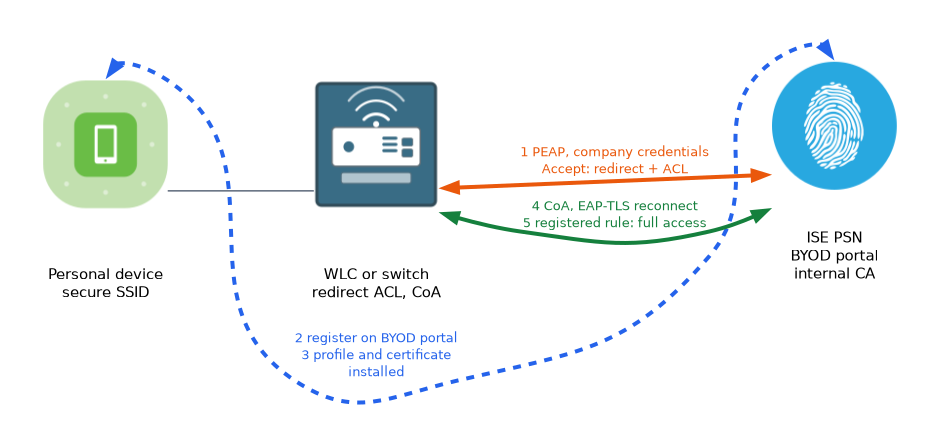 The flow is the same in outline for both designs.
- The user connects and authenticates with company credentials, or uses central web authentication.
- ISE returns a redirect to the BYOD portal, with an ACL that allows only the basics.
- The user opens a browser, is redirected, and signs in on the portal.
- The user accepts the policy and registers the device. ISE records the MAC address.
- The device downloads a setup tool or profile. The tool installs the network profile and requests a certificate.
- ISE issues the certificate from its internal CA.
- ISE sends a CoA, and the device reconnects to the secure network with EAP-TLS.
- A new authorization rule matches the registered device and gives full access.
Step 5 depends on the type of device. Windows and macOS use a setup assistant that runs on the device.
Apple mobile devices use a configuration profile that the system installs. Android devices use an app from the store.
The authorization rules
You write two rules, and the rule for the registered device goes first.
Rule 1: registered, authenticated by EAP-TLS  -> permit access
Rule 2: not registered, authenticated by PEAP -> redirect to the BYOD portal
The redirect rule uses the BYOD registration status of the endpoint in its condition. The permit rule matches a device that is registered and that authenticated with a certificate. If the redirect rule is placed first and its condition is too broad, finished devices loop in the redirect.
Network device settings
The switch or controller needs the settings you use for central web authentication. That means a redirect ACL, the web server on a switch, and a dynamic author entry for CoA.
Switch(config)# ip http server
Switch(config)# ip http secure-server
Switch(config)# aaa server radius dynamic-author
Switch(config-locsvr)# client 10.1.1.11 server-key SECRET
What the device ends up with
After onboarding, the device holds a certificate that carries the user name and the device identity. It also holds a network profile that points at the secure SSID with EAP-TLS. The user does not type a password on later connections.
Keep the order of the two rules in mind. The rule for the registered device must come first, or a device that has finished onboarding is redirected again.
What to remember for the exam
Seven facts cover this topic.
- BYOD onboards personal devices with a certificate and a network profile.
- The solution needs an identity store, a CA, redirect capable devices, a portal and policy.
- The main components are the BYOD portal, native supplicant profile, client provisioning policy and certificate template.
- Dual SSID uses a separate onboarding SSID. Single SSID uses one SSID and reconnects with EAP-TLS.
- The device is redirected, registered, provisioned, and then moved to a certificate based connection.
- A CoA tells the device to reconnect after provisioning.
- The registered device rule must come before the redirect rule.
If the redirect rule is placed above the registered device rule, devices that finished onboarding are redirected over and over.
Common mistakes
These four mistakes are common.
Wrong rule order. Registered devices loop through the portal.
No CoA setup. The device is provisioned but stays on the limited access.
Untrusted portal certificate. Users see warnings, and some devices refuse to continue.
Assuming one tool for every device. Each device type has its own way to install the profile.
Check yourself
Work through these three questions.
What does a device hold at the end of BYOD onboarding?
A certificate and a network profile that points at the secure network with EAP-TLS.
How does a single SSID design differ from dual SSID?
It uses one secure SSID from the start, and reconnects with EAP-TLS after onboarding, with no separate onboarding network.
Why must the registered device rule come first?
Otherwise a device that has finished onboarding matches the redirect rule again.
Topic 1 of 4 in BYOD
Test yourself on BYOD
The full Cisco CCNP 300-715 SISE question bank has 852 questions, with timed practice exams and an explanation for every answer.
This study guide is independent and is not affiliated with, endorsed by, or sponsored by Cisco. Vendor names, certification names and exam codes are trademarks of their respective owners and are used for identification only.