Architecture and Deployment · Topic 1 of 3
Personas and Node Roles
Learn the four Cisco ISE personas, what each one does, how to assign them to nodes and register a secondary node in a distributed deployment.
- 5 min
- Includes a diagram
- ISE has four personas: Administration, Policy Service, Monitoring and pxGrid.
- The PAN is where you configure. It replicates changes to the other nodes.
- The PSN answers RADIUS and TACACS+ requests and applies policy.
What it is
A persona is a role that an Identity Services Engine node plays in a deployment.
Cisco ISE splits its work into four personas. A node can run one persona or several at once. Which personas run on which node is a design choice you make in the admin portal.
| Persona | Main job |
|---|---|
| Administration (PAN) | Holds the configuration. You log in here to change policy. |
| Policy Service (PSN) | Answers RADIUS and TACACS+ requests from network devices. |
| Monitoring (MnT) | Collects logs and builds the live logs and reports. |
| pxGrid | Shares context with other security products. |
How it works
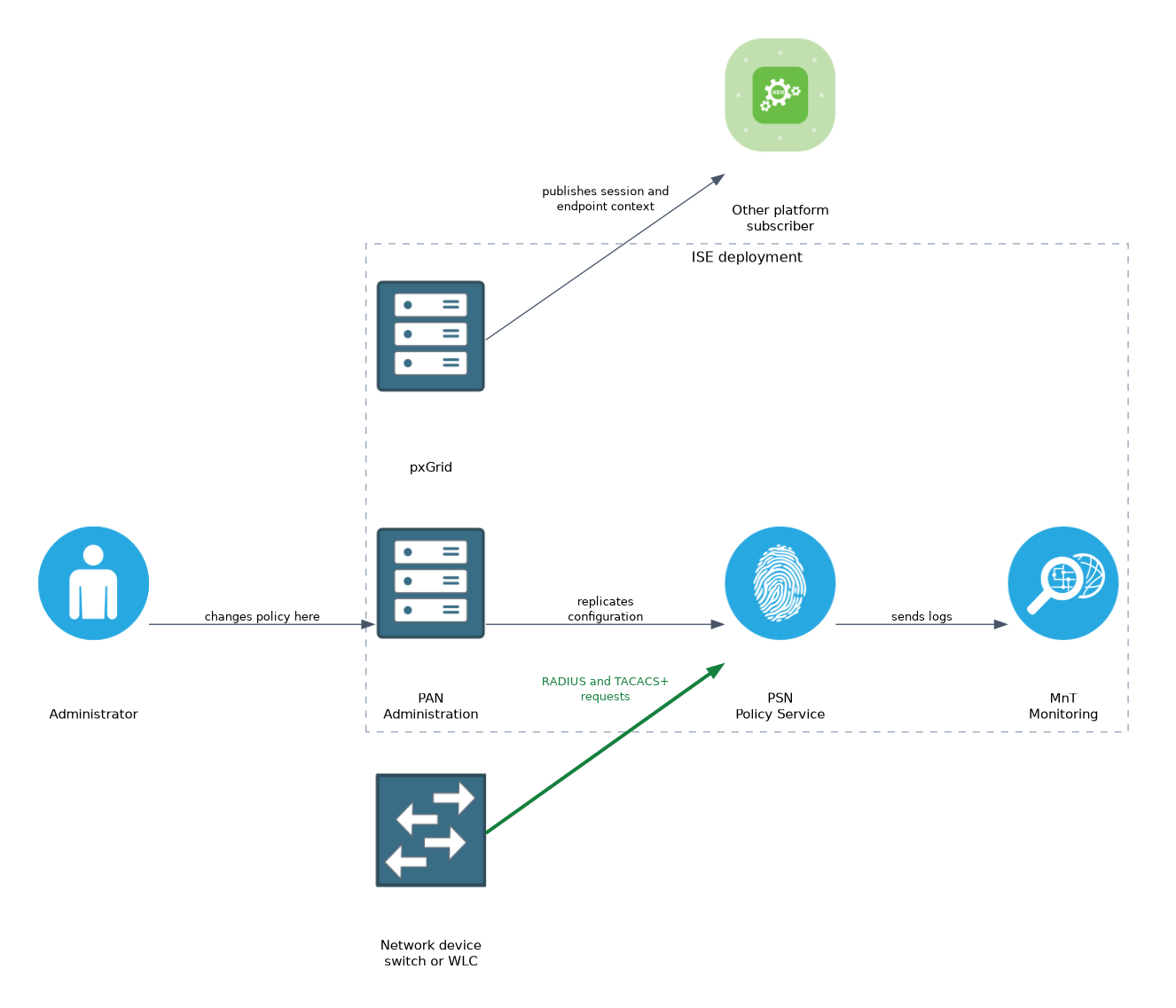 You assign personas on each node, and the primary administration node pushes configuration to the rest.
Administration persona
The Policy Administration Node is the single place where you change configuration. Changes are written to the primary PAN and then replicated to every other node.
A deployment has one primary PAN. You can add one secondary PAN that takes over if the primary fails. Promotion of the secondary is manual unless you set up automatic failover.
Policy Service persona
The Policy Service Node does the real work. It receives authentication requests, evaluates the policy sets and returns the authorization result.
Several services are switched on under the PSN persona:
- Session services handle network access authentication and authorization.
- Profiling service runs the probes that classify endpoints.
- Device Admin service answers TACACS+ requests.
- Passive identity service learns users from sources such as Active Directory login events.
If you do not enable these services, the node does not take part in that function. A PSN without session services will not answer RADIUS requests for network access.
Monitoring persona
The Monitoring node stores the logs that PSNs send. It feeds Operations, including the RADIUS and TACACS live logs and the reports.
You can have a primary and a secondary MnT. PSNs send their logs to both, so the secondary holds a copy.
pxGrid persona
pxGrid lets ISE publish session and endpoint context to other platforms. It lets subscribers act on that context, for example to quarantine an endpoint.
Standalone and distributed nodes
A freshly installed node is a standalone node. It runs the Administration, Policy Service and Monitoring personas together.
When you register a second node to it, the first node becomes the primary PAN and the deployment becomes distributed. The path in the admin portal is Administration, System, Deployment.
Registering a node
Registration is done from the primary node, not from the node you are adding.
- Install the new node and finish its setup, so it has a fully qualified domain name and an IP address.
- Make sure both nodes resolve each other by name in DNS and that their clocks agree through NTP.
- On the primary, open the deployment page and choose Register.
- Enter the FQDN of the new node and the admin credentials, then select its personas.
- Wait for the sync. The new node restarts its services and joins.
The primary has to trust the certificate that the new node presents. If it does not, import the new node's certificate into the trusted certificates of the primary first.
ise-pan/admin# show application status ise
ise-pan/admin# show version
The show application status ise command lists the running ISE processes on a node. It is the quick check that the application is up after a registration or restart.
Node groups
A node group is a set of PSNs that keep in contact with each other. If one PSN in the group fails, another member can take over a pending CoA for its sessions. Put PSNs that sit in the same site and share a fast network in one group.
Register nodes from the primary PAN only, and check name resolution and time first. Most failed registrations come from DNS or certificate trust.
What to remember for the exam
Eight facts cover this topic.
- ISE has four personas: Administration, Policy Service, Monitoring and pxGrid.
- The PAN is where you configure. It replicates changes to the other nodes.
- The PSN answers RADIUS and TACACS+ requests and applies policy.
- The MnT collects logs and drives the live logs and reports.
- A standalone node runs the Administration, Policy Service and Monitoring personas together.
- A deployment can have a primary and a secondary PAN, and a primary and a secondary MnT.
- Session, profiling, Device Admin and passive identity are services you enable on the PSN.
- You register new nodes from the primary PAN, after DNS, NTP and certificate trust are in order.
Promoting a secondary PAN after a failure is manual unless automatic failover is configured. Plan for it, because configuration changes stop until a PAN is available.
Common mistakes
These five mistakes are common.
Sending network devices to the PAN. Devices should point at PSNs for RADIUS and TACACS+. The PAN is for administration.
Forgetting to enable a PSN service. A node with the persona but no session services will not authenticate network access.
Registering without DNS. The nodes must resolve each other by FQDN, or the join fails.
Ignoring clock differences. Nodes with different time give certificate and sync errors.
Treating MnT as optional. Without a Monitoring node you lose the live logs and reports that you use to troubleshoot.
Check yourself
Work through these three questions.
Which persona do network devices send RADIUS requests to?
They send them to a Policy Service Node, which applies the policy and returns the result.
Where do you register a new node in a distributed deployment?
On the primary administration node, after DNS, NTP and certificate trust are in order.
What does a standalone ISE node run?
It runs the Administration, Policy Service and Monitoring personas together.
Topic 1 of 3 in Architecture and Deployment
Test yourself on Architecture and Deployment
The full Cisco CCNP 300-715 SISE question bank has 852 questions, with timed practice exams and an explanation for every answer.
This study guide is independent and is not affiliated with, endorsed by, or sponsored by Cisco. Vendor names, certification names and exam codes are trademarks of their respective owners and are used for identification only.