Configuration · Topic 2 of 9
Access Control Policy
Learn how the FMC access control policy orders rules, which actions and conditions exist, how inspection attaches, and how logging and deploy work.
- 4 min
- Includes a diagram
- Rules are checked in order and the first match decides.
- Mandatory rules are checked before default rules.
- The default action applies when no rule matches.
What it is
The access control policy is the main policy of Secure Firewall, and it decides what happens to each connection.
A policy holds an ordered list of rules. Each rule has conditions that describe the traffic, an action, and options for inspection and logging. When no rule matches, the default action applies.
A policy is built once in the Secure Firewall Management Center (FMC), assigned to one or more devices, and then deployed.
How it works
The policy is read from the top, and the first matching rule decides the outcome.
Order of processing
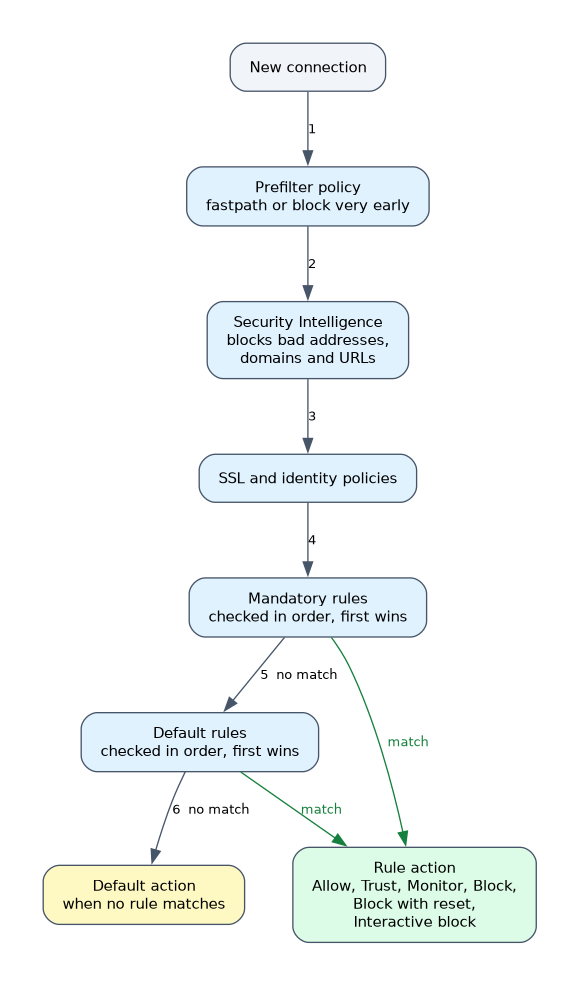 Some checks happen before the rule list.
A prefilter policy can fastpath or block traffic very early. Security Intelligence can block traffic to bad addresses, domains and URLs. The SSL and identity policies run before the rules are applied.
Then the access control rules are checked in order. Rules sit in sections called Mandatory and Default, and the mandatory ones are checked first.
Rule conditions
A rule can match on many things. The more conditions you add, the more specific the rule is.
| Condition | Matches on |
|---|---|
| Zones | The ingress and egress security zones |
| Networks | Source and destination addresses |
| VLAN tags | The VLAN of the traffic |
| Users | The identity of the user |
| Applications | The detected application |
| Ports | Protocol and port numbers |
| URLs | The category or reputation of a website |
Rule actions
The action says what the firewall does with a matching connection.
| Action | Result |
|---|---|
| Allow | The traffic passes, and can still be inspected |
| Trust | The traffic passes with no further deep inspection |
| Monitor | The connection is logged and rule matching continues |
| Block | The traffic is dropped silently |
| Block with reset | The traffic is dropped and a reset is sent |
| Interactive block | The user sees a page and may choose to continue |
Allow is the usual action for attaching an intrusion policy and a file policy on the Inspection tab. Trust skips that inspection, so use it only where you are sure.
Default action
The default action covers traffic that matched no rule. Common choices are to block all traffic, or to allow traffic and inspect it with an intrusion policy. A trust all choice also exists, but it removes inspection.
A security conscious design usually blocks by default and adds allow rules for what is needed.
Logging
You choose in each rule whether to log at the start of the connection, at the end, or both. Logging at the end gives the most complete record, with the byte counts.
Events can go to the FMC, to a syslog server or to an SNMP trap destination. Rules that block usually log at the start, because the connection never completes.
Deploying
The policy has no effect until it is deployed to the device. You deploy from the FMC, and the device then holds the compiled rules.
> show access-control-configThis command on the device CLI shows the policy as it was deployed, which helps you check that the right version is live.
What to remember for the exam
Eight facts cover the usual questions.
- Rules are checked in order and the first match decides.
- Mandatory rules are checked before default rules.
- The default action applies when no rule matches.
- Allow can use intrusion and file policy, and Trust skips deep inspection.
- Monitor logs the connection and keeps matching further rules.
- Block silently drops, and block with reset also sends a reset.
- Logging at the end of a connection includes the traffic totals.
- A change is live only after you deploy it.
If a question asks which action still lets an intrusion policy inspect traffic, choose Allow, not Trust.
Common mistakes
These four mistakes are common with access control.
Putting a broad rule above a specific one. The first match wins, so the specific rule never gets hit.
Using Trust for convenience. Trusted traffic skips deep inspection.
Forgetting to deploy. The device keeps using the old policy until you deploy.
Not logging blocked traffic. Without a log setting you have no event to troubleshoot.
A default action of trust all removes inspection for everything that does not match a rule. Treat it as an exception, not a standard.
Check yourself
Work through these three questions.
Which rule action allows traffic and lets you attach an intrusion policy?
Allow, because the Inspection tab of an Allow rule takes the intrusion and file policies.
What happens to traffic that matches no rule?
The default action of the policy applies to it.
What does the Monitor action do?
It logs the connection and continues checking later rules.
Topic 2 of 9 in Configuration
Test yourself on Configuration
The full Cisco CCNP 300-710 SNCF question bank has 865 questions, with timed practice exams and an explanation for every answer.
This study guide is independent and is not affiliated with, endorsed by, or sponsored by Cisco. Vendor names, certification names and exam codes are trademarks of their respective owners and are used for identification only.