Security Monitoring · Topic 5 of 8
Web Application Attacks
Describe SQL injection, command injection and cross site scripting, how each attack works, what it looks like in logs and how input validation stops it.
- 4 min
- Includes a diagram
- These attacks arise when an application trusts user input.
- SQL injection puts SQL commands into a query and targets the database.
- Command injection puts operating system commands into a shell call.
What it is
Web application attacks send crafted input to a website so that the server or the visitor runs something the developer never intended.
The root cause is usually weak handling of input. The application trusts text from the user and passes it on to a database, an operating system or another visitor's browser.
This page covers three classic attacks. SQL injection targets the database, command injection targets the server operating system, and cross site scripting targets other users.
How it works
Each attack inserts code into a place that expects plain data.
SQL injection
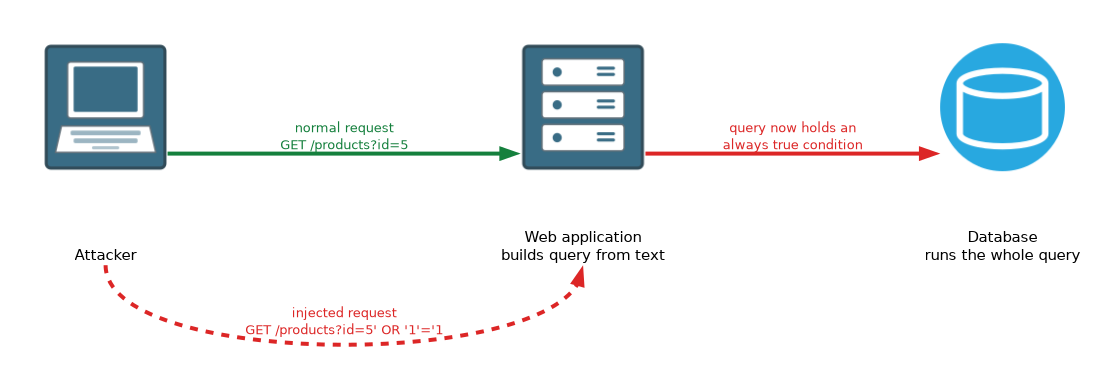 SQL injection inserts SQL commands into an input field or URL parameter. If the application builds its query by joining text, the database runs the attacker's commands as part of the query.
A normal login query might check a name and password. An attacker enters text that changes the logic, so the check always passes or extra data is returned.
Normal request:   GET /products?id=5
Injected request: GET /products?id=5' OR '1'='1
The injected text closes the expected value and adds a condition that is always true. Results can include reading, changing or deleting data.
Defences include parameterised queries, which keep data separate from commands, input validation and least privilege for the database account.
Command injection
Command injection places operating system commands in input that the application passes to a system shell. A tool that pings an address the user types might be tricked into running a second command after it.
Normal input:   10.1.1.5
Injected input: 10.1.1.5; cat /etc/passwd
The semicolon ends the first command and starts another. The commands run with the rights of the web server, which can lead to full control of the host.
Defences include avoiding shell calls, validating input against a strict allowed list and running the application with low privileges.
Cross site scripting (XSS)
Cross site scripting injects script into a page that other users view. The victim's browser trusts the page and runs the script.
- Stored XSS saves the script on the server, for example in a comment, so every visitor receives it.
- Reflected XSS puts the script in a link or request and the server echoes it back in the response. The victim must follow the link.
- DOM based XSS happens in the browser when page script handles untrusted data unsafely, without the server echoing it.
A script can steal session cookies, redirect the user or change what the page shows.
Defences include output encoding, input validation and a content security policy that limits which scripts may run.
| Attack | Target | Injected content | Core defence |
|---|---|---|---|
| SQL injection | Database | SQL commands | Parameterised queries |
| Command injection | Server operating system | Shell commands | Avoid the shell, validate input |
| XSS | Other users' browsers | Script code | Output encoding, content security policy |
What it looks like in logs
Web server logs and web application firewall alerts record the request text.
- Quotes, the word OR with an always true condition, or UNION and SELECT in a parameter suggest SQL injection.
- Semicolons, pipes or command names such as cat in a parameter suggest command injection.
- Script tags or encoded versions of them in a parameter suggest XSS.
Attackers often encode characters, so a payload may appear with percent codes instead of plain symbols.
What to remember for the exam
Seven facts cover most questions on this topic.
- These attacks arise when an application trusts user input.
- SQL injection puts SQL commands into a query and targets the database.
- Command injection puts operating system commands into a shell call.
- XSS runs script in the visitor browser and targets users.
- Stored XSS is saved on the server, and reflected XSS is echoed from a request.
- Parameterised queries are the main defence against SQL injection.
- A web application firewall and input validation add further protection.
Ask where the injected text ends up. A database means SQL injection, a shell means command injection, and a browser means XSS.
Common mistakes
These four errors appear often.
Saying XSS attacks the server. Its main victim is another user of the site.
Treating a firewall as a complete fix. The flaw is in the application, so the code must be fixed.
Blocking only plain text patterns. Encoded payloads can slip through simple filters.
Mixing up SQL and command injection. One reaches the database and the other reaches the operating system.
Only test for these flaws on systems you own or have written permission to test.
Check yourself
Work through these three questions.
What is the best defence against SQL injection?
Parameterised queries, which keep user data separate from the SQL command.
Where does injected script run in a cross site scripting attack?
In the browser of another user who views the page.
How does command injection differ from SQL injection?
Command injection runs operating system commands through a shell call, while SQL injection changes a database query.
Topic 5 of 8 in Security Monitoring
Test yourself on Security Monitoring
The full Cisco CCNA 200-201 CBROPS question bank has 754 questions, with timed practice exams and an explanation for every answer.
This study guide is independent and is not affiliated with, endorsed by, or sponsored by Cisco. Vendor names, certification names and exam codes are trademarks of their respective owners and are used for identification only.