Network Intrusion Analysis · Topic 2 of 7
Inspection Methods and Traffic Capture
Compare deep packet inspection with packet filtering and stateful firewalls, inline devices with taps and SPAN ports, and tap data with NetFlow.
- 5 min
- Includes a diagram
- A packet filter looks at headers one packet at a time.
- A stateful firewall tracks connections and allows replies to permitted sessions.
- DPI inspects the payload and application, and needs decryption to see inside encrypted data.
What it is
Security tools inspect traffic at different depths, and they see it either in the path or from a copy.
A packet filter looks at headers only, a stateful firewall adds connection tracking, and deep packet inspection reads into the payload. Separately, a tool can sit inline and act on traffic, or it can watch a copy from a tap or a mirror port.
Finally, the data from a tap and the data from NetFlow differ a great deal in detail and cost.
How it works
Deeper inspection and inline placement give more control, and they also cost more and add risk.
Packet filtering, stateful firewalls and DPI
| Method | What it examines | Decision based on | Limit |
|---|---|---|---|
| Packet filter | Layer 3 and 4 headers of each packet alone | Addresses, ports, protocol | No memory of connections, so replies need explicit rules |
| Stateful firewall | Headers plus a table of connections | Whether the packet belongs to an allowed connection | Does not read the payload or understand the application |
| Deep packet inspection (DPI) | Headers and the payload, up to the application layer | Signatures, protocol checks and application identity | Needs more processing and is blind to encrypted payload unless decrypted |
An access control list on a router is a packet filter. The stateful firewall allows replies to connections that an inside host started, without a rule for each reply.
DPI looks for patterns in the data. An intrusion prevention system uses it to find an exploit string inside an allowed web connection, where a stateful firewall would see only a permitted connection to port 80.
Inline interrogation compared with taps and monitoring
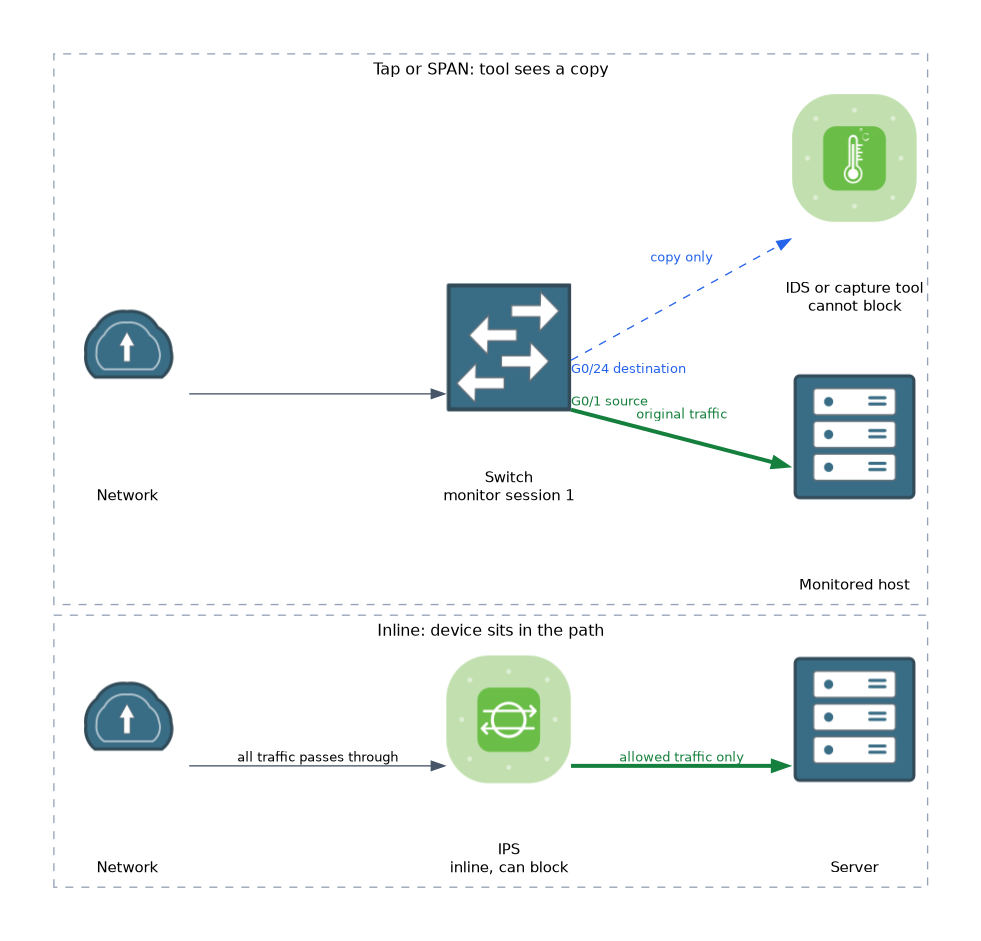 An inline device sits in the traffic path, so all traffic passes through it. It can block traffic. Intrusion prevention and firewalls work this way.
A tap or a mirror port gives a tool a copy of traffic. The tool cannot block, since the original traffic is not affected. Intrusion detection and network monitoring tools often work this way.
| Feature | Inline | Tap or monitoring |
|---|---|---|
| Can block traffic | Yes | No |
| Effect on traffic | Adds a little delay | None |
| Failure risk | A failure can stop traffic, unless it fails open | A failure does not affect traffic |
| Typical use | IPS, firewall | IDS, packet capture |
A network tap is a hardware device that copies traffic from a link. A SPAN port, also called a mirror port, is a switch feature that copies traffic from one or more ports to another port. On a Cisco Catalyst switch running IOS or IOS XE, it is set like this.
Switch(config)# monitor session 1 source interface GigabitEthernet0/1 both
Switch(config)# monitor session 1 destination interface GigabitEthernet0/24
Switch# show monitor session 1
Other platforms use different commands. A hardware tap gives a complete copy. A SPAN port can drop packets when the link is busy, and it shares switch resources.
Tap data compared with NetFlow
| Feature | Tap or full capture | NetFlow |
|---|---|---|
| Content | Every packet, with payload | Summary of each conversation |
| Detail | Highest | Medium |
| Storage | Very high | Low |
| Retention | Days or hours | Weeks or months |
| Best for | Proving what was sent, rebuilding files | Finding who talked to whom, spotting patterns |
The outline calls this transactional data. A flow record is created on a device that sees the traffic, such as a router or switch, and exported to a collector. It holds the five tuple, counts and times, but no payload.
Analysts often use both. They start with NetFlow to find the suspicious conversation, then go to the capture from the tap to look at the packets.
What to remember for the exam
Seven facts cover most questions on this topic.
- A packet filter looks at headers one packet at a time.
- A stateful firewall tracks connections and allows replies to permitted sessions.
- DPI inspects the payload and application, and needs decryption to see inside encrypted data.
- An inline device can block traffic, and a tap or SPAN copy cannot.
- A SPAN port copies traffic to another port on a switch and can drop packets when busy.
- Tap data holds full packets, and NetFlow holds summaries only.
- NetFlow is cheap to keep for a long time, and full capture is not.
If the question needs a device to block an attack, it must be inline. A tap or SPAN copy only lets you watch.
Common mistakes
These four errors appear often.
Saying a stateful firewall reads the payload. It tracks connections but does not inspect the content.
Expecting an IDS on a tap to block traffic. It only sees a copy.
Using NetFlow to recover file contents. It holds no payload.
Ignoring SPAN limits. A busy link can overload the mirror port and lose packets.
An inline device that fails closed can cut off the network, so plan for failure.
Check yourself
Work through these three questions.
How does DPI differ from a stateful firewall?
DPI inspects the payload and application. A stateful firewall tracks connections and looks at headers only.
Why can an IDS connected to a SPAN port not block an attack?
It sees only a copy of the traffic, so the original traffic is not affected.
Which keeps data for longer, a tap capture or NetFlow, and why?
NetFlow, because it holds only conversation summaries, which need far less storage than full packets.
Topic 2 of 7 in Network Intrusion Analysis
Test yourself on Network Intrusion Analysis
The full Cisco CCNA 200-201 CBROPS question bank has 754 questions, with timed practice exams and an explanation for every answer.
This study guide is independent and is not affiliated with, endorsed by, or sponsored by Cisco. Vendor names, certification names and exam codes are trademarks of their respective owners and are used for identification only.