Network Intrusion Analysis · Topic 6 of 7
Artifact Elements in an Alert
Interpret artifact elements in an alert: IP addresses, client and server ports, processes, API calls, hashes and URLs, and combine them to judge an event.
- 5 min
- Includes a diagram
- The source address started the traffic, and the destination received it.
- The server port shows the service, and the client port is a high number chosen for that connection.
- A service on an unexpected port deserves attention.
What it is
An alert is a bundle of artifacts, which are the small facts about an event, and reading them well tells you whether the alert matters.
Network artifacts include addresses, ports and web addresses. Host artifacts include processes, files, registry entries, system calls and hashes.
No single artifact decides the case. You combine them to describe who did what, to which system, and how.
How it works
Read each artifact for what it says, then check that the pieces agree.
IP addresses
An alert has a source address and a destination address. The source started the traffic, and the destination received it.
Check whether each address is internal or external, and whether it is on a threat intelligence list. An internal source talking to a known bad external destination suggests a compromised host. An external source probing an internal server suggests scanning or attack.
Remember that NAT and proxies can hide the real address, so the alert may show the translated one.
Client and server ports
The server port is the well known service port, such as 80, 443, 53 or 22. The client port is a high number that the client picks for that connection.
The server port tells you what service was used. A service on an unexpected port, such as web traffic on a high port, or a connection to a rarely used port, deserves a look. Direction matters, since the server port is normally on the destination side.
Process, file or registry
On a host, the key question is what program caused the activity.
| Artifact | What to check |
|---|---|
| Process | The name, path, parent process and the user it runs as |
| File | The path, name, creation time and whether it is in a temporary or user folder |
| Registry | Run keys or service entries that make a program start again |
A suspicious pattern is an unexpected parent and child relationship. A word processor that starts a command shell is far more worrying than a shell started by an administrator. A program running from a temporary folder, or named like a system file but in the wrong folder, is also suspect.
System API calls
Programs ask the operating system to do things through API calls. Some call patterns point to malicious intent.
- Writing code into another process suggests injection.
- Creating a remote thread or changing memory permissions can suggest an exploit or shellcode.
- Hooking keyboard input suggests a keylogger.
- Creating files in startup locations suggests persistence.
- Opening many files and writing encrypted copies suggests ransomware.
Sandboxes and endpoint tools list these calls. An analyst reads them as a summary of behaviour.
Hashes
A file hash identifies a file. Check it against threat intelligence, and search for it on other hosts. A known bad hash is a strong indicator, and an unknown hash needs more work, because a small change to a file gives a new hash.
URI and URL
A URL is a full web address. A URI identifies a resource, and in practice the path and query part of the request is often called the URI.
Host: files.example.test
Request URI: /download/update.exe?id=4821
Look at the host, the path and the file type. A download of an executable from an unfamiliar host is a concern. Random looking names, very long query strings and encoded characters can show an attack or a command and control address.
Putting it together
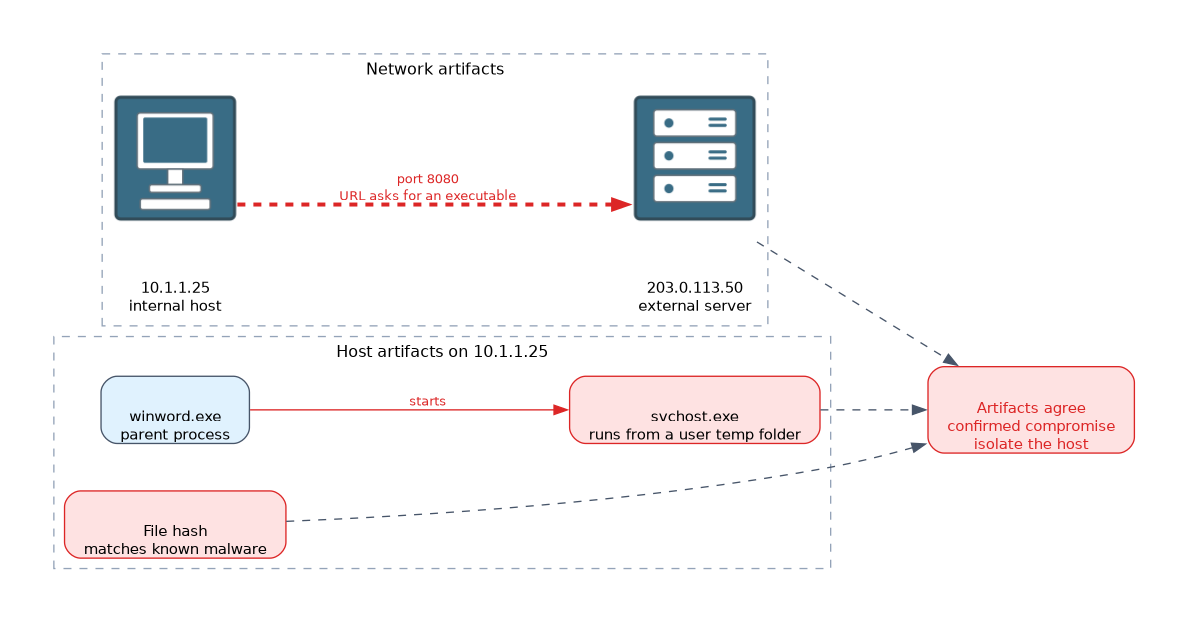 Take an alert that shows host 10.1.1.25 contacting 203.0.113.50 on port 8080. The host log shows a process called svchost.exe running from a user temporary folder, with a parent of winword.exe. The URL requested was an executable file, and its hash matches a known malware sample.
The artifacts agree. An internal host contacted an external server, a document opened a disguised program, and the file is known bad. This is a confirmed compromise, so the host should be isolated.
What to remember for the exam
Seven facts cover most questions on this topic.
- The source address started the traffic, and the destination received it.
- The server port shows the service, and the client port is a high number chosen for that connection.
- A service on an unexpected port deserves attention.
- A strange parent and child process pair is a strong sign of compromise.
- System API calls summarise what a program tried to do.
- A file hash can be checked against threat intelligence and searched across hosts.
- A URL shows the host, path and file type requested.
Check that the artifacts agree with each other. A story that fits across the network and the host is strong evidence.
Common mistakes
These four errors appear often.
Trusting the process name alone. Check the path, the parent and the signer, since malware copies system names.
Reading the client port as the service. The server port shows the service.
Relying on a hash alone. A changed file has a new hash.
Ignoring NAT and proxies. The address in the alert may not be the real host.
A single odd artifact may be harmless, and several matching ones across network and host are what raise confidence.
Check yourself
Work through these three questions.
Which port in a connection shows the service in use?
The server port, which is usually on the destination side.
Why is a command shell started by a word processor suspicious?
It is an unexpected parent and child pair, which often means a document delivered malicious code.
What should you do with a file hash from an alert?
Check it against threat intelligence and search for it on other hosts.
Topic 6 of 7 in Network Intrusion Analysis
Test yourself on Network Intrusion Analysis
The full Cisco CCNA 200-201 CBROPS question bank has 754 questions, with timed practice exams and an explanation for every answer.
This study guide is independent and is not affiliated with, endorsed by, or sponsored by Cisco. Vendor names, certification names and exam codes are trademarks of their respective owners and are used for identification only.