Security and Compliance · Topic 2 of 5
Organizations, SCPs and AWS Config
Govern many AWS accounts with Organizations and SCPs, and check compliance with AWS Config rules, conformance packs, aggregators and remediation.
- 5 min
- Includes a diagram
- Organizations groups accounts into OUs, and policies inherit down the tree.
- SCPs set maximum permissions, grant nothing, and do not apply to the management account.
- SCPs affect the root user of member accounts.
What it is
Larger AWS environments use many accounts to separate workloads, teams and environments. AWS Organizations groups those accounts, applies central policies, and gives consolidated billing.
AWS Config answers a different question: what is the configuration of my resources, and does it match the rules I set? Together they let you set guardrails and prove compliance.
How it works
Organizations structure
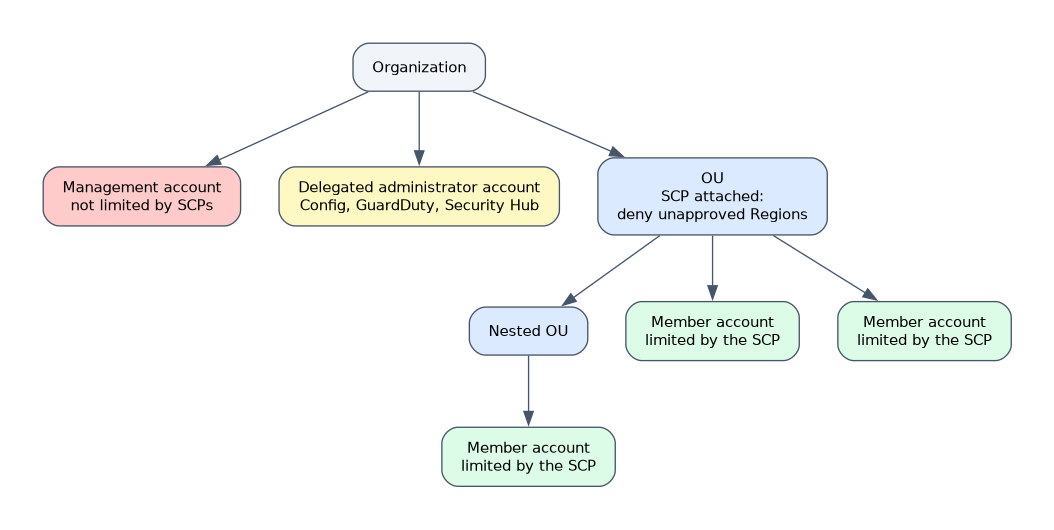 An organization has one management account and any number of member accounts. Accounts sit in organizational units (OUs), which can be nested. Policies attached to an OU apply to every account below it.
Using separate accounts limits the effect of a mistake or compromise, and makes cost and access boundaries clearer. AWS Control Tower can build a multi account landing zone with preconfigured controls, and it uses Organizations underneath.
Service control policies
An SCP is a guardrail that sets the maximum permissions for accounts. The effective permissions of a principal are the overlap of the SCP and the principal's own IAM policies.
- SCPs affect IAM users and roles in member accounts, including the root user of a member account.
- SCPs do not affect the management account.
- SCPs never grant permission by themselves.
- Two common styles: a deny list that blocks specific actions and allows the rest, or an allow list that allows only named services.
A typical guardrail denies use of Regions you do not approve.
{
  "Version": "2012-10-17",
  "Statement": [{
    "Effect": "Deny",
    "NotAction": ["iam:*", "organizations:*", "sts:*", "support:*"],
    "Resource": "*",
    "Condition": {
      "StringNotEquals": { "aws:RequestedRegion": ["eu-west-1", "eu-central-1"] }
    }
  }]
}
Other policy types in Organizations include tag policies, backup policies and AI services opt out policies. Tag policies define the keys and values you allow.
AWS Config
AWS Config records the configuration of supported resources as configuration items and keeps a history of changes. Config needs a configuration recorder and a delivery channel, which writes history to an S3 bucket.
| Feature | Purpose |
|---|---|
| Configuration history | See what a resource looked like at a past time |
| Config rules | Evaluate resources against a desired setting |
| Conformance packs | Bundle of rules and remediations deployed as one unit |
| Aggregator | Collects data from many accounts and Regions into one view |
| Remediation | Runs a Systems Manager Automation runbook on non compliant resources |
A Config rule is either AWS managed (for example, checks that S3 buckets block public access or that volumes are encrypted) or custom, using a Lambda function or Guard. Rules run when a resource changes, or on a periodic schedule, depending on the rule.
# AWS CLI: list non compliant resources for a rule
aws configservice get-compliance-details-by-config-rule \
  --config-rule-name s3-bucket-public-read-prohibited \
  --compliance-types NON_COMPLIANT
Remediation can be manual, or automatic with retries. For example, an unencrypted volume can trigger a runbook that creates an encrypted copy, or a public bucket can be locked down at once.
Config, CloudTrail and CloudWatch compared
| Service | Question it answers |
|---|---|
| CloudTrail | Who made which API call, and when |
| Config | What is the resource's configuration, and is it compliant |
| CloudWatch | How is the resource performing right now |
Central security view
In an organization, you can name a delegated administrator account for services such as Config, GuardDuty and Security Hub. This keeps security tooling out of the management account and gives one place to see all accounts.
"Prevent" points to an SCP (a preventive guardrail). "Detect and report" points to AWS Config (a detective control). "Fix automatically" points to Config remediation.
What to remember for the exam
- Organizations groups accounts into OUs, and policies inherit down the tree.
- SCPs set maximum permissions, grant nothing, and do not apply to the management account.
- SCPs affect the root user of member accounts.
- Config records configuration history and evaluates rules, and it does not block actions.
- Config rules can be managed or custom, and run on changes or on a schedule.
- Conformance packs deploy a set of rules and remediations together.
- Aggregators give a multi account and multi Region compliance view.
- Remediation uses Systems Manager Automation runbooks.
- CloudTrail records API activity, and Config records resource state.
Common mistakes
Expecting Config to block a change. Config detects after the change. To block it, use an SCP or IAM policy.
Forgetting the recorder. Rules show no data until the configuration recorder is turned on.
Testing an SCP only in the management account. SCPs do not apply there, so tests prove nothing.
Treating SCPs as grants. An allowed service in the SCP still needs an IAM allow.
Confusing Config with CloudTrail. One shows state over time, the other shows calls.
A badly written SCP can lock every account in an OU out of important actions. Test it on a single non production OU first.
Check yourself
Answer these three.
Which control prevents member accounts from using an unapproved Region?
A service control policy that denies requests outside the approved Regions.
Which service shows whether a security group changed and whether it is compliant?
AWS Config, which records configuration history and evaluates rules.
How can you view compliance across many accounts in one place?
Use a Config aggregator, usually in a delegated administrator account.
Topic 2 of 5 in Security and Compliance
Test yourself on Security and Compliance
The full AWS SOA-C03 question bank has 850 questions, with timed practice exams and an explanation for every answer.
This study guide is independent and is not affiliated with, endorsed by, or sponsored by AWS. Vendor names, certification names and exam codes are trademarks of their respective owners and are used for identification only.