Reliability and Continuity · Topic 5 of 5
Backup and Restore Strategies
Plan backups with AWS Backup, EBS snapshots and Data Lifecycle Manager, RDS point in time recovery, S3 versioning and DynamoDB recovery options.
- 5 min
- Includes a diagram
- Replication and Multi AZ are not backups, since errors are copied too.
- AWS Backup uses plans, rules, vaults and tag based resource assignment.
- Backup copy rules move recovery points across Regions and accounts.
What it is
A backup is a separate copy of data that lets you recover from deletion, corruption, a bad deployment or an attack. Replication alone is not a backup, because a mistake is copied to the replica as well.
AWS Backup is a managed service that sets up and runs backups for many AWS services from one place. Individual services such as EBS, RDS, DynamoDB and S3 also have their own backup features, and the exam expects you to know both.
How it works
AWS Backup
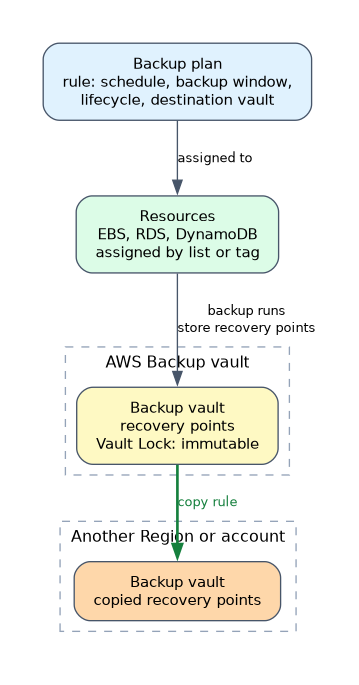 You create a backup plan with one or more rules. Each rule sets a schedule, a backup window, a lifecycle (when to move to cold storage and when to delete) and a destination vault. You then assign resources to the plan, either by listing them or by tag, so new tagged resources are protected automatically.
Backups are stored as recovery points in a backup vault. Copy rules send recovery points to another Region or account, which helps with disaster recovery and with protection from account compromise. Vault Lock can make recovery points immutable for a retention period, which guards against deletion.
AWS Backup also supports centrally managed policies across an organization, and reports to show backup compliance.
EBS snapshots
An EBS snapshot is a point in time copy of a volume. The first one copies all used blocks, and later ones store only changed blocks, but each snapshot can still be used on its own for a restore.
- Restoring creates a new volume, which you attach to an instance.
- Copy a snapshot to another Region for disaster recovery.
- Amazon Data Lifecycle Manager automates snapshot creation and deletion by schedule and tag.
- Fast snapshot restore can reduce the initial slowness of a volume restored from a snapshot.
- A Recycle Bin rule can keep deleted snapshots for a time, so accidental deletion is reversible.
An AMI (Amazon Machine Image) is built from snapshots and lets you relaunch a whole instance.
RDS backups
| Type | Details |
|---|---|
| Automated backups | Daily snapshot plus transaction logs, kept for a retention period you set (up to 35 days) |
| Manual snapshots | Taken on demand and kept until you delete them |
| Point in time recovery | Restore to a chosen moment inside the retention period |
Every restore creates a new database instance with a new endpoint, so the application must be pointed at it. Restoring does not overwrite the original. Automated backups are removed with the instance unless you choose to keep them, so take a final snapshot before deleting.
# AWS CLI: restore an RDS instance to a point in time
aws rds restore-db-instance-to-point-in-time \
  --source-db-instance-identifier mydb \
  --target-db-instance-identifier mydb-restored \
  --restore-time 2026-05-01T09:30:00Z
Aurora offers continuous backup within its retention window and a backtrack feature on supported engines, which rewinds a cluster in place.
S3 and DynamoDB
S3 versioning keeps earlier versions of an object, so an overwrite or delete can be undone. MFA Delete and Object Lock add more protection against removal. Lifecycle rules can expire old versions to control cost.
DynamoDB supports on demand backups and point in time recovery, which restores a table to any second in the recovery window of up to 35 days. A restore creates a new table.
Which tool when
| Situation | Choice |
|---|---|
| Central policy across many services and accounts | AWS Backup |
| Scheduled EBS snapshots only | Data Lifecycle Manager |
| Undo an accidental database change | RDS point in time recovery |
| Undo an S3 overwrite or delete | S3 versioning |
| Keep backups safe from deletion | Vault Lock or Object Lock |
Testing restores
A backup you have never restored is unproven. Run restore tests on a schedule, time them against your RTO, and check the application works on the restored copy.
Whenever a question asks for one place to manage backups across several services and accounts, the answer is AWS Backup.
What to remember for the exam
- Replication and Multi AZ are not backups, since errors are copied too.
- AWS Backup uses plans, rules, vaults and tag based resource assignment.
- Backup copy rules move recovery points across Regions and accounts.
- Vault Lock makes recovery points immutable for the retention period.
- EBS snapshots are incremental, region scoped and restored to a new volume.
- Data Lifecycle Manager automates EBS snapshot schedules.
- RDS automated backups keep up to 35 days, and a restore always creates a new instance.
- DynamoDB point in time recovery restores to a new table.
- S3 versioning protects against overwrite and delete.
Common mistakes
Expecting an in place restore. RDS and DynamoDB restores build a new resource, so update connection settings.
Relying on automated backups after deletion. They go with the instance unless you keep them, so take a manual or final snapshot.
Backing up to the same account and Region only. One compromise or one Regional issue can remove both source and backup.
Skipping the file system step. For EBS, a restored volume still has to be attached and mounted.
Never testing. Many failures are found only during a real restore.
Snapshots of encrypted volumes are encrypted. To restore them in another Region or account, the key must be usable there, or the copy must be re encrypted with a key that is.
Check yourself
Try these three.
Which service gives one backup policy across EBS, RDS and DynamoDB?
AWS Backup, using a backup plan and tag based resource assignment.
How do you recover an RDS database to 10 minutes ago?
Use point in time recovery, which creates a new instance restored to the chosen time.
What protects an S3 object from an accidental overwrite?
Bucket versioning, which keeps the earlier version.
Topic 5 of 5 in Reliability and Continuity
Test yourself on Reliability and Continuity
The full AWS SOA-C03 question bank has 850 questions, with timed practice exams and an explanation for every answer.
This study guide is independent and is not affiliated with, endorsed by, or sponsored by AWS. Vendor names, certification names and exam codes are trademarks of their respective owners and are used for identification only.