Networking and Content Delivery · Topic 1 of 6
VPC Subnets, Routing and Gateways
Build a VPC with public and private subnets, route tables, internet gateways, NAT gateways and egress only gateways, and how routes make a subnet public.
- 5 min
- Includes a diagram
- A subnet is in one AZ, and public or private depends on the route table.
- A public subnet has a default route to an IGW, and instances also need a public or Elastic IP.
- A zonal NAT gateway goes in a public subnet, with an Elastic IP, and private route tables point to it.
What it is
A Virtual Private Cloud (VPC) is your own isolated network in an AWS Region. You choose its IP range, split it into subnets, and control traffic with route tables and gateways.
A subnet lives in exactly one Availability Zone. Whether a subnet is public or private is not a setting on the subnet. It depends on its route table.
How it works
Addressing
A VPC has a primary IPv4 CIDR (Classless Inter-Domain Routing) block, between a /16 and a /28 netmask, and you can add secondary blocks. Subnet ranges are carved from it and cannot overlap. In each subnet, AWS reserves five addresses (the first four and the last), so a small subnet has fewer usable hosts than the arithmetic suggests.
Plan ranges so they do not overlap with other VPCs or on premises networks you may connect later, because peering and VPN need distinct ranges.
Route tables
Every subnet uses one route table. If you do not assign one, it uses the main route table.
Each table has a local route for the VPC range that cannot be removed. When several routes match a destination, the most specific one wins.
| Subnet type | Default route (0.0.0.0/0) points to | Instances need |
|---|---|---|
| Public | Internet gateway (IGW) | A public or Elastic IP address |
| Private with outbound access | NAT gateway in a public subnet | Only a private IP address |
| Isolated | No default route | Private IP, no internet at all |
An internet gateway is a horizontally scaled, managed component. Making a subnet public needs three things: the IGW attached to the VPC, a route to it, and a public IPv4 address on the instance (security groups and network ACLs must also allow the traffic).
NAT gateway
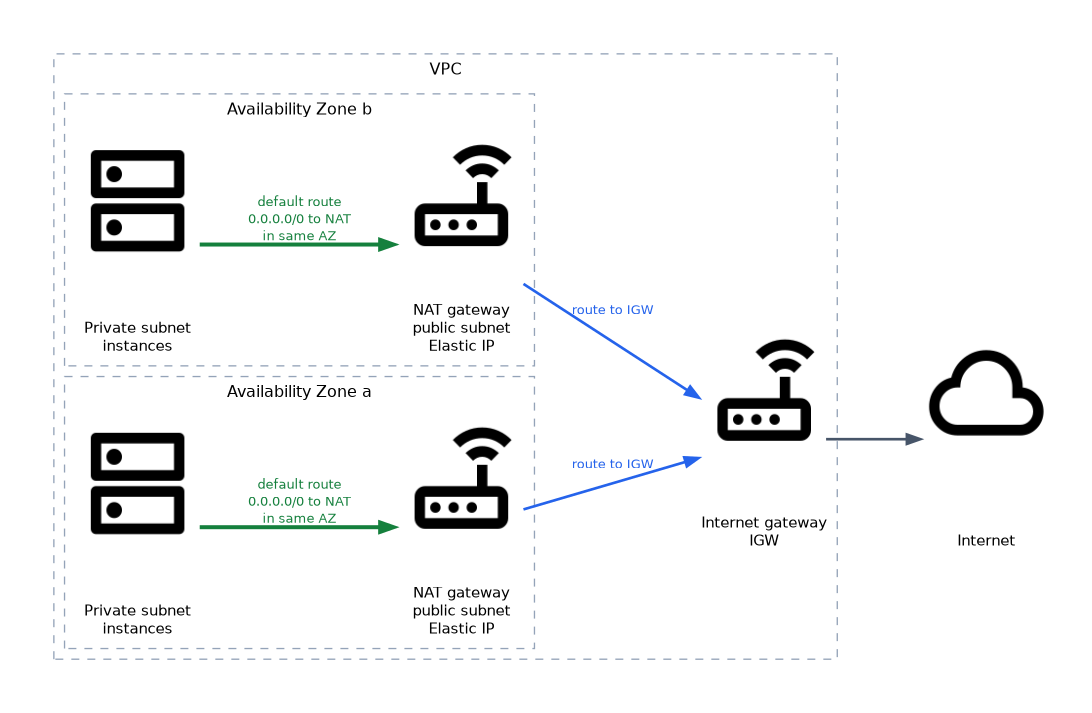 A NAT (Network Address Translation) gateway lets instances in a private subnet start connections to the internet, while the internet cannot start connections to them. A zonal NAT gateway is a managed resource that lives in one AZ (a newer regional mode spans AZs automatically). Create a zonal one in a public subnet with an Elastic IP address, then add a default route in the private route tables that points to it.
# AWS CLI
aws ec2 create-nat-gateway --subnet-id subnet-0pub1 \
  --allocation-id eipalloc-0123456789abcdef0
aws ec2 create-route --route-table-id rtb-0priv1 \
  --destination-cidr-block 0.0.0.0/0 \
  --nat-gateway-id nat-0123456789abcdef0
For resilience, create one NAT gateway per AZ and point each AZ's private route table to the one in the same zone. This avoids dependence on a single zone and avoids cross zone data charges. A NAT gateway is the managed replacement for the older do it yourself NAT instance.
IPv6 and egress only gateways
IPv6 addresses are public. To let private IPv6 instances reach the internet while blocking inbound connections, use an egress only internet gateway, which is the IPv6 counterpart of a NAT gateway.
Elastic IP addresses
An Elastic IP is a static public IPv4 address that you own until you release it. It can be moved between instances, which is handy for a fixed identity. An unattached Elastic IP address still incurs a charge.
DNS settings
A VPC has two DNS attributes. enableDnsSupport turns on the Amazon provided resolver, and enableDnsHostnames gives instances public DNS names. Private hosted zones in Route 53 need both turned on.
Design checklist
- Use at least two AZs, with a public and a private subnet in each.
- Put load balancers in public subnets and servers and databases in private subnets.
- Give databases isolated subnets with no internet route when possible.
- Use gateway endpoints for S3 and DynamoDB to avoid NAT charges (next page).
A subnet is public only because its route table has a route to an internet gateway. A zonal NAT gateway always sits in a public subnet.
What to remember for the exam
- A subnet is in one AZ, and public or private depends on the route table.
- A public subnet has a default route to an IGW, and instances also need a public or Elastic IP.
- A zonal NAT gateway goes in a public subnet, with an Elastic IP, and private route tables point to it.
- One NAT gateway per AZ is the resilient design.
- AWS reserves five IP addresses in each subnet.
- The
localroute is always present and the most specific route wins. - An egress only internet gateway serves outbound IPv6 traffic.
- Private hosted zones need DNS support and DNS hostnames on the VPC.
- VPC CIDR ranges must not overlap if you plan to peer or connect them.
Common mistakes
Putting the NAT gateway in a private subnet. It has no route to the internet gateway and cannot work.
Forgetting the route. A new subnet that uses the main route table may not have the route you intended.
Expecting an IGW alone to give internet access. Instances also need a public IP and open security groups and network ACLs.
Using a NAT gateway for inbound access. It only supports outbound connections started from inside.
Overlapping CIDR blocks. They block later peering and VPN designs, and are costly to fix.
A NAT gateway in one AZ is a single point of failure for private subnets that route to it. If that zone fails, instances in other zones that depend on it lose outbound internet.
Check yourself
Try these three questions.
What makes a subnet public?
Its route table has a default route to an internet gateway (and its instances have public IP addresses).
Where must a NAT gateway be created?
In a public subnet, with an Elastic IP address attached.
Which gateway gives outbound only IPv6 internet access?
An egress only internet gateway.
Topic 1 of 6 in Networking and Content Delivery
Test yourself on Networking and Content Delivery
The full AWS SOA-C03 question bank has 850 questions, with timed practice exams and an explanation for every answer.
This study guide is independent and is not affiliated with, endorsed by, or sponsored by AWS. Vendor names, certification names and exam codes are trademarks of their respective owners and are used for identification only.