Deployment and Automation · Topic 4 of 7
Systems Manager Operations Tools
Manage fleets with Systems Manager: managed node needs, Run Command, Session Manager, State Manager, Parameter Store, Inventory and Automation runbooks.
- 5 min
- Includes a diagram
- A managed node needs SSM Agent, an instance profile with Systems Manager permissions, and a network path to the endpoints.
- Private subnets without internet need VPC endpoints for
ssm,ssmmessagesandec2messages. - Run Command runs documents on many nodes, selected by tag, with rate control.
What it is
AWS Systems Manager is a set of tools for operating many servers without logging in to each one. It works on EC2 instances and on premises servers, and it replaces habits such as SSH loops and bastion hosts.
A server that Systems Manager can control is called a managed node. Most of the exam questions on this topic test what a node needs in order to appear as managed, and which tool fits which task.
How it works
What makes a node managed
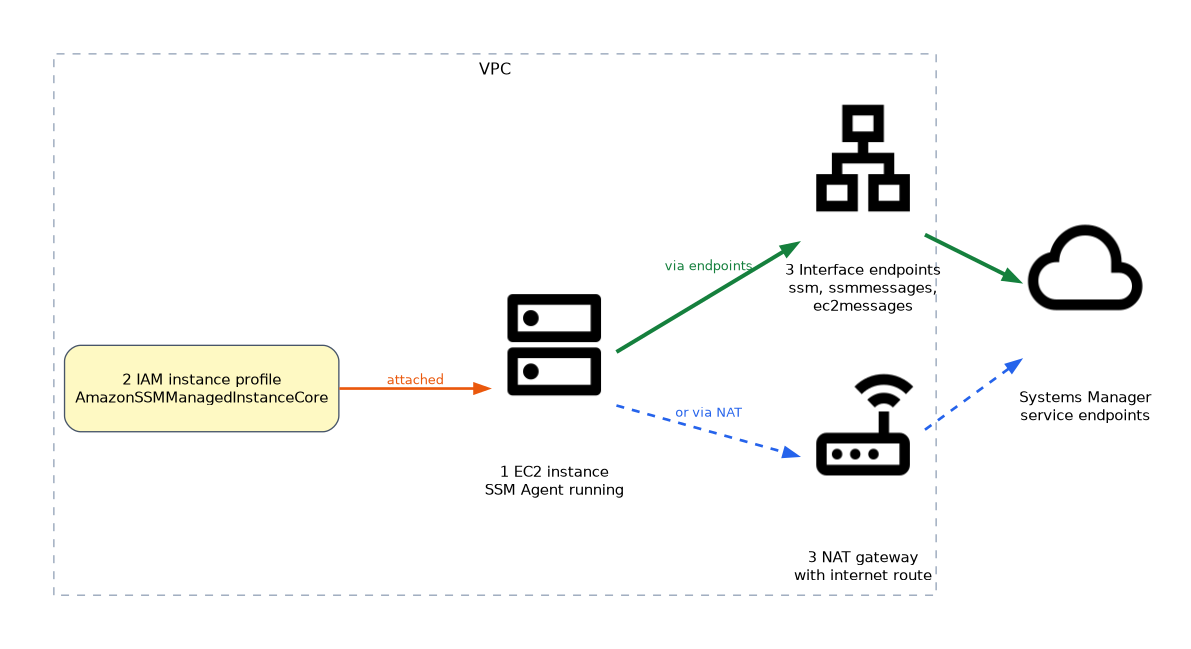 Three things must be true.
- The SSM Agent is installed and running. It comes preinstalled on many AWS provided AMIs.
- The instance has an IAM instance profile that allows Systems Manager access. The managed policy
AmazonSSMManagedInstanceCoreis the usual choice. - The node can reach the Systems Manager endpoints, through the internet, a NAT gateway, or VPC interface endpoints for
ssm,ssmmessagesandec2messages.
On premises servers register with a hybrid activation. If an instance is missing from Fleet Manager, check these three points in order.
The main tools
| Tool | What it does |
|---|---|
| Run Command | Runs a command or script on many nodes at once, selected by tag or ID |
| Session Manager | Opens a shell on a node with no open inbound port, SSH key or bastion host |
| State Manager | Keeps nodes in a desired state with associations that run on a schedule |
| Parameter Store | Holds configuration values and secrets in a hierarchy, with versions |
| Inventory | Collects software and configuration data from nodes |
| Automation | Runs multi step runbooks across AWS resources |
| Patch Manager | Scans and installs patches (next page) |
Run Command
Run Command uses documents, which are definitions of the actions to run. AWS-RunShellScript runs shell commands on Linux, and AWS-RunPowerShellScript does the same on Windows. You choose targets by instance ID or by tag, and you can limit how many run at once and how many errors to tolerate.
# AWS CLI: run a command on all instances tagged Env=prod
aws ssm send-command \
  --document-name "AWS-RunShellScript" \
  --targets "Key=tag:Env,Values=prod" \
  --parameters 'commands=["uptime"]' \
  --max-concurrency 10 --max-errors 1
Output can be sent to S3 or CloudWatch Logs for later review.
Session Manager
Session Manager gives an interactive shell through the Systems Manager service. Access is controlled by IAM, so no inbound port 22 is needed and no key pairs have to be shared. Sessions can be logged to S3 or CloudWatch Logs, and CloudTrail records who started them.
This makes it the preferred answer when a question asks for secure, auditable access without opening ports.
State Manager
A State Manager association applies a document to targets on a schedule, for example to make sure an agent is installed or a setting stays in place. If someone changes the setting, the next run puts it back.
Parameter Store
Parameters can be plain String, StringList or SecureString (encrypted with KMS, the Key Management Service). A path such as /app/prod/db/host allows IAM permissions by path. Standard parameters are free, and advanced parameters allow larger values and policies such as expiry.
Automation runbooks
An Automation runbook is a document with ordered steps, such as stop an instance, create an AMI, then start it again. AWS supplies many, for example AWS-RestartEC2Instance. Steps can wait for manual approval, which suits changes that need a person to sign off.
An Automation runbook can use an assume role, so the person running it needs only permission to start it, not permission to do the actions.
"Secure shell access with no open ports and a full audit trail" is Session Manager. "Run a command on 500 instances by tag" is Run Command.
What to remember for the exam
- A managed node needs SSM Agent, an instance profile with Systems Manager permissions, and a network path to the endpoints.
- Private subnets without internet need VPC endpoints for
ssm,ssmmessagesandec2messages. - Run Command runs documents on many nodes, selected by tag, with rate control.
- Session Manager replaces SSH and bastion hosts, and logs sessions to S3 or CloudWatch Logs.
- State Manager enforces a desired configuration on a schedule.
- Parameter Store keeps configuration and SecureString secrets in a path hierarchy.
- Automation runbooks perform multi step workflows and can include approvals.
- Hybrid activations bring on premises servers under management.
Common mistakes
Forgetting the instance profile. The agent runs but the node never registers. The role is the most common missing piece.
No route to Systems Manager in a private subnet. Without a NAT gateway or endpoints, the agent cannot call home.
Opening port 22 when Session Manager would do. The exam prefers the approach with fewer exposed ports.
Mixing Run Command and State Manager. Run Command is a one time action, and State Manager keeps repeating to hold a state.
Storing secrets in plain String parameters. Use SecureString for anything sensitive.
Anyone who can start Run Command with a broad document effectively has administrator access to every targeted node, so scope the IAM permissions by tag.
Check yourself
Try these three.
An instance does not show as a managed node. What do you check?
The SSM Agent, the instance profile permissions, and the network path to the Systems Manager endpoints.
Which tool gives audited shell access with no inbound ports?
Session Manager.
What is the difference between Run Command and State Manager?
Run Command runs an action once on demand, and State Manager applies a document on a schedule to keep a desired state.
Topic 4 of 7 in Deployment and Automation
Test yourself on Deployment and Automation
The full AWS SOA-C03 question bank has 850 questions, with timed practice exams and an explanation for every answer.
This study guide is independent and is not affiliated with, endorsed by, or sponsored by AWS. Vendor names, certification names and exam codes are trademarks of their respective owners and are used for identification only.