Security Foundations and Governance · Topic 3 of 6
Central Security Account Patterns
Design security tooling, log archive and shared services accounts, use delegated administrators, cross account roles and RAM, and follow the AWS model.
- 6 min
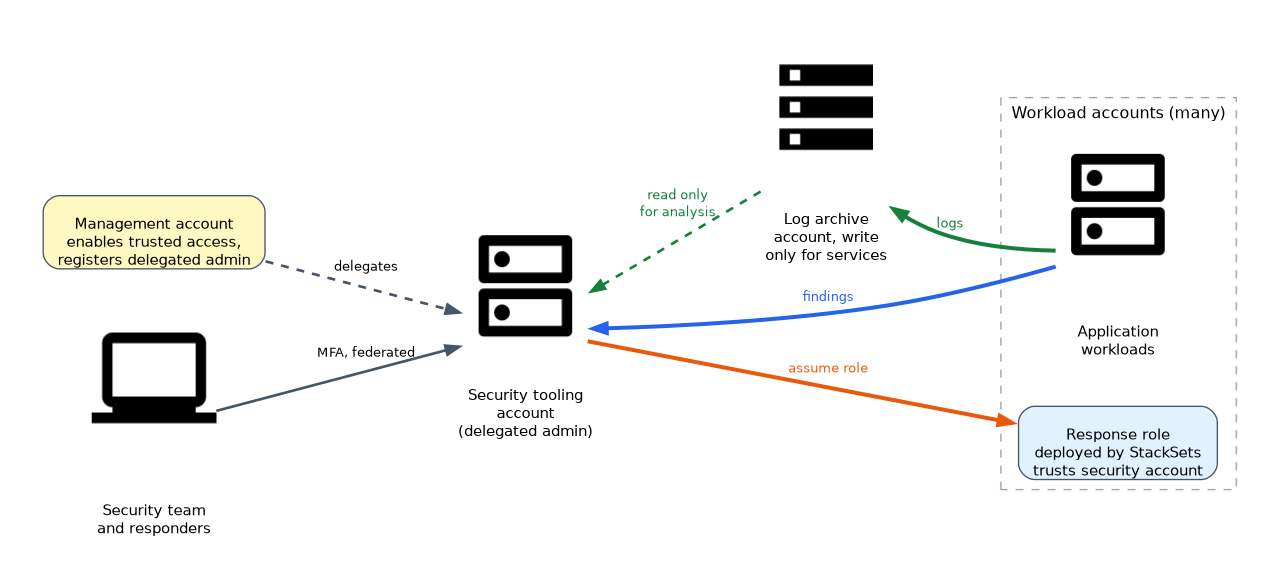
- Includes a diagram
- Use dedicated accounts for logs, security tooling, audit, networking and shared services, separate from workloads.
- Run security services from a delegated administrator, not from the management account.
- Pre create response roles in every account that trust the security account, and deploy them by StackSets.
What it is
A multi account strategy needs a plan for where security services run, where logs live and how people and tools reach into workload accounts. The common answer is a small set of dedicated accounts that each have one job.
This page covers those accounts, the cross account access patterns they use, and the trade-offs behind them. The pattern mirrors the AWS Security Reference Architecture.
How it works
The dedicated accounts
| Account | Job | Who has access |
|---|---|---|
| Management | Organizations, billing, Identity Center, central policies | Very few, with strong MFA |
| Log archive | Stores CloudTrail, Config, flow logs and other logs in protected buckets | Read only for analysts, write only from services |
| Security tooling (delegated admin) | Runs GuardDuty, Security Hub, Inspector, Macie, Detective, Access Analyzer | Security team |
| Audit | Read only access across accounts for auditors | Auditors and compliance |
| Network | Transit Gateway, inspection VPCs, central egress, DNS | Network team |
| Shared services | Directory, CI/CD tooling, artifact repositories | Platform team |
| Workload accounts | Applications, one per workload and environment | Application teams |
Separate accounts mean that someone with administrator rights in a workload cannot delete the logs or switch off the security tooling for the organization.
Delegated administrator pattern
Enable trusted access in the management account, register the security tooling account as delegated administrator, and enable auto enrolment of new accounts. The security account then sees findings from every member account and Region.
| Service | What the administrator does |
|---|---|
| GuardDuty | Enables members, sees findings, sets suppression rules |
| Security Hub | Aggregates findings, applies central configuration policies |
| AWS Config | Creates an organization aggregator and conformance packs |
| Inspector | Enables scanning for members and sees vulnerability findings |
| Macie | Runs discovery across member buckets |
| Detective | Investigates across accounts |
| IAM Access Analyzer | Creates an analyzer with the organization as zone of trust |
| Firewall Manager | Enforces WAF, security group and firewall policies |
Cross account access for responders
Responders must reach into workload accounts quickly and safely.
- Federated roles. Identity Center permission sets give analysts a read only or response role in each account.
- Pre created response roles. A role in every account trusts the security account, so tools and responders can assume it. Condition the trust on the responder's role ARN, and add MFA for humans.
- StackSets deployment. Use CloudFormation StackSets with service managed permissions to deploy the response role to every account in an OU, including new ones.
{
  "Version": "2012-10-17",
  "Statement": [{
    "Effect": "Allow",
    "Principal": { "AWS": "arn:aws:iam::222233334444:role/SecurityResponder" },
    "Action": "sts:AssumeRole",
    "Condition": { "StringEquals": { "aws:PrincipalOrgID": "o-exampleorgid" } }
  }]
}
This trust policy lets one named role in the security account assume the response role. The organization condition adds a second check on the caller's origin.
Central logging
Central logging uses the log archive account.
- Create buckets with Block Public Access, versioning, Object Lock if needed and SSE-KMS.
- Write bucket and key policies that allow the services and organization accounts to deliver logs, and deny deletion.
- Use organization trails, an AWS Config aggregator and delivery of flow and DNS logs to the buckets.
- Give the security tooling account read access for analysis, with Athena or Security Lake.
Network patterns
A network account centralises shared connectivity. Share subnets or Transit Gateway attachments with RAM, route internet egress and inspection through a central VPC, and keep a single point to monitor and filter. Balance this against the blast radius and the cost of data transfer through the hub.
Sharing with RAM
AWS Resource Access Manager shares resources to accounts or OUs. The owner keeps control, and the recipients use the resource as though it was theirs, with their own security groups for shared subnets. Enable sharing with Organizations so shares to an OU do not need invitations.
Trade-offs
| Decision | Benefit | Cost |
|---|---|---|
| Many small accounts | Strong isolation, simple permissions | More accounts to automate and monitor |
| One security tooling account | One place to see everything | A high value target, so protect it heavily |
| Central network hub | Consistent inspection and egress | Added latency, cost and a shared dependency |
| Separate log archive | Evidence survives workload compromise | Needs careful cross account policies |
Automation first
Treat account setup as code. A new account should get its roles, logging, security service enrolment and guardrails without manual steps, using Control Tower, StackSets or a pipeline. This keeps accounts consistent and auditable.
What to remember for the exam
- Use dedicated accounts for logs, security tooling, audit, networking and shared services, separate from workloads.
- Run security services from a delegated administrator, not from the management account.
- Pre create response roles in every account that trust the security account, and deploy them by StackSets.
- Keep the log archive account write only for services and read only for analysts, with Object Lock where required.
- An AWS Config organization aggregator and Security Hub aggregation give a single view of compliance and findings.
- RAM shares subnets, Transit Gateway and other resources without copying them.
- Use
aws:PrincipalOrgIDin trust and resource policies to restrict access to your organization. - Automate account baselines so every account is configured the same way.
For "an analyst in the security account needs read access in every workload account, including future ones", choose a response role deployed with service managed StackSets and trusted by the security account.
Common mistakes
Putting the security tooling in the management account. It widens the privileged footprint of an account that SCPs cannot restrict.
Forgetting to enable auto enrolment. New accounts are then invisible to security services.
Allowing log buckets to be deleted by their writers. An attacker could erase evidence after taking over a workload.
Trusting the whole account root in cross account roles. Name the specific role and add conditions.
The security tooling account is the most valuable target in the organization, so use strong MFA, minimal users and monitoring on its own activity.
Check yourself
Why separate the log archive from workload accounts?
So that an attacker with administrator rights in a workload cannot delete the evidence.
How do you deploy a response role into all current and future accounts of an OU?
Use CloudFormation StackSets with service managed permissions and automatic deployment to the OU.
What does a delegated administrator do for GuardDuty?
It enables GuardDuty for member accounts and receives their findings, so the management account stays minimal.
Topic 3 of 6 in Security Foundations and Governance
Test yourself on Security Foundations and Governance
The full AWS SCS-C03 question bank has 858 questions, with timed practice exams and an explanation for every answer.
This study guide is independent and is not affiliated with, endorsed by, or sponsored by AWS. Vendor names, certification names and exam codes are trademarks of their respective owners and are used for identification only.