Infrastructure Security · Topic 7 of 7
Network Firewall and Troubleshooting
Use Network Firewall, DNS Firewall, Gateway Load Balancer and Transit Gateway inspection, and troubleshoot connectivity with Reachability Analyzer.
- 6 min
- Includes a diagram
- Network Firewall needs firewall endpoints in dedicated subnets and routes that send traffic through them.
- Network Firewall supports stateless rules, stateful rules, domain lists, Suricata compatible rules and TLS inspection.
- DNS Firewall filters DNS queries that use the VPC resolver, using domain lists and rule groups.
What it is
Security groups and network ACLs filter by address and port. When you need deeper inspection, such as domain names, protocol detection, intrusion signatures or decrypting TLS, you add a managed firewall or a third party appliance.
This page covers the inspection services, where to place them, and the tools you use when a connection does not work.
How it works
AWS Network Firewall
Network Firewall is a managed, stateful firewall and intrusion prevention service for a VPC. You deploy firewall endpoints into dedicated firewall subnets, and change route tables so that traffic goes through those endpoints. Traffic only passes the firewall if routing sends it there.
A firewall policy holds rule groups.
| Rule group | What it does |
|---|---|
| Stateless | Matches single packets on addresses, ports and protocol, and forwards, drops or passes them to the stateful engine |
| Stateful, 5 tuple | Matches connection details with flow awareness |
| Stateful, domain list | Allows or denies traffic by domain name, for HTTP and HTTPS |
| Stateful, Suricata compatible | Detailed signature rules for intrusion detection and prevention |
Network Firewall can inspect encrypted traffic with TLS inspection when you provide a certificate, and it logs alerts, flows and TLS events to S3, CloudWatch Logs or Firehose.
A common use is an egress allow list: workloads may reach only approved domains, and the firewall drops everything else.
# Suricata compatible stateful rule: pass TLS only to the exact name example.com
# (a default drop action or a later drop rule blocks everything else)
pass tls $HOME_NET any -> $EXTERNAL_NET 443 (tls.sni; content:"example.com"; startswith; endswith; nocase; msg:"allow example.com"; sid:100001; rev:1;)
Route 53 Resolver DNS Firewall
DNS Firewall filters outbound DNS queries from a VPC. You build domain lists and rule groups with actions to allow, block or alert, and associate the rule groups with VPCs. AWS managed domain lists cover known malware and botnet domains.
Use it to stop malware reaching command and control domains and to block DNS exfiltration. It acts only on queries that go through the VPC resolver, so a workload that talks directly to an outside DNS server is not covered. Block that path with network controls.
Central inspection with Transit Gateway
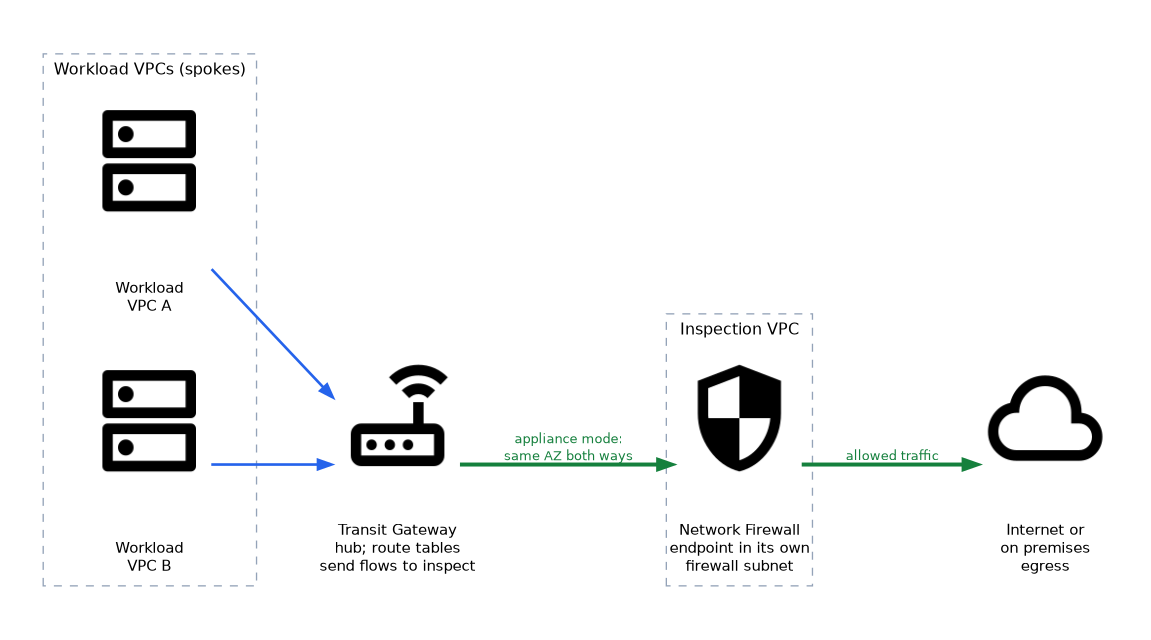 For many VPCs, build an inspection VPC with Network Firewall or appliances, and send traffic there from a Transit Gateway. Route tables decide which flows are inspected. Turn on appliance mode for the inspection VPC attachment, so that both directions of a flow use the same Availability Zone and the stateful inspection sees them together.
Gateway Load Balancer
Gateway Load Balancer (GWLB) places third party virtual appliances, such as next generation firewalls, behind a single entry point. Traffic is encapsulated using GENEVE and sent to the appliances, then returns through the same path. Choose it when the organization already standardised on a vendor firewall.
| Need | Choose |
|---|---|
| AWS managed firewall with Suricata rules and domain lists | Network Firewall |
| Existing vendor appliance fleet with scaling | Gateway Load Balancer |
| Filter DNS queries by domain | DNS Firewall |
| Block a subnet range quickly | Network ACL |
| Full packet capture for analysis | Traffic Mirroring |
Traffic Mirroring
Traffic Mirroring copies packets from an elastic network interface to a monitoring target, such as an appliance behind a Network Load Balancer. It must be configured in advance, and it adds a copy of traffic that has its own network cost.
Troubleshooting connectivity
Work from the path outward and check every control the packet crosses.
| Symptom | Check |
|---|---|
| Instance cannot reach the internet | Route to NAT or internet gateway, public IP, NACL and security group outbound, firewall policy |
| Cannot connect to an instance | Security group inbound, NACL both directions, route back, OS firewall |
| S3 access fails from a private subnet | Gateway endpoint route, endpoint policy, bucket policy conditions, IAM permissions |
| Interface endpoint unreachable | Endpoint security group, private DNS setting, subnet in the right Availability Zone |
| Traffic dropped through the firewall | Routes to and from firewall endpoints, rule order, default action, appliance mode |
Two tools help confirm the cause.
VPC Reachability Analyzer analyses the configuration between a source and a destination, such as two network interfaces, and reports whether the path exists. If not, it names the blocking component, for example a security group rule or a route table. It does not send packets.
Network Access Analyzer finds unintended network access, such as resources reachable from the internet, against requirements that you define. VPC Flow Logs show the actual accepted or rejected traffic.
Reading flow logs together with the symptom is the usual pattern. A REJECT on an inbound request suggests a security group or network ACL. An inbound ACCEPT with a REJECT on the reply suggests a stateless network ACL.
What to remember for the exam
- Network Firewall needs firewall endpoints in dedicated subnets and routes that send traffic through them.
- Network Firewall supports stateless rules, stateful rules, domain lists, Suricata compatible rules and TLS inspection.
- DNS Firewall filters DNS queries that use the VPC resolver, using domain lists and rule groups.
- Use Transit Gateway with an inspection VPC for central inspection, with appliance mode for symmetric flows.
- Gateway Load Balancer fronts third party appliances using GENEVE encapsulation.
- Reachability Analyzer checks configuration without sending packets. Flow logs show actual accepted or rejected traffic.
- Network Access Analyzer finds unintended access paths against rules you define.
- Traffic Mirroring needs to be set up before an incident to capture packets.
When a question compares inspecting by domain name with port and IP filtering, Network Firewall with a domain list rule group is the answer, since security groups cannot filter by domain.
Common mistakes
Deploying a firewall without routing to it. The endpoint exists but traffic bypasses it.
Skipping appliance mode. Return traffic can take a different Availability Zone and the stateful firewall drops it.
Relying on DNS Firewall alone. A workload using a direct outside resolver bypasses it.
Expecting Reachability Analyzer to find application faults. It looks at network configuration, not at whether the application is listening.
A firewall endpoint cannot inspect traffic from resources in its own subnet, so place endpoints in dedicated firewall subnets.
Check yourself
Why use appliance mode on a Transit Gateway attachment?
It keeps both directions of a flow in the same Availability Zone so a stateful inspection VPC sees the whole connection.
Which service filters outbound traffic by domain name?
AWS Network Firewall using a stateful domain list, and DNS Firewall for DNS queries.
Does VPC Reachability Analyzer send test packets?
No, it analyses configuration and reports the path or the component that blocks it.
Topic 7 of 7 in Infrastructure Security
Test yourself on Infrastructure Security
The full AWS SCS-C03 question bank has 858 questions, with timed practice exams and an explanation for every answer.
This study guide is independent and is not affiliated with, endorsed by, or sponsored by AWS. Vendor names, certification names and exam codes are trademarks of their respective owners and are used for identification only.