Operational Excellence and Automation · Topic 2 of 7
CI/CD Pipelines and Artifact Security
Design CodePipeline, CodeBuild and CodeDeploy pipelines that scan and sign artifacts, then promote one build across accounts and Regions with roles.
- 5 min
- Includes a diagram
- CodePipeline orchestrates, CodeBuild builds and tests, CodeDeploy shifts traffic.
- Cross-account pipelines need a customer managed KMS key, a bucket policy and target account roles.
- Enhanced ECR scanning uses Inspector and rescans continuously; basic scanning does not.
What it is
A CI/CD pipeline turns a commit into a tested, deployed release with no manual copying. On AWS the usual building blocks are AWS CodePipeline for orchestration, AWS CodeBuild for build and test, and AWS CodeDeploy or CloudFormation for deployment.
The professional exam adds two concerns. The artifact must be scanned and signed so only trusted code runs, and the same artifact must move from a tools account into test and production accounts through assumed roles.
How it works
Pipeline building blocks
| Service | Role in the pipeline |
|---|---|
| CodeCommit or a connected Git provider | Source, through AWS CodeConnections for GitHub, GitLab or Bitbucket |
| CodePipeline | Stages, actions, approvals, variables and triggers |
| CodeBuild | Managed build containers defined by a buildspec, scaling per build |
| CodeDeploy | Deployments to EC2, on premises servers, Lambda and ECS with traffic shifting |
| CloudFormation action | Creates or updates stacks, often through change sets |
CodePipeline V2 pipelines add triggers filtered by Git branch, tag or file path, pipeline-level variables and execution modes. Queued mode runs executions in order, superseded mode lets a newer run replace an older waiting one, and parallel mode runs executions independently.
A stage can be configured to roll back automatically on failure to the last successful execution of that stage. A source stage cannot be rolled back.
Use a manual approval action before production when a human sign-off is a stated requirement. Otherwise prefer automated gates, such as test results or CloudWatch alarm checks, which scale better.
Security scanning and signing
Shift checks left so a vulnerable build never reaches an environment.
| Check | Service | Where it runs |
|---|---|---|
| Container image vulnerabilities | Amazon ECR scanning; enhanced scanning uses Amazon Inspector and rescans continuously | On push and when new CVEs appear |
| Package vulnerabilities during the build | Amazon Inspector CI/CD integration with an SBOM generator | Inside CodeBuild, failing the build on severity |
| Lambda and EC2 vulnerabilities | Amazon Inspector | Continuous after deployment |
| Code and image signing | AWS Signer | Signs Lambda code packages and container images |
ECR basic scanning scans on push or on demand. Enhanced scanning is continuous, covers operating system and programming language packages, and sends findings to EventBridge and Security Hub, so a rule can block promotion.
AWS Signer signs Lambda deployment packages. A Lambda code signing configuration can then reject unsigned or untrusted code at deploy time. Signer also signs container images with the open Notation tooling, and a cluster admission check can verify the signature before a pod runs.
Cross-account and multi Region pipelines
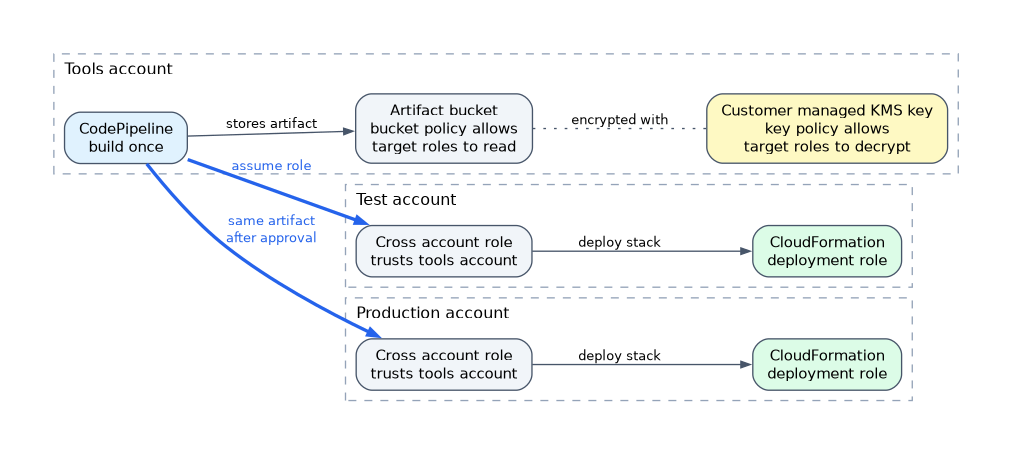 The standard design keeps the pipeline in a central tools account and deploys into workload accounts.
Three pieces make it work:
- A customer managed KMS key encrypts the artifact bucket, and its key policy lets the target account roles decrypt. The default AWS managed key cannot be shared across accounts.
- A bucket policy on the artifact bucket allows the target account roles to read artifacts.
- A cross-account role in each target account trusts the tools account. The pipeline action sets this role ARN, and a CloudFormation deployment role in the target account creates the resources.
For multi Region deployment, CodePipeline actions can run in other Regions. Each Region needs its own artifact store bucket, which the pipeline replicates artifacts into.
Artifact promotion means you build once and deploy the same artifact everywhere. Rebuilding per environment can produce a different binary than the one you tested, so promote the image digest or the S3 object version instead.
For large organizations, one pipeline can feed CloudFormation StackSets to reach many accounts. Use a separate stage per wave, such as test OUs, then a few production accounts, then the rest.
How the exam asks about this
- "The pipeline in the shared services account must deploy CloudFormation stacks into the production account" -> a customer managed KMS key shared with production, bucket policy, and a cross-account role assumed by the action.
- "Block container images with critical vulnerabilities, including CVEs published after the image was pushed" -> ECR enhanced scanning with Amazon Inspector and an EventBridge rule on findings.
- "Lambda must run only code produced by the approved pipeline" -> AWS Signer signing profile with a Lambda code signing configuration set to enforce.
What to remember for the exam
- CodePipeline orchestrates, CodeBuild builds and tests, CodeDeploy shifts traffic.
- Cross-account pipelines need a customer managed KMS key, a bucket policy and target account roles.
- Enhanced ECR scanning uses Inspector and rescans continuously; basic scanning does not.
- AWS Signer plus Lambda code signing enforces that only trusted code deploys.
- Build once and promote the same artifact through every environment.
- Stage rollback returns a failed stage to its last successful execution.
An artifact bucket encrypted with the default AWS managed S3 key cannot be decrypted by another account. Cross-account pipeline questions almost always hinge on the customer managed KMS key.
Common mistakes
Copying the pipeline into every account. It multiplies maintenance and breaks the single audit trail. A central pipeline with assumed roles is the scalable answer.
Rebuilding for production. A new build can pull different dependencies than the tested one. Promote the exact image digest or artifact version.
Scanning only at build time. New CVEs appear after deployment. Continuous scanning with Inspector catches images and functions that were clean when built.
Check yourself
Why does a cross-account CodePipeline need a customer managed KMS key?
The target account must decrypt the artifacts, and only a customer managed key policy can grant that to another account.
What stops Lambda from running code that the pipeline did not sign?
A Lambda code signing configuration that trusts the AWS Signer profile and enforces rejection of unsigned code.
What is artifact promotion?
Building one artifact once and deploying that same version to test and then production, instead of rebuilding per environment.
Topic 2 of 7 in Operational Excellence and Automation
Test yourself on Operational Excellence and Automation
The full AWS SAP-C03 question bank has 850 questions, with timed practice exams and an explanation for every answer.
This study guide is independent and is not affiliated with, endorsed by, or sponsored by AWS. Vendor names, certification names and exam codes are trademarks of their respective owners and are used for identification only.