Design Resilient Architectures · Topic 4 of 5
High Availability and Fault Tolerance
Design highly available, fault tolerant AWS systems with multiple AZs, RDS Multi AZ, Aurora, Route 53 failover and no single point of failure.
- 6 min
- Includes a diagram
- Use at least two AZs for every tier, and avoid components that exist in only one AZ.
- RDS Multi AZ gives a synchronous standby and automatic failover for availability, not for read scaling.
- Read replicas use asynchronous replication and help with read performance and cross Region copies.
What it is
High availability (HA) means the system keeps working with only a short interruption when a component fails. Fault tolerance goes further: the system continues with no interruption, usually at higher cost.
The main tool is redundancy across Availability Zones (AZs), which are separate locations inside a Region with independent power, cooling and networking. The exam rewards designs with no single point of failure, so ask of each component: what happens if this one disappears?
How it works
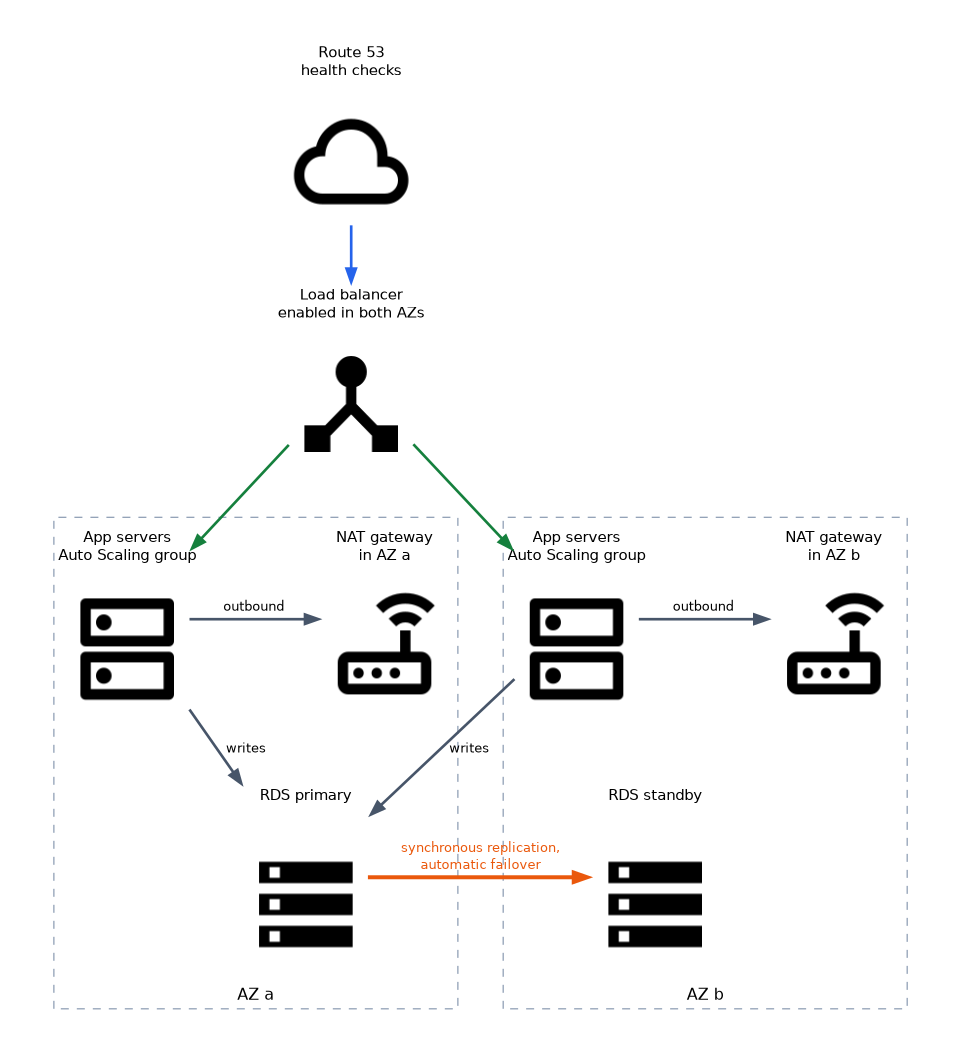
Compute and network tiers
Run instances in an Auto Scaling group across at least two AZs, behind a load balancer that is also enabled in those AZs. If an AZ fails, the load balancer stops sending traffic there and the group launches replacements elsewhere.
A NAT gateway lives in a single AZ. For HA, create one in each AZ and route each private subnet to the NAT gateway in its own AZ. An Elastic IP address can be re-mapped to a standby instance when a design needs a fixed address.
Database availability
| Option | What it provides |
|---|---|
| RDS Multi AZ (instance) | A synchronous standby in another AZ with automatic failover. The standby does not serve reads |
| RDS Multi AZ DB cluster | One writer and two readable standbys in different AZs, for faster failover and read capacity |
| RDS read replica | Asynchronous copy for scaling reads, which can be in another Region, and can be promoted manually. It is not an automatic failover target |
| Amazon Aurora | Storage replicated six ways across three AZs, with up to 15 replicas, and a replica can be promoted on failure |
| DynamoDB | Data is stored across multiple AZs automatically, and global tables add multi Region replication |
Remember the difference between a Multi AZ setup (for availability) and read replicas (for performance). A failover changes the DNS name target, so applications must use the endpoint name, not an IP address. Amazon RDS Proxy can keep connections open and shorten the failover impact.
Storage availability
Amazon S3 stores data across multiple AZs in most classes, and Amazon EFS is regional and spans AZs. An EBS volume lives in a single AZ, so protect it with snapshots, which can be restored in any AZ in the Region. For shared storage across AZs, use EFS or FSx options that offer Multi AZ.
DNS and traffic failover
Amazon Route 53 health checks monitor endpoints and feed routing policies.
| Routing policy | Behavior |
|---|---|
| Failover | Active and passive: sends traffic to the secondary only when the primary is unhealthy |
| Weighted | Splits traffic by percentage |
| Latency based | Sends users to the Region with lowest latency |
| Geolocation | Routes by the user's location |
| Multivalue answer | Returns several healthy records |
Route 53 can also route to an alias target such as a load balancer or a CloudFront distribution. AWS Global Accelerator offers static anycast IP addresses and shifts traffic away from unhealthy endpoints faster than DNS caching allows.
Multi Region designs
If a whole Region must be survivable, replicate data (Aurora Global Database, DynamoDB global tables, S3 Cross Region Replication) and keep a second stack. Route 53 or Global Accelerator then points users to the healthy Region. The next page treats this as disaster recovery.
Removing single points of failure
Prefer managed services with built in Multi AZ behavior (S3, DynamoDB, SQS, Lambda). Use loose coupling so that one failing tier does not take down the rest. Test failover, because an untested plan often fails when it is needed.
"Highly available with the least effort" for a relational database is RDS Multi AZ. "Scale read traffic" is a read replica. Do not swap them.
Workload visibility with AWS X-Ray
You cannot fix a weak dependency you cannot see. AWS X-Ray follows a request as it passes through services such as API Gateway, Lambda, containers and databases. It records a trace for each sampled request and draws a service map, so you can spot which call is slow or returning errors.
Use it together with Amazon CloudWatch. CloudWatch metrics and alarms tell you that something is wrong, CloudWatch Logs hold the detail, and X-Ray shows where in the call chain the problem sits.
Managed AI services instead of self built models
For tasks such as text analysis or speech, the exam prefers a managed AI service to training and running your own model, because AWS operates and scales the service for you. SageMaker is the exception, since it is the platform for building and hosting your own models.
| Service | Typical use |
|---|---|
| Amazon Comprehend | Find sentiment, key phrases and entities in text |
| Amazon Polly | Turn text into spoken audio |
| Amazon Rekognition | Detect objects, faces and unsafe content in images and video |
| Amazon Textract | Extract text and form or table data from scanned documents |
| Amazon Transcribe | Turn speech into text |
| Amazon Translate | Translate text between languages |
| Amazon Lex | Build voice and text chatbots |
| Amazon Kendra | Intelligent search across enterprise documents |
| Amazon Forecast | Time series forecasts such as demand |
| Amazon Fraud Detector | Score events such as sign ups or payments for fraud risk |
| Amazon SageMaker | Build, train and host custom machine learning models |
What to remember for the exam
- Use at least two AZs for every tier, and avoid components that exist in only one AZ.
- RDS Multi AZ gives a synchronous standby and automatic failover for availability, not for read scaling.
- Read replicas use asynchronous replication and help with read performance and cross Region copies.
- Aurora keeps six copies of data across three AZs and fails over to a replica.
- Create a NAT gateway in each AZ for a resilient design.
- EBS volumes are zonal, while S3, EFS and DynamoDB are regional or multi AZ by design.
- Route 53 health checks with failover routing redirect users from an unhealthy endpoint.
- Global Accelerator uses static IPs and fast failover between endpoints.
Common mistakes
Confusing Multi AZ with Multi Region. Multi AZ protects against an AZ failure inside one Region. Surviving a Region failure needs cross Region replication.
Expecting an RDS standby to serve reads. In the single standby deployment, it only waits for failover. Use read replicas or a Multi AZ DB cluster for reads.
Hardcoding database IP addresses. After failover, the endpoint name points to the new primary, and an IP address does not.
Forgetting the AZ scope of a NAT gateway. If its AZ fails, private subnets in other AZs that route through it lose outbound access.
A load balancer is only as available as its targets. If all targets sit in one AZ, enabling more AZs on the load balancer does not make the application resilient.
Check yourself
Which RDS feature gives automatic failover to another AZ?
Multi AZ deployment, which keeps a synchronous standby copy.
Why create one NAT gateway per AZ?
A NAT gateway is tied to one AZ, so each AZ needs its own to keep outbound access if another AZ fails.
Which Route 53 policy sends traffic to a backup only when the primary is unhealthy?
Failover routing, driven by health checks.
Topic 4 of 5 in Design Resilient Architectures
Test yourself on Design Resilient Architectures
The full AWS SAA-C03 question bank has 823 questions, with timed practice exams and an explanation for every answer.
This study guide is independent and is not affiliated with, endorsed by, or sponsored by AWS. Vendor names, certification names and exam codes are trademarks of their respective owners and are used for identification only.