Development with AWS Services · Topic 3 of 7
Event Driven Patterns, Streaming, and Lambda Triggers
Wire S3 Event Notifications, EventBridge, SNS and SQS to Lambda, process streams with Kinesis, and know how event source mappings invoke your code.
- 5 min
- Includes a diagram
- S3 Event Notifications go to SNS, SQS (not FIFO), Lambda or EventBridge.
- EventBridge uses rules with event patterns, and retries target delivery for 24 hours by default.
- Lambda is called synchronously, asynchronously, or by an event source mapping that polls.
What it is
In an event driven design, a producer announces that something happened and consumers react. The producer does not know who listens. S3 Event Notifications, EventBridge, SNS and SQS carry these events.
Streaming data is a continuous flow of records, such as clicks or sensor readings. Amazon Kinesis Data Streams and Amazon Data Firehose ingest it, and consumers read it in order.
Lambda is the usual consumer. Which side starts the invocation depends on the source.
How it works
The event sources
| Source | What it does | Developer details |
|---|---|---|
| S3 Event Notifications | Emits object events such as create and remove | Destinations are SNS, SQS (standard queues only), Lambda or EventBridge; filter by key prefix and suffix; delivered at least once |
| Amazon EventBridge | Matches events with rules and sends them to targets | Event pattern in JSON, default bus for AWS events, custom events with PutEvents, schedules |
| Amazon SNS | Pushes a message to every subscriber | Fan out to SQS, Lambda, HTTP; subscription filter policies |
| Amazon SQS | Holds messages until polled | Standard or FIFO, DLQ through a redrive policy |
The destination must allow the source to call it: a Lambda resource based policy for S3, SNS or EventBridge, or a queue policy for SQS.
An EventBridge rule that reacts to a new S3 object uses a pattern like this one:
{
  "source": ["aws.s3"],
  "detail-type": ["Object Created"],
  "detail": { "bucket": { "name": ["uploads"] } }
}
EventBridge retries a failed target delivery for 24 hours and up to 185 times by default. A dead letter queue on the target keeps undelivered events.
If a Lambda function writes its output into the same bucket and prefix that triggers it, it invokes itself in a loop. Use a second bucket or a different prefix.
Three ways Lambda is invoked
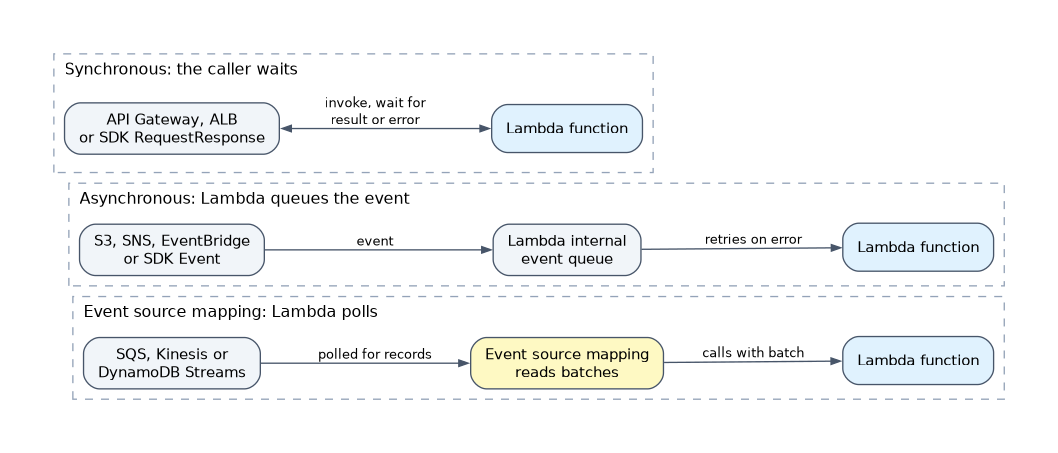
| Model | Who calls Lambda | Examples | On failure |
|---|---|---|---|
| Synchronous | The caller waits | API Gateway, ALB, SDK RequestResponse | Error goes back to the caller |
| Asynchronous | The service queues the event | S3, SNS, EventBridge, SDK Event | Lambda retries, then DLQ or destination |
| Event source mapping | Lambda polls the source | SQS, Kinesis, DynamoDB Streams | Depends on the source |
From code, the Invoke call with InvocationType="Event" starts an asynchronous run, and RequestResponse waits for the result.
An event source mapping is a Lambda resource that reads batches and calls your function synchronously. The function's execution role needs read permission on the source, for example sqs:ReceiveMessage and sqs:DeleteMessage. Managed policies such as AWSLambdaSQSQueueExecutionRole cover these.
Useful mapping settings follow.
- Batch size and batching window control records per invocation.
- Filter criteria drop unwanted events before they invoke the function.
- Partial batch response (
ReportBatchItemFailures) lets the function return only the failed item IDs, so the rest are not retried. - For SQS, set the queue visibility timeout to at least six times the function timeout, and put the dead letter queue on the source queue.
Kinesis Data Streams
A stream is split into shards. The partition key you send picks the shard, and records with the same key keep their order.
- In provisioned mode each shard accepts up to 1 MB per second or 1,000 records per second of writes, and serves 2 MB per second of reads. On demand mode scales shards for you.
- Records are kept for 24 hours by default, and retention can be extended up to 365 days.
- A low cardinality partition key creates a hot shard and
ProvisionedThroughputExceededException. Choose a key with many distinct values. - Consumers share a shard's read throughput. Enhanced fan out gives each registered consumer dedicated throughput.
A Lambda mapping on a stream retries a failing batch until it succeeds or the records expire, and that blocks the shard. Limit the damage with MaximumRetryAttempts, MaximumRecordAgeInSeconds, BisectBatchOnFunctionError (split the batch to isolate the bad record) and an on failure destination.
Amazon Data Firehose is the managed delivery path. It buffers records and writes them to S3, OpenSearch Service and other targets, with optional Lambda transformation. There are no shards to manage, and no replay.
How the exam asks about this
- "Process each image uploaded to S3 with the least operational overhead." -> S3 event notification to a Lambda function, with a prefix filter.
- "Ordered clickstream records must be read by several independent applications and replayed." -> Kinesis Data Streams, not SQS.
- "One bad record keeps a Kinesis consumer stuck." -> Set maximum retry attempts or record age, bisect on error, and an on failure destination.
What to remember for the exam
- S3 Event Notifications go to SNS, SQS (not FIFO), Lambda or EventBridge.
- EventBridge uses rules with event patterns, and retries target delivery for 24 hours by default.
- Lambda is called synchronously, asynchronously, or by an event source mapping that polls.
- The mapping's execution role needs permission to read the source.
- SQS visibility timeout should be at least six times the function timeout.
- Kinesis keeps order per shard, so the partition key matters. Firehose delivers but cannot replay.
- Use partial batch responses so that one bad message does not retry the whole batch.
SQS and Kinesis mappings deliver at least once. Your function can see the same record twice, so make it idempotent.
Common mistakes
Using SQS where replay is needed. SQS deletes a message once processed. Multiple readers or replays call for Kinesis.
Picking a low cardinality partition key. A key like a country code puts most traffic on a few shards.
Forgetting trigger permissions. The source must be allowed to invoke the function, and a mapping's role must be allowed to read the source.
Check yourself
Which S3 notification destinations are supported?
SNS topics, SQS standard queues, Lambda functions and EventBridge; FIFO queues are not supported directly.
Why does a failing Kinesis record block processing?
The mapping keeps retrying the batch in order until it succeeds or the record expires, unless you limit retries or bisect.
What does Firehose do that Kinesis Data Streams does not?
It delivers buffered records to targets like S3 with no shards to manage, but it cannot replay data.
Topic 3 of 7 in Development with AWS Services
Test yourself on Development with AWS Services
The full AWS DVA-C03 question bank has 850 questions, with timed practice exams and an explanation for every answer.
This study guide is independent and is not affiliated with, endorsed by, or sponsored by AWS. Vendor names, certification names and exam codes are trademarks of their respective owners and are used for identification only.