Monitoring and Logging · Topic 2 of 5
Log Collection and Storage
Design log pipelines with CloudWatch Logs, retention, subscription filters, Firehose, cross account aggregation, S3 archives and sources like VPC flow logs
- 5 min
- Includes a diagram
- Log groups default to never expire, so set retention to control cost.
- Subscription filters deliver in near real time to Kinesis, Firehose or Lambda.
- Metric filters turn log patterns into metrics for alarms, but only for new data.
What it is
Logs record what happened inside applications and infrastructure. Collecting them well means getting every source into a central place, keeping them for the right time, controlling who can read them and making them searchable.
Amazon CloudWatch Logs is the main collection service. It organizes data into log groups (one per application or source) and log streams (one per instance or container inside the group).
How it works
Where logs come from
| Source | How it reaches CloudWatch Logs |
|---|---|
| EC2 and on premises servers | The CloudWatch agent tails log files |
| Lambda | Automatically, using the function role |
| ECS containers | The awslogs log driver, or FireLens with Fluent Bit for routing to several targets |
| EKS | An agent such as Fluent Bit running on nodes |
| VPC Flow Logs | Delivered to CloudWatch Logs, S3 or Firehose |
| Route 53 Resolver query logs | CloudWatch Logs, S3 or Firehose |
| API Gateway, AWS WAF, many others | Their own logging settings, with targets that depend on the service |
| Application Load Balancer access logs | S3 only |
| CloudTrail | S3, with optional delivery to CloudWatch Logs |
Choose S3 as the destination for high volume logs that you analyse in batch, and CloudWatch Logs where you need near real time search, metric filters or alarms.
Retention, encryption and cost
By default a log group keeps data forever, which can become a large cost. Set a retention period per group.
aws logs put-retention-policy --log-group-name /app/web --retention-in-days 30Associate a customer managed KMS key with a log group to control encryption, and use data protection policies to detect and mask sensitive data such as personal identifiers. The Infrequent Access log class costs less for logs you rarely query.
Metric filters
A metric filter scans incoming log events for a pattern and increments a CloudWatch metric, which an alarm can then watch.
aws logs put-metric-filter --log-group-name /app/web --filter-name errors \
  --filter-pattern '"ERROR"' \
  --metric-transformations metricName=ErrorCount,metricNamespace=MyApp,metricValue=1
Metric filters apply only to data ingested after the filter exists, and they do not change old data.
Subscription filters
A subscription filter streams matching log events in near real time to a destination.
| Destination | Typical purpose |
|---|---|
| Kinesis Data Streams | Custom real time processing at scale |
| Amazon Data Firehose | Load into S3, OpenSearch, Splunk or another HTTP endpoint |
| Lambda | Transform or react to events |
aws logs put-subscription-filter --log-group-name /app/web \
  --filter-name to-firehose --filter-pattern "" \
  --destination-arn arn:aws:firehose:us-east-1:111122223333:deliverystream/central-logs \
  --role-arn arn:aws:iam::111122223333:role/CWLtoFirehose
A log group can have a small number of subscription filters, so route to one stream and fan out from there if many consumers need the data.
Central logging across accounts
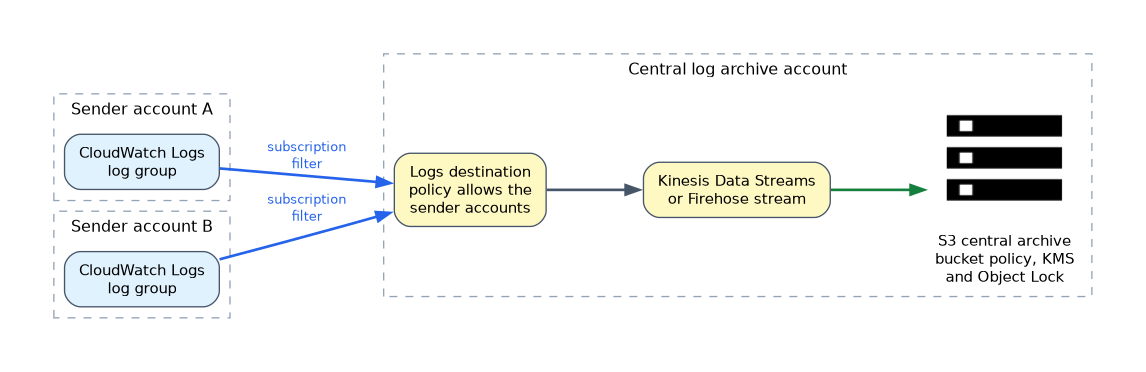 Large organizations send logs from every account to a central logging account. The receiving account creates a destination, backed by Kinesis Data Streams or Firehose, with a policy that allows the sender accounts. Each sender creates a subscription filter that targets the destination.
Control Tower creates a Log Archive account for this purpose, and CloudTrail and Config also deliver there. Protect it with a restrictive bucket policy, KMS encryption and S3 Object Lock for tamper resistance.
Export versus streaming
Exporting a log group to S3 with a create export task is a batch operation and not real time. Use it for ad hoc archiving. For continuous delivery, use a subscription filter with Firehose, which can compress, convert and partition data by time before writing to S3.
Analysis in place
Once logs sit in S3, Amazon Athena queries them with SQL and the Glue Data Catalog keeps the schema. For interactive search and dashboards across large volumes, Amazon OpenSearch Service is the usual choice. For queries inside CloudWatch, use CloudWatch Logs Insights, covered on a later page.
Lifecycle for archives
An S3 lifecycle rule moves aging logs to cheaper storage classes and then expires them, matching your compliance period. Partition data by date so queries scan less and cost less.
What to remember for the exam
- Log groups default to never expire, so set retention to control cost.
- Subscription filters deliver in near real time to Kinesis, Firehose or Lambda.
- Metric filters turn log patterns into metrics for alarms, but only for new data.
- Cross account aggregation uses a destination in the central account and subscription filters in senders.
- ALB access logs go to S3, not CloudWatch Logs.
- ECS uses the
awslogsdriver, and FireLens routes container logs to other targets. - Export tasks are batch, so use Firehose for continuous delivery to S3.
- Use S3 Object Lock and KMS on the central archive for tamper resistance and encryption.
- Athena queries log data in S3; OpenSearch handles interactive search at scale.
When a question mentions "near real time" delivery to S3 or OpenSearch, the answer is a subscription filter to Firehose, not an export task.
Common mistakes
Leaving retention unset. Log costs grow quietly because nothing expires.
Using export tasks for streaming. They run on demand and are not continuous.
Sending every account's logs to its own bucket. Central search and audit become hard, and a compromised account can delete its own evidence.
Expecting metric filters to backfill. They only see events that arrive after creation.
Logs often contain secrets and personal data, so restrict read access and use data protection policies before sharing a log group widely.
Check yourself
Which feature streams CloudWatch Logs to S3 in near real time?
A subscription filter that targets Amazon Data Firehose, which writes to S3.
Where do Application Load Balancer access logs go?
To an S3 bucket, since the load balancer does not write them to CloudWatch Logs.
How do you collect logs from many accounts centrally?
Create a destination in a central account and add subscription filters in each source account.
Topic 2 of 5 in Monitoring and Logging
Test yourself on Monitoring and Logging
The full AWS DOP-C02 question bank has 844 questions, with timed practice exams and an explanation for every answer.
This study guide is independent and is not affiliated with, endorsed by, or sponsored by AWS. Vendor names, certification names and exam codes are trademarks of their respective owners and are used for identification only.