Data Security and Governance · Topic 3 of 7
Lake Formation Permissions
Control data lake access with AWS Lake Formation: registered locations, column, row and cell permissions, LF tags, cross account sharing and IAM.
- 5 min
- Includes a diagram
- Lake Formation grants permissions on catalog databases, tables, columns and rows, not only on S3 paths.
- Data filters give row, column and cell level security.
- LF tags give scalable tag based access control.
What it is
AWS Lake Formation adds central, fine grained access control to a data lake. Instead of writing S3 and IAM policies for every team, you grant permissions on catalog resources: databases, tables, columns and rows.
Engines that integrate with Lake Formation, such as Athena, Redshift Spectrum, EMR and Glue, check those grants when they read the data.
How it works
Registering locations
You register an S3 location with Lake Formation, and it then manages access to the data under that path using a service role. After registration, engines receive temporary, narrowly scoped credentials from Lake Formation, so users do not need direct S3 permissions on the data.
Grants on catalog resources
Lake Formation uses a GRANT and REVOKE model similar to a relational database. You grant permissions to IAM users, roles, groups and, through IAM Identity Center, to directory users.
| Level | Permission examples |
|---|---|
| Database | Create table, describe |
| Table | Select, insert, delete, alter, describe |
| Column | Select on named columns only, or all columns except some |
| Row | Select with a row filter that returns only matching rows |
| Cell | A data filter that combines column and row restrictions |
A data filter defines which columns and which rows a principal may see. This is the Lake Formation answer to "analysts in each region should see only their region's rows, without the national ID column".
aws lakeformation grant-permissions \
  --principal DataLakePrincipalIdentifier=arn:aws:iam::123456789012:role/analyst \
  --permissions SELECT \
  --resource '{"Table":{"DatabaseName":"sales","Name":"orders"}}'
LF tags and tag based access control
Lake Formation tags (LF tags) are key value pairs attached to databases, tables and columns, such as sensitivity=high. You grant a principal access to all resources that carry certain tag values.
This scales better than naming tables one by one. A new table with the right tag is covered by existing grants, which cuts administration for large catalogs.
How IAM and Lake Formation combine
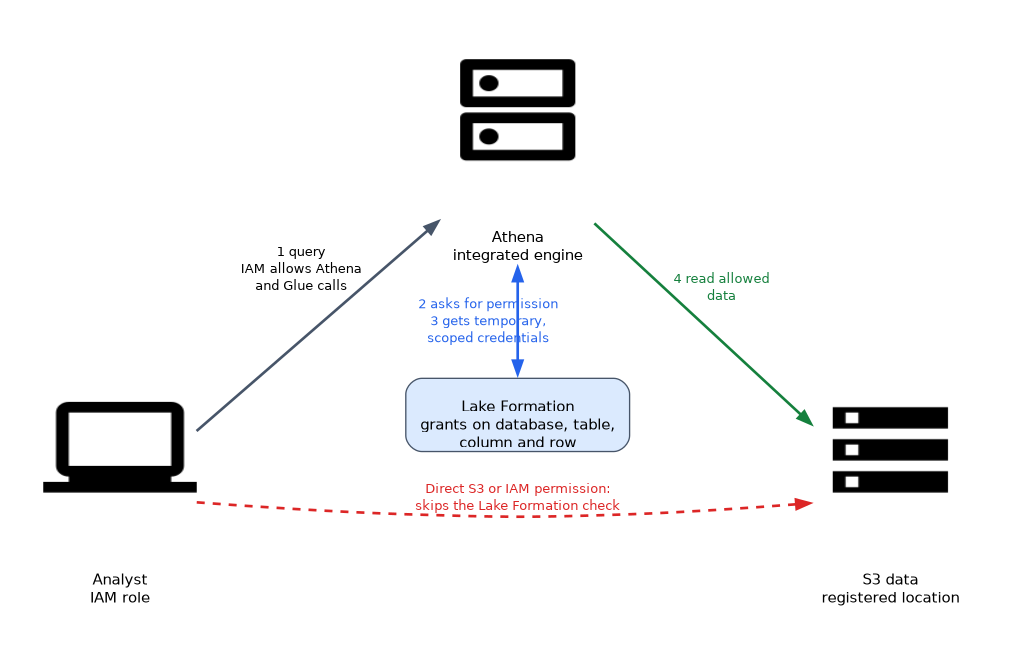 Both layers apply. The caller needs IAM permission to call the service API, for example Athena and Glue actions, and Lake Formation must grant access to the data resource.
Lake Formation also has a hybrid access mode, so you can adopt it for selected databases and tables while existing IAM and S3 based access continues for others. A common pitfall is leftover IAM permissions that let a user bypass Lake Formation, because S3 access granted by IAM still works for tools that read S3 directly.
Cross account sharing
You can share databases and tables with another account or an organization.
The consumer account receives a resource link in its own catalog and can grant its own users access. Sharing works by granting to the account, with AWS Resource Access Manager (RAM) behind the scenes. The consumer's data lake administrator can then grant its own users access.
Lake Formation and other services
| Service | Behavior |
|---|---|
| Athena | Honors table, column, row and cell permissions |
| Redshift Spectrum | Uses Lake Formation for external tables in the catalog |
| EMR | Supported when the cluster is set up for Lake Formation |
| Glue ETL | Jobs run with a role that Lake Formation authorizes |
Lake Formation can also ingest data through blueprints and governs the Glue Data Catalog in the same account. It records permission changes and data access in CloudTrail, which supports audits.
Redshift data sharing and governance
Redshift data sharing controls which schemas and tables a consumer cluster can read. Redshift also has its own row level security and dynamic data masking policies. Pick the mechanism that matches where the data lives: Lake Formation for lake tables, Redshift native features for warehouse tables.
Operational tips
Start with a small number of admin roles, use LF tags for scale, and test with a restricted user before rollout. Remove broad grants to the special group named IAMAllowedPrincipals when you want Lake Formation to be the only gatekeeper.
What to remember for the exam
- Lake Formation grants permissions on catalog databases, tables, columns and rows, not only on S3 paths.
- Data filters give row, column and cell level security.
- LF tags give scalable tag based access control.
- Register an S3 location so Lake Formation can manage and vend access to it.
- IAM and Lake Formation both apply. Leftover IAM or S3 access can bypass Lake Formation.
- Cross account sharing uses resource links and grants to the other account.
- Athena, Redshift Spectrum, EMR and Glue honor Lake Formation permissions.
- Lake Formation actions appear in CloudTrail for audit.
"Hide columns and rows from analysts with one central control" points to Lake Formation data filters.
Common mistakes
Granting broad S3 access too. Direct S3 permissions let a user skip Lake Formation checks.
Naming every table in grants. Use LF tags to avoid updating grants for each new table.
Forgetting the IAM side. The user still needs IAM permission to call Athena or Glue.
Using Lake Formation for warehouse internals. Tables loaded inside Redshift use Redshift grants.
Leaving the default IAMAllowedPrincipals grants in place means IAM alone still controls access, so Lake Formation permissions may not be enforced as you expect.
Check yourself
Which Lake Formation feature restricts both rows and columns?
A data filter, which gives cell level security.
What lets you grant access by tag instead of by table name?
LF tags (tag based access control).
Why might a user bypass Lake Formation?
They hold direct S3 or IAM permissions that let them read the data without the Lake Formation check.
Topic 3 of 7 in Data Security and Governance
Test yourself on Data Security and Governance
The full AWS DEA-C01 question bank has 845 questions, with timed practice exams and an explanation for every answer.
This study guide is independent and is not affiliated with, endorsed by, or sponsored by AWS. Vendor names, certification names and exam codes are trademarks of their respective owners and are used for identification only.