Data Operations and Support · Topic 3 of 6
QuickSight and DataBrew
Prepare data visually with Glue DataBrew and publish dashboards in Amazon QuickSight, covering SPICE, direct query, refresh and row level security.
- 5 min
- Includes a diagram
- DataBrew is a visual, serverless data preparation tool with recipes and jobs.
- A DataBrew profile job produces statistics on data quality.
- QuickSight is the AWS BI service for dashboards.
What it is
Analysis often ends in a chart or a clean table that a business user can read. Two AWS services cover that last mile without writing much code.
AWS Glue DataBrew is a visual data preparation tool for cleaning and shaping data. Amazon QuickSight is a business intelligence (BI) service for building interactive dashboards.
How it works
AWS Glue DataBrew
DataBrew lets an analyst explore and transform data in a point and click interface. It includes a large library of built in transformations, such as removing duplicates, filling missing values, changing types, splitting columns and standardizing formats.
| Concept | Meaning |
|---|---|
| Dataset | A pointer to the source data in S3, a catalog table, or a database |
| Project | An interactive session to try transformations on a sample |
| Recipe | The saved, ordered list of transformation steps |
| Job | Applies a recipe to the full dataset, or profiles the data |
| Data profile | Statistics on columns, missing values, outliers and correlations |
A recipe job reads the source, applies the recipe and writes results, for example to S3 in Parquet. Recipes are versioned and reusable, and jobs can run on a schedule. DataBrew is serverless and needs no cluster.
DataBrew also has transformations for personal data, such as masking, hashing and substituting values. It can define data quality rules and run a profile job to check them. The data quality page covers these.
Pick DataBrew when the user is an analyst who prefers a visual tool and the transformations are standard. Pick Glue ETL when code, custom logic or very large scale is needed.
Amazon QuickSight
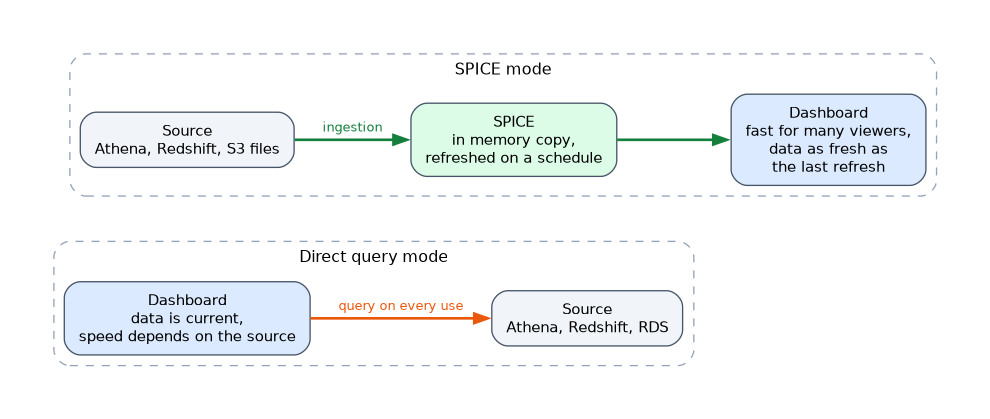 QuickSight connects to many data sources, including Athena, Redshift, RDS, S3 files with a manifest, and SaaS applications. You build a dataset, create analyses with visuals, then publish a dashboard to share with others.
There are two ways to read data.
| Mode | Behavior |
|---|---|
| SPICE | Data is imported into QuickSight's in memory engine for fast, scalable queries, and refreshed on a schedule |
| Direct query | QuickSight sends queries to the source each time, so data is current, but speed depends on the source |
SPICE (Super fast, Parallel, In memory Calculation Engine) reduces load on the source and suits dashboards with many viewers. Direct query suits data that must be fresh, or data too large to import.
Refreshing and sharing
SPICE datasets refresh on a schedule or by API, with an ingestion. A failed refresh leaves old data in place, which is a common cause of a stale dashboard. Dashboards can be shared with users and groups, embedded in applications and sent as email reports.
Security in QuickSight
QuickSight has its own access to AWS resources. You must allow it to use S3 buckets and services such as Athena and Redshift in the QuickSight settings, and a missing permission is a frequent cause of "cannot access data" errors. Lake Formation permissions also apply when the source is a governed catalog table.
Row level security (RLS) in a dataset restricts which rows each user or group sees. RLS and column level security are features of the Enterprise edition. For private databases, QuickSight can connect through a VPC connection.
Typical analysis flow
A common design is S3 data lake, Glue Data Catalog, Athena for queries, and QuickSight for dashboards. For heavy BI use with many users, the source may be Redshift instead. DataBrew or Glue jobs prepare data upstream when the raw format is messy.
Other analysis options
Athena notebooks and EMR notebooks suit code based exploration. Amazon OpenSearch Service dashboards suit log and search data. The exam usually expects QuickSight for business dashboards.
What to remember for the exam
- DataBrew is a visual, serverless data preparation tool with recipes and jobs.
- A DataBrew profile job produces statistics on data quality.
- QuickSight is the AWS BI service for dashboards.
- SPICE imports data for fast, scalable reads. Direct query reads from the source each time.
- SPICE datasets must be refreshed on a schedule or by API.
- QuickSight needs permission to reach S3, Athena and Redshift in its own settings.
- Row level security limits which rows users see in a dataset.
- Use Glue ETL instead of DataBrew for code heavy, large or custom transformations.
A dashboard that is fast for many viewers but shows yesterday's data points to a SPICE dataset with a refresh schedule that is too slow.
Common mistakes
Blaming the query for a stale dashboard. The usual reason is a SPICE refresh that has not run or has failed.
Using direct query for heavy dashboards. Many viewers can overload the source database or warehouse.
Forgetting QuickSight's own permissions. IAM and Lake Formation can be correct while QuickSight still lacks S3 access.
Using DataBrew for pipelines with complex logic. It is built for standard transformations, not custom code.
Row level security rules depend on a rules dataset with the right user or group names, so a typo can hide data from everyone or expose too much.
Check yourself
What is the saved list of steps in DataBrew called?
A recipe.
When would you choose SPICE over direct query?
For fast dashboards with many viewers and less load on the source, accepting a refresh delay.
Why might QuickSight fail to read an S3 bucket that IAM allows?
QuickSight itself has not been granted access to that bucket in its settings.
Topic 3 of 6 in Data Operations and Support
Test yourself on Data Operations and Support
The full AWS DEA-C01 question bank has 845 questions, with timed practice exams and an explanation for every answer.
This study guide is independent and is not affiliated with, endorsed by, or sponsored by AWS. Vendor names, certification names and exam codes are trademarks of their respective owners and are used for identification only.