Data Ingestion and Transformation · Topic 6 of 8
Step Functions and Glue Workflows
Orchestrate data pipelines with AWS Step Functions and Glue workflows, using states, retries, error handling, service integrations and workflow types.
- 4 min
- Includes a diagram
- Step Functions state machines are defined in Amazon States Language and have Task, Choice, Parallel, Map and Wait states.
RetryandCatchhandle errors inside the state machine..syncintegrations wait for Glue or EMR jobs to finish.
What it is
Orchestration means coordinating the steps of a pipeline: what runs first, what runs in parallel, what happens on failure and when the pipeline is done. A pipeline without orchestration is a set of jobs that someone starts by hand.
AWS offers several orchestrators. This page covers the two most tied to AWS services: AWS Step Functions and AWS Glue workflows.
How it works
AWS Step Functions
Step Functions runs a state machine, which is a workflow written in Amazon States Language (ASL), a JSON based format. You design it visually in Workflow Studio or write the JSON yourself.
| State type | Purpose |
|---|---|
| Task | Do work, such as call a Lambda function or start a Glue job |
| Choice | Branch on a condition |
| Parallel | Run branches at the same time |
| Map | Run the same steps for each item in a list |
| Wait | Pause for a time or until a timestamp |
| Pass, Succeed, Fail | Move data along or end the run |
Step Functions has direct service integrations with Lambda, Glue, Athena, EMR, ECS (Elastic Container Service), SQS, SNS, DynamoDB and many others. Adding .sync to a Glue or EMR task makes the state machine wait until the job finishes, instead of moving on once the job starts.
{
  "StartAt": "RunGlueJob",
  "States": {
    "RunGlueJob": {
      "Type": "Task",
      "Resource": "arn:aws:states:::glue:startJobRun.sync",
      "Parameters": { "JobName": "curate-orders" },
      "Retry": [{ "ErrorEquals": ["States.ALL"], "IntervalSeconds": 60,
                  "MaxAttempts": 2, "BackoffRate": 2.0 }],
      "Catch": [{ "ErrorEquals": ["States.ALL"], "Next": "NotifyFailure" }],
      "Next": "Done"
    },
    "NotifyFailure": { "Type": "Task",
      "Resource": "arn:aws:states:::sns:publish",
      "Parameters": { "TopicArn": "arn:aws:sns:us-east-1:123456789012:etl-alerts",
                      "Message": "Glue job failed" },
      "End": true },
    "Done": { "Type": "Succeed" }
  }
}
Retry and Catch
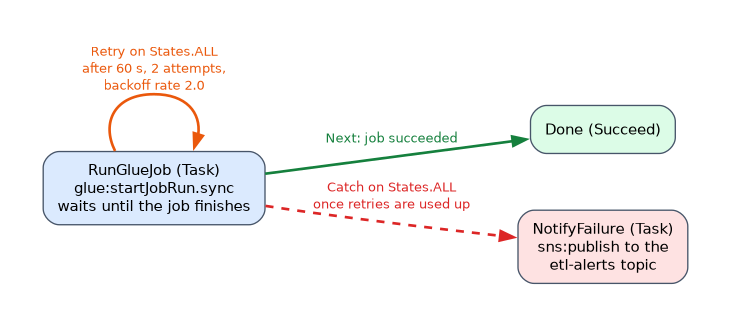
Retry repeats a failed state with an interval and a backoff rate. Catch sends the run to a fallback state once retries are used up. Together they give resilient pipelines without custom code.
Standard and Express workflows
| Type | Duration | Typical use |
|---|---|---|
| Standard | Up to one year, full execution history | Long, auditable data pipelines, human approval steps |
| Express | Up to five minutes, very high rate of starts | Short, high volume event processing |
For long ETL pipelines, choose Standard. The Map state has a distributed mode that can process large numbers of S3 objects in parallel child workflows.
Waiting for outside work
A callback pattern uses a task token. The state machine pauses at a task, passes the token to another system, and resumes when that system returns the token with a success or failure call. This suits human approval or a job that runs outside AWS.
AWS Glue workflows
A Glue workflow chains Glue triggers, crawlers and jobs in one graph that you can view and monitor. A trigger can be on demand, on a schedule or conditional on the success or failure of earlier jobs and crawlers. Workflows are the simplest option when the whole pipeline is made of Glue parts.
Choosing between them
| Situation | Choice |
|---|---|
| Pipeline made only of Glue crawlers and jobs | Glue workflow |
| Mixed services such as Lambda, Athena, EMR and SNS | Step Functions |
| Complex branching, retries, parallel work | Step Functions |
| Existing Apache Airflow code | MWAA (next page) |
What to remember for the exam
- Step Functions state machines are defined in Amazon States Language and have Task, Choice, Parallel, Map and Wait states.
RetryandCatchhandle errors inside the state machine..syncintegrations wait for Glue or EMR jobs to finish.- Standard workflows run up to a year and suit long pipelines. Express workflows run up to five minutes.
- A task token enables callbacks and human approval.
- Glue workflows orchestrate Glue crawlers and jobs only.
- Step Functions gives a visual execution history that helps debugging.
- Send failure alerts to SNS or EventBridge from a Catch state.
For a mixed pipeline of Lambda, Glue and Athena with error handling, Step Functions is the usual best answer.
Common mistakes
Forgetting .sync. Without it, the next state starts as soon as the Glue job is requested, not when it is done.
Using Express for long pipelines. Express workflows stop at five minutes.
Letting errors fail silently. A state with no Catch and no alarm ends the run in failure with no notice to the team.
Choosing Glue workflows for non Glue steps. They orchestrate Glue components, so a Lambda or Athena step needs Step Functions.
A Parallel state fails as a whole if one branch fails and is not caught, so handle errors in each branch.
Check yourself
What makes Step Functions wait for a Glue job to finish?
Using the
.syncintegration pattern on the Task state.Which workflow type fits a pipeline that runs for hours and needs a full history?
Standard.
Which orchestrator fits a pipeline made only of Glue jobs and crawlers?
A Glue workflow.
Topic 6 of 8 in Data Ingestion and Transformation
Test yourself on Data Ingestion and Transformation
The full AWS DEA-C01 question bank has 845 questions, with timed practice exams and an explanation for every answer.
This study guide is independent and is not affiliated with, endorsed by, or sponsored by AWS. Vendor names, certification names and exam codes are trademarks of their respective owners and are used for identification only.