Security and Compliance · Topic 3 of 5
IAM and Access Management
Learn AWS Identity and Access Management for CLF-C02: users, groups, roles, policies, root user, MFA, least privilege and IAM Identity Center.
- 4 min
- Includes a diagram
- Use roles, not long term keys, for applications and AWS services that need access.
- The root user has full access, so protect it with MFA and use it rarely.
- IAM is free to use and is a global service, not tied to one Region.
What it is
AWS Identity and Access Management (IAM) controls who can sign in to an AWS account and what they are allowed to do. It is free to use and applies across the whole account.
IAM answers two questions. Authentication asks who you are, and authorisation asks what you may do.
The exam focuses on the building blocks and on good security habits, not on writing detailed policies.
How it works
The building blocks
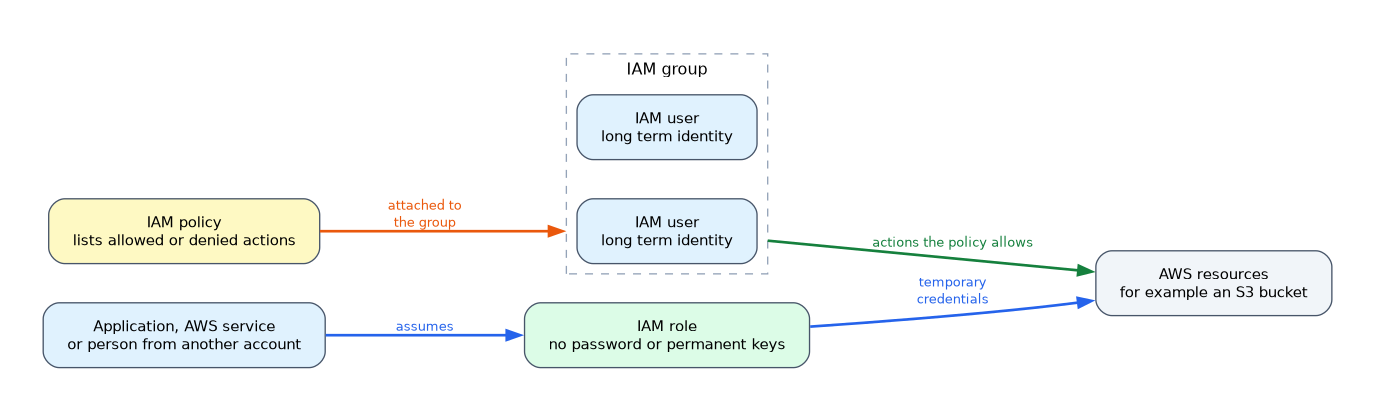
| Item | What it is |
|---|---|
| Root user | The first identity created with the account, with full access to everything |
| IAM user | A long term identity for one person or application |
| IAM group | A collection of users that share permissions |
| IAM role | An identity with permissions that someone or something temporarily assumes |
| IAM policy | A document that lists allowed or denied actions |
Users get permissions from policies attached to them or to their groups. A group cannot contain another group.
A role has no password or permanent keys. It gives temporary credentials, which suits applications, AWS services and people from other accounts.
Policies
Most policies are written in JSON (JavaScript Object Notation). This example lets the holder read objects in one Amazon Simple Storage Service (S3) bucket.
{
  "Version": "2012-10-17",
  "Statement": [
    {
      "Effect": "Allow",
      "Action": "s3:GetObject",
      "Resource": "arn:aws:s3:::example-bucket/*"
    }
  ]
}
By default, everything is denied. An explicit deny overrides an allow.
Least privilege
The principle of least privilege means giving only the permissions needed to do a job, and no more. Start narrow and add access when it is needed.
The root user
The root user can do anything, including closing the account. Keep it for the few tasks that require it, and protect it with multi factor authentication (MFA).
Do not use the root user for daily work and do not create access keys for it.
Multi factor authentication
MFA asks for something you know (a password) and something you have (a code from a device). It reduces the harm if a password is stolen.
Ways to access AWS
| Method | Used with |
|---|---|
| AWS Management Console | A user name and password, preferably with MFA |
| AWS Command Line Interface (CLI) and software development kits (SDKs) | Access keys, or temporary credentials from a role |
Access keys should be rotated and never put in code or shared.
Single sign on and federation
AWS IAM Identity Center lets people sign in once and reach several AWS accounts and applications from one place. It can connect to an existing corporate directory.
Federation means trusting an outside identity provider, so staff use their existing login instead of separate IAM users. Amazon Cognito serves a different need: it manages sign up and sign in for the customers of your web or mobile app.
Password policy and credential review
An account password policy sets rules such as length and expiry. The IAM credential report lists users and the state of their credentials, which helps with audits.
What to remember for the exam
- Use roles, not long term keys, for applications and AWS services that need access.
- The root user has full access, so protect it with MFA and use it rarely.
- IAM is free to use and is a global service, not tied to one Region.
- Policies are JSON documents. An explicit deny overrides any allow.
- Groups simplify managing permissions for many users.
- Least privilege means granting only what is needed.
- MFA adds a second proof of identity.
- IAM Identity Center provides single sign on across accounts. Cognito is for application end users.
If a question mentions an Amazon Elastic Compute Cloud (EC2) instance that needs to read from S3, the safe answer is an IAM role attached to the instance, not access keys stored on the server.
Common mistakes
Using the root user every day. It should be locked away with MFA after the account is set up.
Giving broad permissions to save time. This breaks least privilege and raises the risk if the credentials leak.
Embedding access keys in code. Keys in code can leak, so use roles and temporary credentials instead.
Confusing IAM Identity Center with Cognito. Identity Center is for your workforce, while Cognito is for your app's customers.
IAM roles are not the same as IAM groups. A group is a set of users, while a role is a temporary identity that can be assumed.
Check yourself
What principle means giving only the permissions needed for a task?
The principle of least privilege.
Which IAM item is best for letting an EC2 instance access S3 without stored keys?
An IAM role attached to the instance.
What should you do to protect the AWS account root user?
Enable multi factor authentication, avoid daily use and do not create access keys for it.
Topic 3 of 5 in Security and Compliance
Test yourself on Security and Compliance
The full AWS CLF-C02 question bank has 832 questions, with timed practice exams and an explanation for every answer.
This study guide is independent and is not affiliated with, endorsed by, or sponsored by AWS. Vendor names, certification names and exam codes are trademarks of their respective owners and are used for identification only.