Operational Efficiency and Optimization for GenAI Applications · Topic 1 of 7
Token Efficiency and Intelligent Caching
Cut FM token spend with CountTokens, context pruning and maxTokens limits, then skip calls with Bedrock prompt caching, semantic caching and hashing.
- 6 min
- Includes a diagram
- CountTokens estimates input tokens before inference and is free; the Converse
usageblock reports actual tokens. - maxTokens and stopSequences limit output; oversized maxTokens wastes quota.
- Prompt caching reuses a static prefix with checkpoints, a TTL that resets on hits, cheaper reads and possibly pricier writes.
What it is
Foundation models on Amazon Bedrock bill on demand by input and output tokens. Every token you trim from a prompt, and every call you avoid, lowers cost and usually latency too.
Token efficiency shrinks what you send and what you get back. Intelligent caching goes further: it reuses work the model already did, either part of the prompt (prompt caching) or the whole answer (response caching).
How it works
Measuring tokens first
You cannot reduce what you do not measure. Two sources give token counts:
- The CountTokens API returns the input token count a request would use for a given model, before you run it. It does not incur charges, and the count is model-specific because each model tokenizes differently.
- Every Converse response includes a
usageblock withinputTokens,outputTokensandtotalTokens. Store these per user, feature or tenant to see who is spending.
Reducing input tokens
| Technique | What it does | Watch out for |
|---|---|---|
| Context window optimization | Send only the turns and documents the task needs | Dropping a fact the answer depends on |
| Context pruning | Drop old chat turns, keep a running summary of earlier turns | Summaries lose detail; keep key facts verbatim |
| Prompt compression | Shorter instructions, fewer few-shot examples, no repeated boilerplate | Quality drop; measure before and after |
| Smaller retrieval | Lower the number of RAG chunks or use smaller chunks | Recall drop if the right chunk falls out |
Limiting output tokens
Output tokens usually cost more than input tokens, so response size controls matter.
- Set maxTokens in the Converse
inferenceConfigto cap the answer length. - Add stopSequences so generation ends at a known marker.
- Ask for a specific format, such as "answer in three bullets" or a JSON schema, so the model does not ramble.
Do not set maxTokens far above what you need "just in case". On-demand throttling reserves input tokens plus max_tokens up front, so an oversized maxTokens burns tokens-per-minute quota even when the answer is short.
Bedrock prompt caching
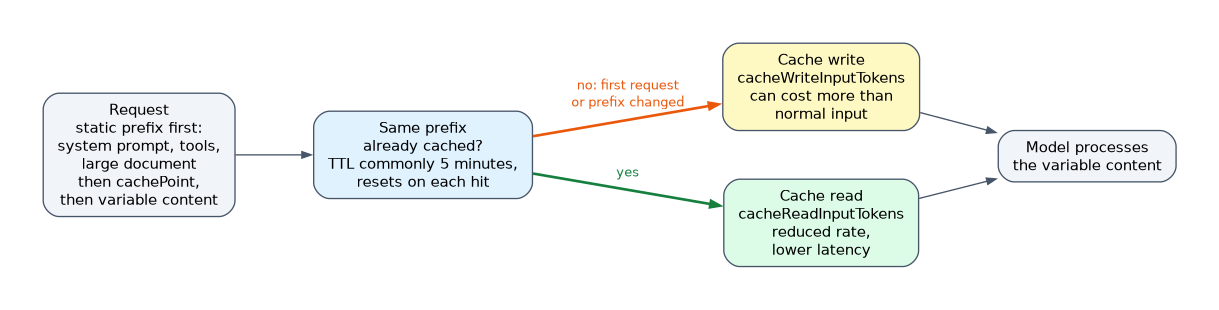 Prompt caching stores a long, repeated prompt prefix, such as a system prompt, tool definitions or a large document, so later requests read it from cache instead of reprocessing it. It lowers both input cost and latency.
- With explicit caching you mark cache checkpoints: a
cachePointblock in the Converse API, orcache_controlin the InvokeModel body for Claude models. - A checkpoint is only created when the prefix before it meets a model-specific minimum token count.
- The cache has a TTL, commonly 5 minutes, that resets on each hit. Some models also support a 1-hour TTL.
- Cache reads are billed at a reduced rate; cache writes can cost more than normal input tokens. The response reports
cacheReadInputTokensandcacheWriteInputTokens. - Prompt caching works with on-demand inference, not with batch inference.
Put static content first and variable content last. Any change in the prefix causes a cache miss for everything after it.
Response caching: skip the call entirely
| Pattern | Key | Hit when | Best for |
|---|---|---|---|
| Deterministic request hashing | Hash of normalized model ID, parameters and prompt | Exact same request | Repeated identical calls, low-temperature tasks |
| Result fingerprinting | Hash of the input content, such as a document | Same document submitted again | Re-summarizing or re-classifying unchanged files |
| Semantic caching | Embedding of the user question | A new question is close in meaning to a cached one | FAQ-style chat where users ask the same thing in different words |
| Edge caching | URL and cache key at CloudFront or API Gateway | Same cacheable GET request | Precomputed, non-personal content close to users |
Deterministic hashing normalizes the request (trim whitespace, sort JSON keys, lowercase where safe), hashes it, and looks the hash up in a store such as DynamoDB or ElastiCache with a TTL.
Semantic caching embeds the incoming question, runs a vector similarity search against cached questions, and returns the stored answer when the score passes a threshold. A vector-capable store such as Amazon MemoryDB or Amazon OpenSearch Service holds the cache.
The threshold is the key setting. Too loose returns wrong answers to different questions; too strict gives few hits. Do not semantic-cache personalized or permission-scoped answers without the user or tenant in the key.
How the exam asks about this
- "Every request repeats the same 20-page policy document and a long system prompt" -> Bedrock prompt caching with a checkpoint after the static content.
- "Users ask the same support questions in many different wordings" -> semantic cache with an embedding similarity threshold.
- "The team must know the cost of a prompt before sending it" -> the CountTokens API.
Common mistakes
Putting the user question before the static context. The variable part breaks the prefix, so the cache never hits. Order prompts as tools, system, static documents, then the user turn.
Using exact-match caching for paraphrased questions. A hash only hits on identical input. Paraphrases need semantic caching.
Caching without a TTL or version in the key. When the source data, prompt template or model changes, stale answers keep being served. Include a version in the key and expire entries.
What to remember for the exam
- CountTokens estimates input tokens before inference and is free; the Converse
usageblock reports actual tokens. - maxTokens and stopSequences limit output; oversized maxTokens wastes quota.
- Prompt caching reuses a static prefix with checkpoints, a TTL that resets on hits, cheaper reads and possibly pricier writes.
- Prompt caching is for on-demand calls, not batch inference.
- Exact hashing for identical requests, semantic caching for similar meaning, edge caching for public cacheable responses.
- Cache keys must include anything that changes the answer: tenant, user permissions, prompt version, model.
If the scenario says "reduce cost AND latency for a long repeated context", prompt caching is the answer. If it says "avoid calling the model at all for repeated questions", it is a response cache.
Check yourself
Why should static content come before the user question in a cached prompt?
Prompt caching matches a prefix, so any change early in the prompt causes a miss for everything after it.
When does semantic caching beat deterministic request hashing?
When users ask the same question in different words, because the embedding similarity still matches while an exact hash does not.
How can an oversized maxTokens hurt a workload that is not near its cost budget?
Throttling reserves input tokens plus max_tokens up front, so it consumes tokens-per-minute quota and causes earlier throttling.
Topic 1 of 7 in Operational Efficiency and Optimization for GenAI Applications
Test yourself on Operational Efficiency and Optimization for GenAI Applications
The full AWS AIP-C01 question bank has 827 questions, with timed practice exams and an explanation for every answer.
This study guide is independent and is not affiliated with, endorsed by, or sponsored by AWS. Vendor names, certification names and exam codes are trademarks of their respective owners and are used for identification only.