Fundamentals of AI and ML · Topic 8 of 8
SageMaker AI and MLOps
See how Amazon SageMaker AI supports each ML lifecycle stage, and how MLOps makes model building repeatable, monitored and ready for production.
- 4 min
- Includes a diagram
- SageMaker AI is the AWS platform to build, train, tune, deploy and monitor ML models.
- Ground Truth labels data, Data Wrangler prepares it, and Feature Store keeps reusable features.
- Model Registry tracks versions, and Pipelines automate the workflow.
What it is
Amazon SageMaker AI is the AWS service for building, training and deploying ML models. It covers the whole lifecycle in one managed platform, so teams do not assemble the tools themselves.
MLOps (machine learning operations) is the practice of applying software delivery discipline to ML. It aims to make model building repeatable, automated, monitored and safe to run in production.
How it works
SageMaker AI tools by lifecycle stage
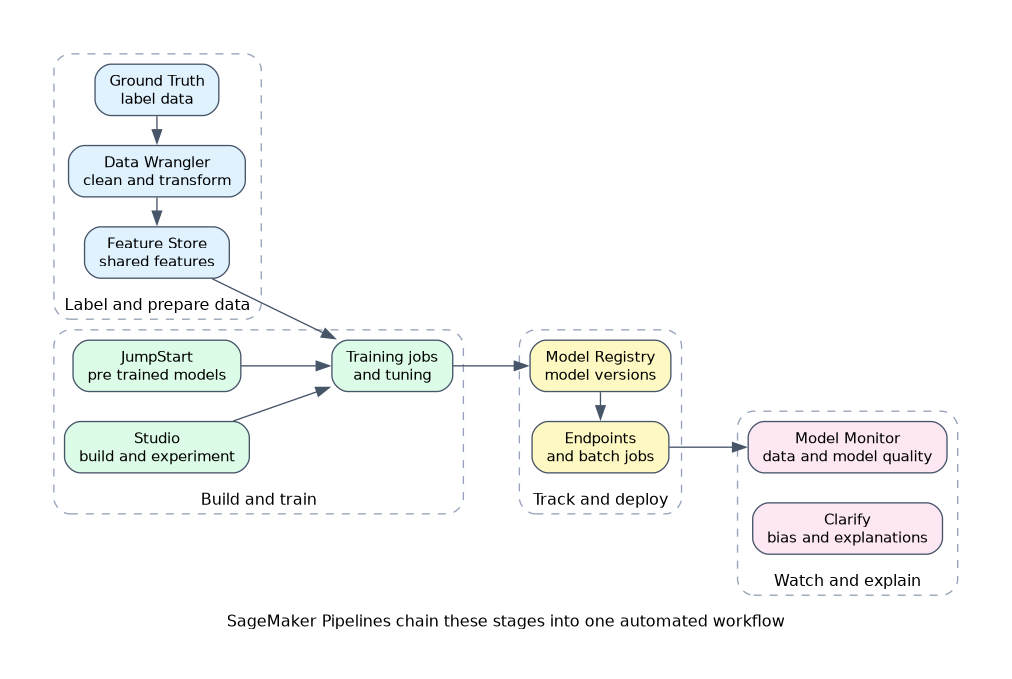
| Stage | SageMaker AI capability |
|---|---|
| Label data | Ground Truth, with human labelers and automation |
| Prepare data | Data Wrangler for importing, cleaning and transforming data |
| Store features | Feature Store, a shared place for features used in training and inference |
| Build and experiment | SageMaker Studio, an integrated development environment |
| Start from existing models | JumpStart, with pre trained models and solutions |
| Train and tune | Managed training jobs and hyperparameter tuning |
| Track versions | Model Registry, a catalogue of model versions and their status |
| Automate steps | Pipelines, workflows that chain the stages |
| Deploy | Managed real time endpoints and batch jobs |
| Monitor | Model Monitor, which watches data and model quality in production |
| Explain and check bias | Clarify |
For people without coding skills, SageMaker Canvas offers a no code visual way to build models.
What MLOps adds
MLOps focuses on a few ideas.
- Repeatability: The same steps can be run again and give consistent results.
- Automation: Pipelines run data, training and deployment steps without manual work.
- Versioning: Data, code and models are tracked so you can roll back.
- Monitoring: Live models are watched for drift and quality loss.
- Retraining: A new version is built and released when quality drops.
- Experimentation: Runs are recorded so teams can compare and learn.
A deployment pipeline
If the new model does not meet the quality bar, the pipeline stops and the current version stays live. Some teams add a manual approval step before release.
Model sources
| Source | When it fits |
|---|---|
| Open source or pre trained model | A close match exists, and you want speed and lower cost |
| Commercial or provider model | You want managed access without running the model yourself |
| Custom trained model | The task is unique or needs your own data |
A pre trained model can be used as it is, or adapted to your data with further training. Starting from a pre trained model is usually cheaper and faster than training from nothing.
Choosing how to deploy
Managed endpoints give simple, scalable hosting, with AWS handling the servers. Self managed hosting gives more control but needs more work and expertise. For the exam, prefer the managed option unless the question asks for special control.
Why MLOps matters
Without these habits, models are built once by hand and then go stale. MLOps reduces manual error, speeds up releases and supports audits, since each model version has a record of the data and steps that created it.
What to remember for the exam
- SageMaker AI is the AWS platform to build, train, tune, deploy and monitor ML models.
- Ground Truth labels data, Data Wrangler prepares it, and Feature Store keeps reusable features.
- Model Registry tracks versions, and Pipelines automate the workflow.
- Model Monitor watches live models, and Clarify checks bias and explains predictions.
- JumpStart gives pre trained models, and Canvas is a no code builder.
- MLOps means repeatable, automated, versioned and monitored ML.
- Pre trained models save time and cost compared to training from scratch.
- Choose managed deployment unless special control is needed.
When a question needs a managed way to keep a record of model versions and approvals, think Model Registry. When it needs drift detection in production, think Model Monitor.
Common mistakes
Assuming SageMaker AI is only for training. It also labels, prepares, deploys and monitors.
Mixing up Model Monitor and Clarify. Monitor watches production data and quality over time. Clarify focuses on bias and explainability.
Treating MLOps as a tool. It is a practice, supported by tools such as Pipelines and Model Registry.
Skipping versioning. Without it, nobody can say which data and settings produced the model in production.
Building from scratch by default. A pre trained or managed option is often faster and cheaper.
Check yourself
Which SageMaker AI capability keeps versions of trained models?
Model Registry, which catalogues versions and their approval status.
What does Model Monitor do?
It watches deployed models for changes in data and quality, such as drift.
What is MLOps?
A practice that makes ML repeatable, automated, versioned and monitored in production.
Topic 8 of 8 in Fundamentals of AI and ML
Test yourself on Fundamentals of AI and ML
The full AWS AIF-C01 question bank has 849 questions, with timed practice exams and an explanation for every answer.
This study guide is independent and is not affiliated with, endorsed by, or sponsored by AWS. Vendor names, certification names and exam codes are trademarks of their respective owners and are used for identification only.